SEO Management
Meta Rules and Title Templates
Overview
The Meta Rules management interface is a component of the BetterCommerce platform's SEO management system, accessible at commerce.bettercommerce.io/Seo/Metarules. This interface enables administrators to manage SEO meta rules across different page types within the e-commerce platform.
Interface Components
Header Actions
- Add Exception: Primary action button allowing administrators to create new meta rules
- Page Type Filter: Dropdown menu for filtering rules by page type categories
- Search Functionality:
| Column Name | Description | Required | Example Value |
|---|---|---|---|
| Rule Name Search Field | A text input to search for specific meta rules by entering the rule name or partial name | No | Product Page Title Rule |
| URL Search Field | Input to filter meta rules by associated URL patterns or paths | No | /product/123 |
| Rule Name Dropdown Filter | Dropdown menu with predefined rule name options for filtering | No | Brand Title Rule |
| Search Button | Executes the search based on entered criteria | No | - |
| Reset All Button | Clears all criteria and returns the view to default | No | - |
Page Type Categories
| Page Type | Description | Required | Example Value |
|---|---|---|---|
| Brand | Meta rules specific to brand landing pages and brand-related content | No | Nike |
| SubBrand | Rules applied to sub-brand pages within the main brand hierarchy | No | Nike Air |
| Product | Meta rules for individual product detail pages (PDPs) | Yes | /product/nike-shoes |
| Collection | Rules applied to product collection or grouping pages | No | /collection/summer |
| Static | Meta rules for static content pages like About Us, Contact, etc. | No | /about-us |
| Exception | Special case meta rules that handle exceptions to standard rules | No | /checkout/success |
| Error404 | Meta rules specifically for 404 (Page Not Found) error pages | No | /404 |
| Gender | Rules applied to gender-specific landing pages or categories | No | /men |
| Category | Meta rules for product category and subcategory pages | Yes | /shoes/running |
| Blog | Rules specific to blog posts and blog listing pages | No | /blog/fashion-trends |
| BrandCategory | Meta rules for pages that combine brand and category filtering | No | /nike/shoes |
Data Grid
| Column Name | Description | Required | Example Value |
|---|---|---|---|
| Rule Name | Unique identifier for the meta rule, clickable to view/edit the rule | Yes | PDP Title Rule |
| Page Type | Indicates the type of page the meta rule applies to (e.g., Brand, Product, Category, etc.) | Yes | Product |
| URL | Displays the URL pattern/path where the rule applies; can be exact, pattern, or wildcard | Yes | /product/* |
Technical Implementation
The interface is integrated within the BetterCommerce platform's main navigation structure, accessible through:
Commerce Hub > Storefront > SEO > Meta Rules
Page Purpose
This page serves as an interface for creating and editing SEO meta rules in the BetterCommerce platform. It's designed to manage multilingual SEO metadata for different types of pages across the e-commerce website.
Page Structure**
- Navigation Context
- Located under: SEO > Meta Rules > Meta Rule Detail
- Current domain context:
betterstore - Accessible via the main navigation menu
- Main Components
A. Meta Information Section
| Field | Purpose | Required | Example Value |
|---|---|---|---|
| Rule Name | Unique identifier for the meta rule, used internally | Yes | Product PDP Meta Rule |
| Page Type | Dropdown to specify the type of page the rule applies to | Yes | Product |
| Page URL | URL pattern/path where this meta rule should be applied | Yes | /product/airmax |
B. Localize Contents Section
| Meta Field | Description | Required | Example Value |
|---|---|---|---|
| MetaTitle | HTML title tag shown in browser tabs and search results. Important for SEO ranking. | Yes | Buy Nike Air Max - Official Store |
| MetaDescription | Short summary of the page shown below title in search results. Helps improve click-through rates. | No | Explore Nike’s latest Air Max... |
| MetaKeywords | Comma-separated keywords related to the page. Useful for internal search and categorization. | No | Nike, Air Max, Running Shoes |
| CanonicalTags | Preferred version of a URL to avoid duplicate content. Must be a full URL. | No | https://domain.com/product/airmax |
Available Variables
A wide range of variables is available to dynamically populate metadata fields:
| Type | Description | Required | Example Value |
|---|---|---|---|
| Product | Variables related to product info for detail and listing pages | No | {{Product.Name}} |
| Manufacturer | Variables specific to brand or manufacturer data | No | {{Manufacturer.Name}} |
| Order | Variables with order-specific details, used in confirmation pages | No | {{Order.OrderNumber}} |
| ProductCollection | Variables used on collection/category pages | No | {{ProductCollection.Title}} |
| OrderLine | Variables for individual order line items | No | {{OrderLine.Sku}} |
| User | User-related variables including name, location, and status | No | {{User.FirstName}} |
| MicroSite | Variables applicable to microsite configurations | No | {{MicroSite.Domain}} |
| SitePage | General page-related variables | No | {{SitePage.PageTitle}} |
| Basket | Variables related to the user's cart or basket | No | {{Basket.TotalAmount}} |
Redirects (301 & 302)
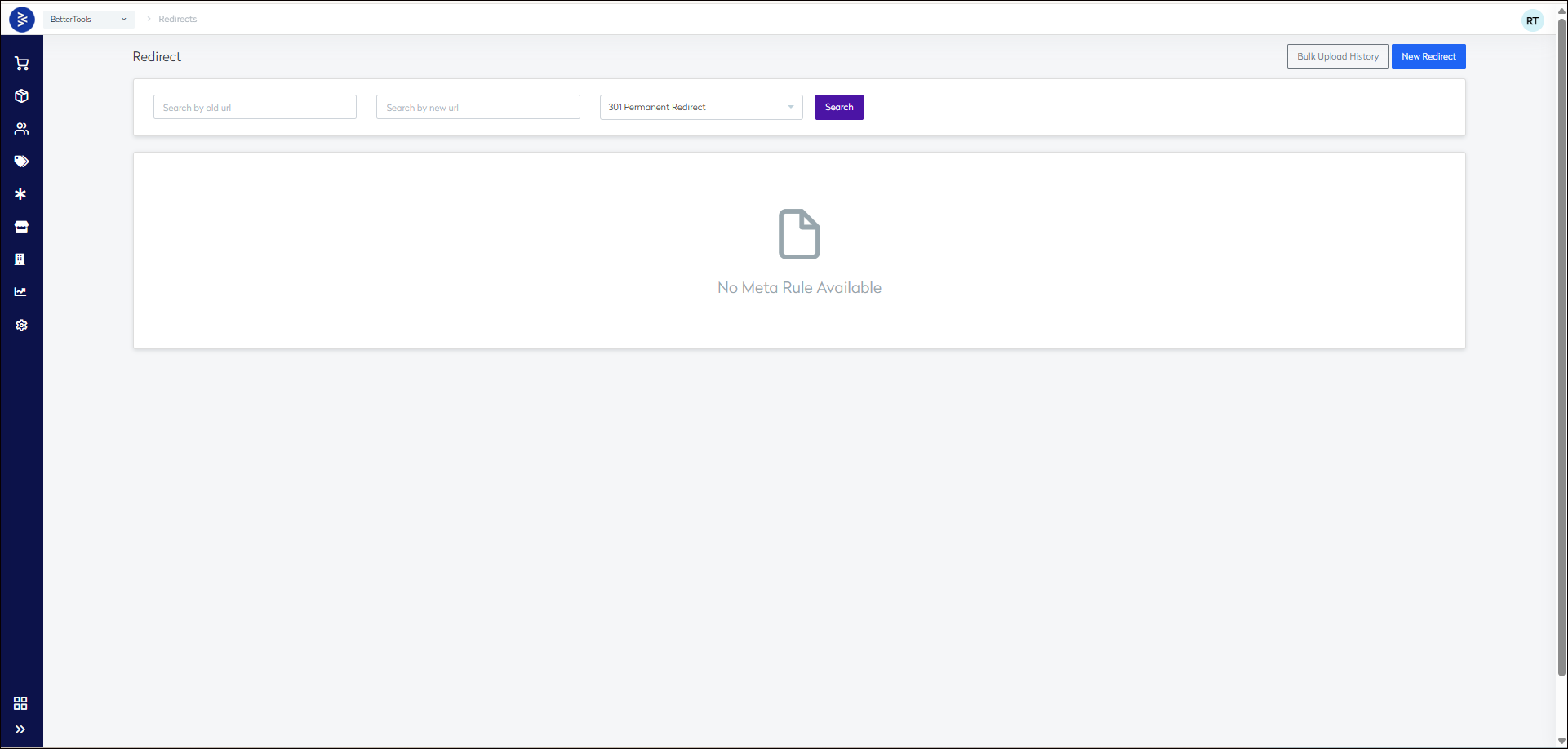
The Redirects Management interface is a part of the BetterCommerce platform's SEO toolkit, accessible via CommerceHub>Storefront>Redirects. This interface allows administrators to manage URL redirections to ensure smooth navigation, maintain user experience, and preserve SEO rankings during URL changes.
Redirect Types
The platform supports two types of redirects:
| Redirect Type | Description | Required | Example Value |
|---|---|---|---|
| 301 | Permanent Redirect – Used when the original URL is permanently moved to a new location. This passes full SEO value to the new URL. | Yes | 301 |
| 302 | Temporary Redirect – Used when the change is temporary. The original URL may return in the future, and SEO value is not transferred. | Yes | 302 |
Creating a New Redirect
To create a new URL redirect within the BetterCommerce platform:
-
Navigate to CommerceHub > Storefront > SEO Redirects from the main dashboard.
-
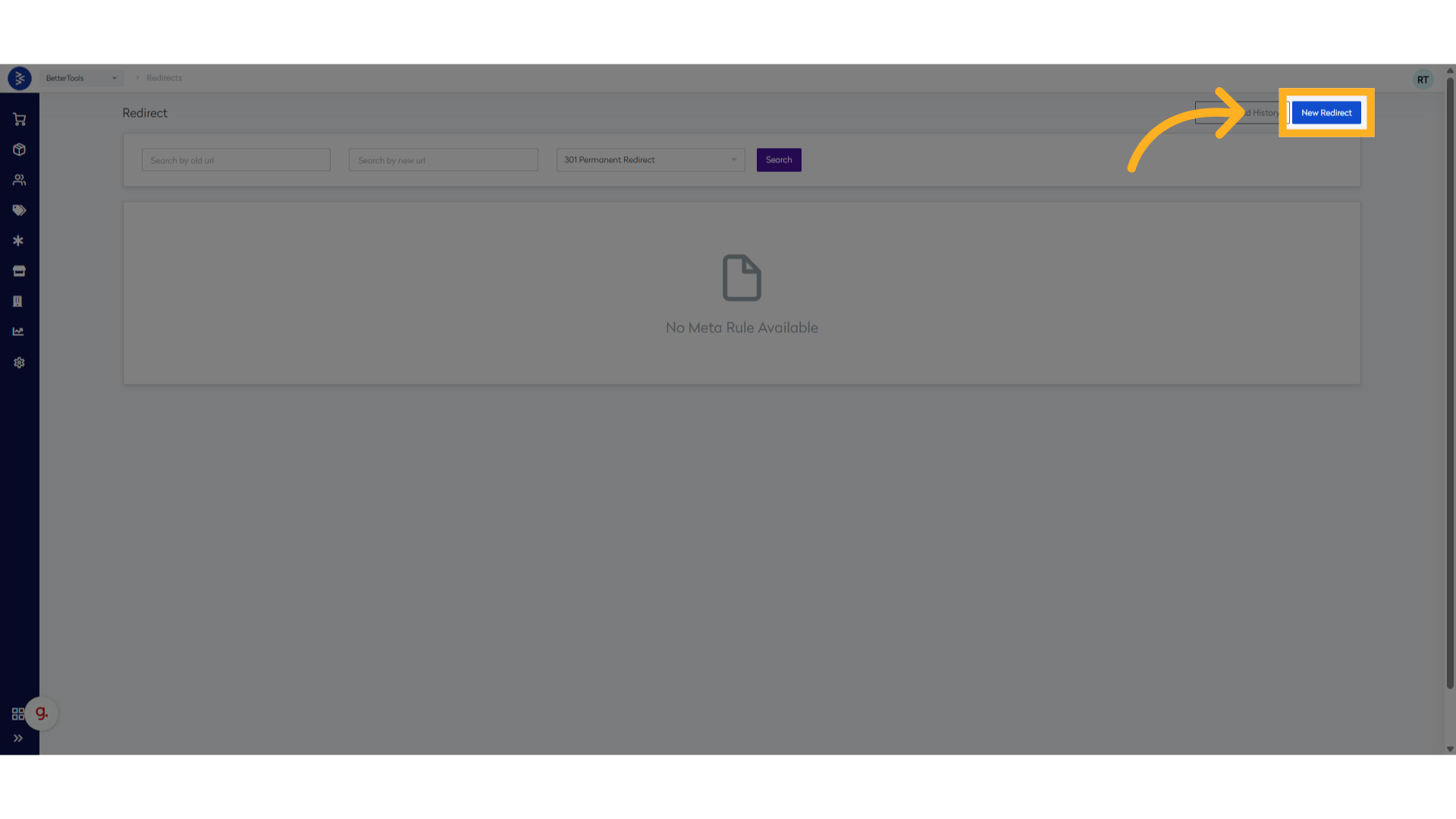
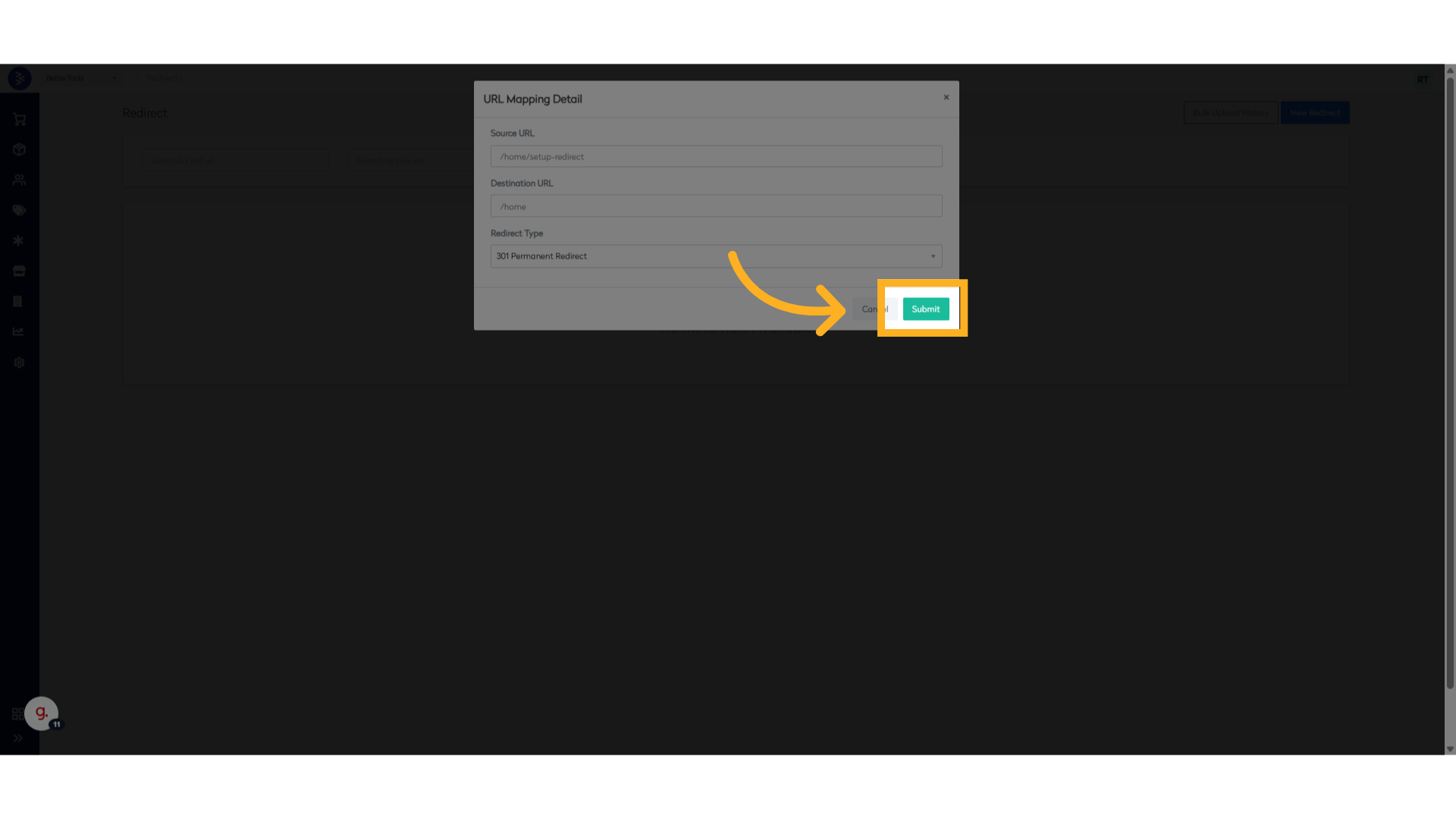
Click the New Redirect button in the top-right corner.
-
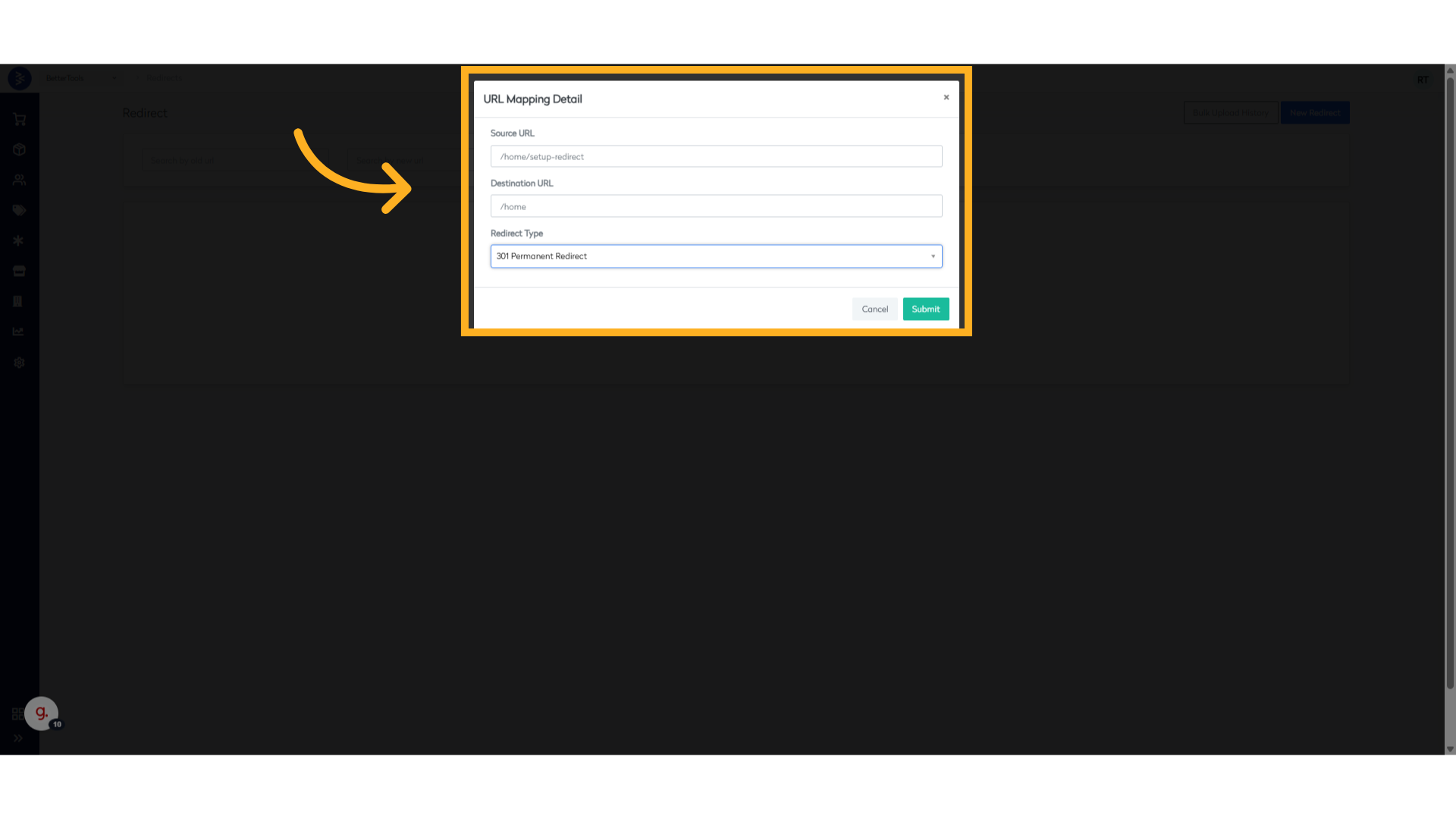
Fill in the following fields:
| Field Name | Description | Required | Example Value |
|---|---|---|---|
| Source URL | Enter the original URL path that should be redirected | Yes | /old-collection |
| Destination URL | Enter the new URL path where the request should be redirected | Yes | /new-collection |
| Redirect Type | Select the redirect type: 301 (Permanent) or 302 (Temporary) | Yes | 301 or 302 |
- Click Submit to create and activate the redirect rule.
Bulk Upload Format
To add multiple redirects efficiently, the platform supports bulk upload using a CSV file.
CSV Structure The file must include the following columns:
| Column Name | Description | Required | Example Value |
|---|---|---|---|
| SourceURL | The original URL path | Yes | /clearance-sale |
| DestinationURL | The target URL path | Yes | /sale |
| RedirectType | The redirect type: 301 or 302 | Yes | 301 |
Example CSV
| SourceURL | DestinationURL | RedirectType |
|---|---|---|
| /old-page | /new-page | 301 |
| /temp-page | /main-page | 302 |
⚠️ Note: Ensure that the URL values do not contain trailing slashes or unnecessary spaces to avoid configuration errors.
Product Description & Meta Feeds
Overview Product feeds are automated files that share your store’s product data with external platforms like marketplaces, search engines, and marketing channels. They help improve visibility, integration, and indexing. Key features include multiple format support, manual refresh, feed preview, and status monitoring. Product feeds serve as a bridge between your store and external platforms, enabling you to:
- Share product information with shopping channels
- Sync inventory with marketplaces
- Update pricing across platforms
- Maintain consistent product data
- Generate sitemaps for search engines
Available Feed Types
Marketing Feeds
| Feed Name | Description | Output Format |
|---|---|---|
| AdRoll Feed | Product data feed for dynamic retargeting ads, product recommendations, abandoned cart campaigns | XML/CSV |
| Facebook Feed | Standard product catalog for Facebook Shop listings, Instagram Shopping, dynamic Facebook ads | CSV |
| Facebook Feed Retargeting | Specialized feed for Facebook dynamic retargeting, custom audience creation, abandoned cart recovery | CSV |
| Google Shopping Feed Standard | Default format for Google Merchant Center, used for Shopping ads, product listings, price comparisons | XML |
| Google Shopping Feed EU | European variant for EU market listings, European pricing, EU compliance requirements | XML |
| Google Shopping Feed IE | Irish market specific feed for local pricing and regional compliance | XML |
| Google Shopping Feed US | US market specific feed for USD pricing and US regulations | XML |
| Google Shopping Feed Minimal | Simplified version with essential attributes for basic product listings and testing | XML |
System Feeds
| Feed Name | Description | Output Format |
|---|---|---|
| ERP | Enterprise Resource Planning feed for inventory sync, price updates, product management | JSON/XML |
| Product Feed - Simple | Basic product information feed for quick exports and system synchronization | CSV |
| Products | Specialized feed for POS integration, inventory management, price synchronization | JSON |
SEO Feeds
| Feed Name | Description | Output Format |
|---|---|---|
| Robot.txt | Search engine crawler instructions for site indexing control and access management | TXT |
| SiteMap | Complete site structure map for search engine indexing and site navigation | XML |
| SiteMap Brand | Brand-specific page mapping for indexing and brand navigation | XML |
| SiteMap Category | Category page mapping for indexing and navigation structure | XML |
| SiteMap Collection | Collection page mapping for special offers and seasonal content indexing | XML |
| SiteMap Content | Content page mapping for blog posts, static pages, information pages | XML |
| SiteMap Product | Product page mapping for product discovery and SEO optimization | XML |
Integration Feeds
| Feed Name | Description | Output Format |
|---|---|---|
| ThirdParty | Affiliate marketing feed for program management, commission tracking, product syndication | XML |
Feed Management
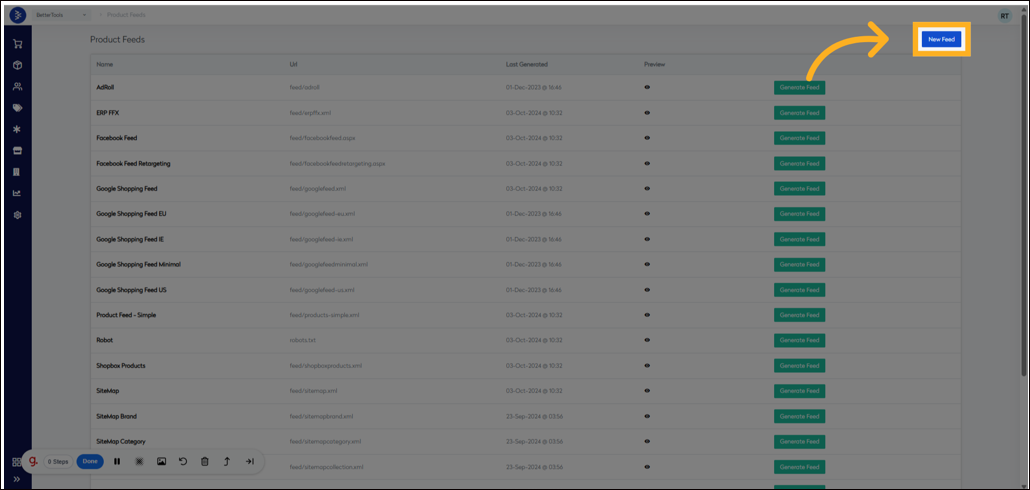
Each feed includes:
- Name: Identifying name of the feed
- URL: Access point for the feed
- Last Generated: Timestamp of last update
- Generate Feed: Manual update option
- Preview: Link to view current feed
Field and Descriptions to know before proceeding with setting up or editing product feeds
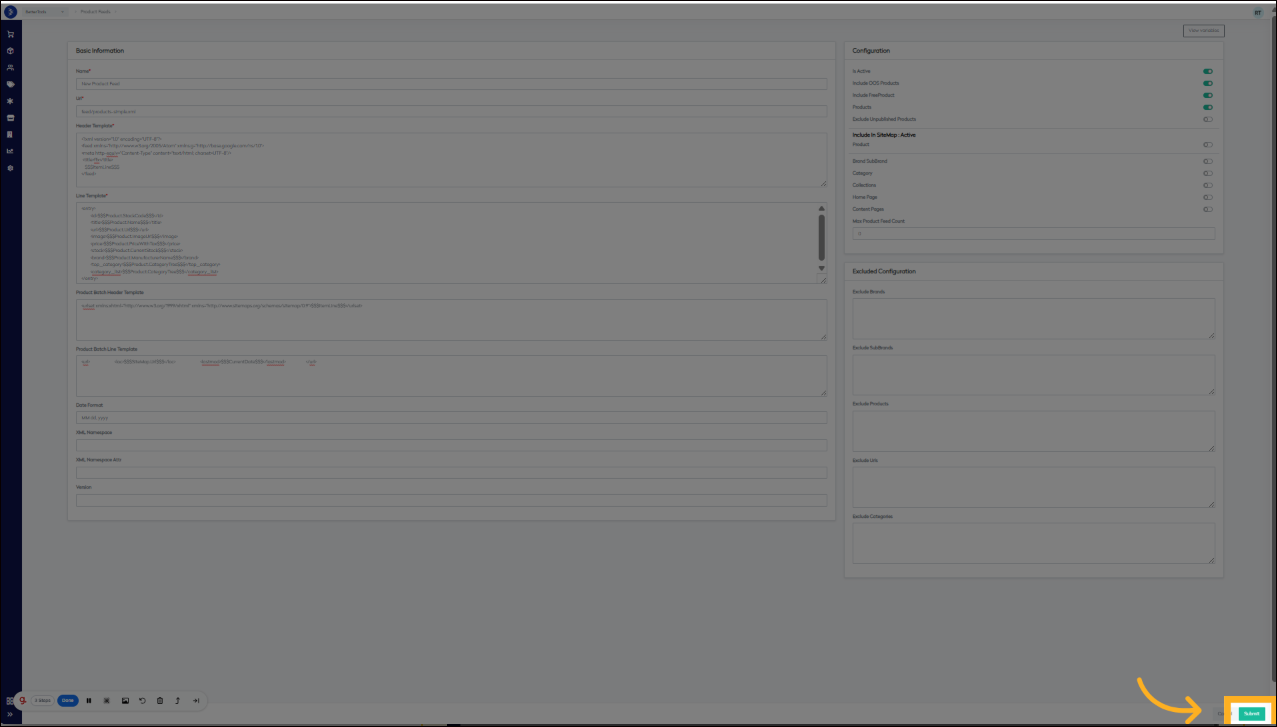
Basic Information
| Field Name | Description | Required | Example Value |
|---|---|---|---|
| Name | Name of the feed (e.g., Facebook Shopping Feed, Google Shopping Feed) | Yes | Facebook Shopping Feed |
| URL | URL path representing the feed endpoint | Yes | /feeds/facebook-shopping |
| Header Template | Defines the XML version, format, charset (e.g., UTF-8), title, domain, etc. | Yes | <?xml version="1.0" encoding="UTF-8"?> |
| Line Template | Line-level detail using BetterCommerce variables (e.g., $$$Product.StockCode$$$ for SKU) | Yes | <product><sku>$$$Product.StockCode$$$</sku></product> |
| Date Format | Format in which dates should be rendered (e.g., MMddyyyy or DDmmyyyy) | No | MMddyyyy |
| Product Batch Header Template | Defines the file header structure (e.g., XML version, encoding) for batch product feeds. Activated when product feed is enabled from configuration. | No | <urlset xmlns:xhtml="http://www.w3.org/1999/xhtml" xmlns="http://www.sitemaps.org/schemas/sitemap/0.9">$$$ItemLine$$$</urlset> |
| Product Batch Line Template | Specifies the format for each product entry using dynamic variables. Activated when product feed is enabledfrom configuration. | No | <url> <loc>$$$SiteMap.Url$$$</loc> <lastmod>$$$CurrentDate$$$</lastmod> </url> |
| XML Namespace | Unique XML name element | No | xmlns:g="http://base.google.com/ns/1.0" |
| XML Namespace Attr | Unique XML attribute element; can be left blank if not required | No | |
| Version | Version of the feed format | No | v.01 |
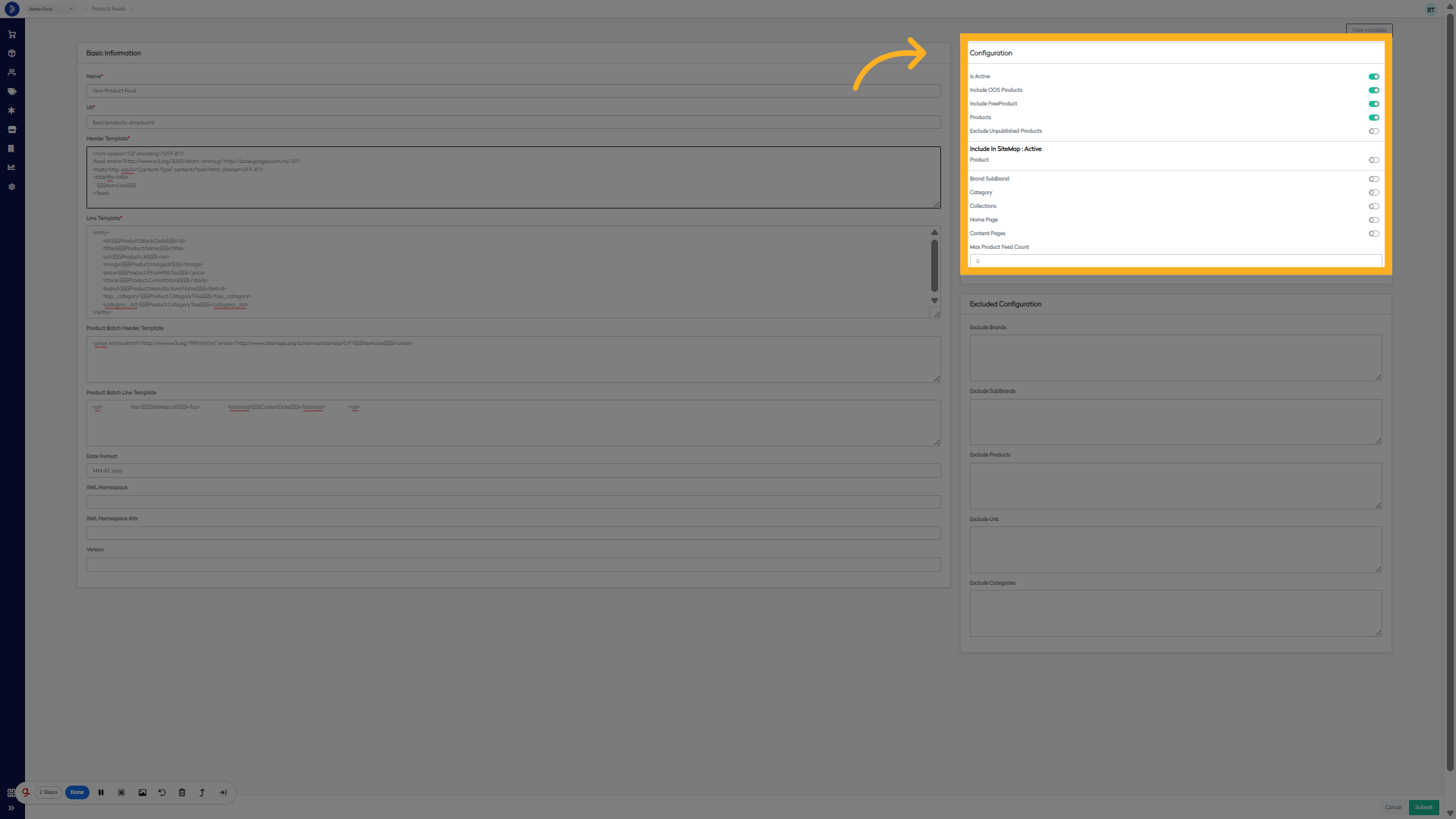
Configuration
| Field Name | Description | Required | Example Value |
|---|---|---|---|
| Is Active | Toggle to enable or disable the feed | Yes | True |
| Include OOS Products | Include/exclude out-of-stock products | No | False |
| Products | Enable inclusion of active products | Yes | True |
| Brand SubBrand | Enable inclusion of brand and sub-brand | No | True |
| Category | Enable inclusion of categories in the feed | No | True |
| Collections | Enable inclusion of collections | No | True |
| Home Page | Enable inclusion of homepage content | No | False |
| Content Pages | Enable inclusion of static content pages (About Us, Contact, etc.) | No | True |
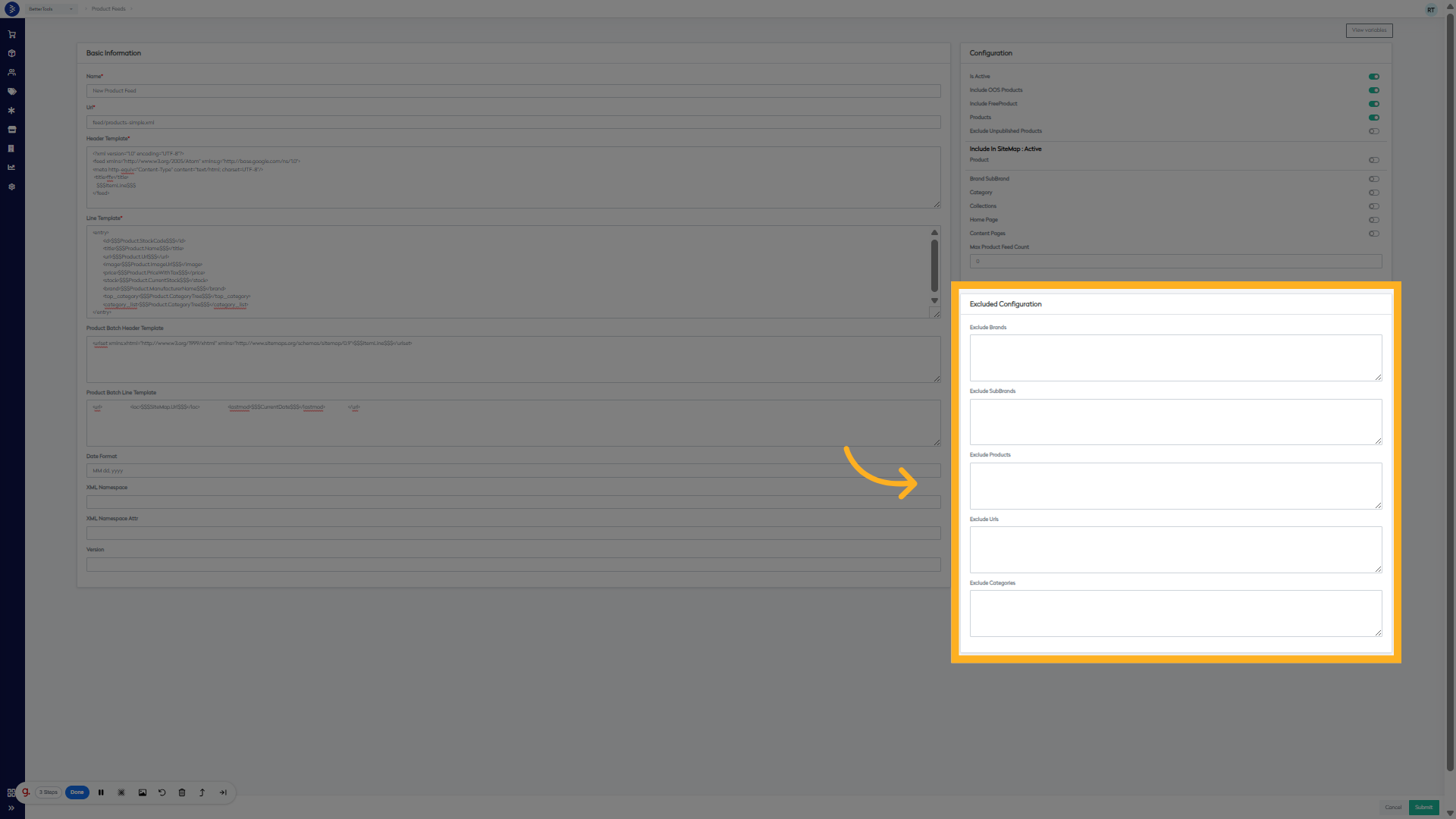
Excluded Configuration
| Field Name | Description | Required | Example Value |
|---|---|---|---|
| Exclude Brands | Brands to be excluded from the feed | No | Nike |
| Exclude Sub Brands | Sub-brands to be excluded from the feed | No | Nike Air |
| Exclude Products | Product SKUs to be excluded | No | SKU1234, SKU5678 |
| Exclude URLs | Specific URL paths to be excluded | No | /hidden-product |
| Exclude Categories | Specific categories paths to be excluded | No | /hidden-product |
How to Set Up a Feed
Follow these steps to create and configure a new feed:
-
From CommerceHub dashboard navigate to
Storefront > Feeds. -
Click the New Feed button.
-
Fill out the following sections:
-
Basic Information
- Name
- URL
- Header Template
- Line Template
- Date Format
- XML Namespace
- XML Namespace Attr
- Version

-
Configuration
- Is Active
- Include OOS Products
- Products
- Brand SubBrand
- Category
- Collections
- Home Page
- Content Pages
-
Excluded Configuration
- Exclude Brands
- Exclude Sub Brands
- Exclude Products
- Exclude URLs
-
-
Click Submit to save and activate the feed.