
Manage Promotions
Overview
Promotions and campaigns are an integral part of growing a digital commerce business. The platform provides business users with tools to create promotions and vouchers that can be applied either at the product line or order level, and targeted to specific customer segments.
They can be used to increase revenue, improve conversion rates, reward customer loyalty, attract first-time customers, or address customer support issues.
Configurable Promotions
The platform supports a wide range of configurable promotions. These are grouped by discount type below:
Percentage-Based Promotions
| Promotion Type | Description |
|---|---|
| X% Off | Flat percentage discount |
| X% Off on Specific Date | Discount applies on a selected date |
| X% Off on Specific Time | Discount valid during specific hours |
| X% Off Between Dates/Times | Discount active over a set date range |
Fixed Value ($$) Promotions
| Promotion Type | Description |
|---|---|
| $$s Off | Flat value discount |
| $$s Off on Specific Date | Applies on a defined calendar date |
| $$s Off on Specific Time | Active during a selected time window |
| $$s Off Between Dates/Times | Valid over a date/time range |
Multi-Buy Promotions
| Promotion Type | Description |
|---|---|
| N for $$ | Get N items for a fixed price |
| Buy X Save $$ | Save a fixed value when purchasing X items |
| Buy One Get One Free (BOGOF) | Get one item free when purchasing another |
| Buy One Get Cheapest Free | Get the cheapest of selected items for free |
| Spend $$, Get Y Free | Free product on reaching a spend threshold |
| Buy X, Get % Off on Y | Discount on Y when X quantity is purchased |
Note: All the above promotions can include additional conditions such as:
- Brand
- Category
- Product(s)
- Promo Code requirement
- Auto-Apply (no code required)
Built-in Promotion Types
| Promotion Type | Description |
|---|---|
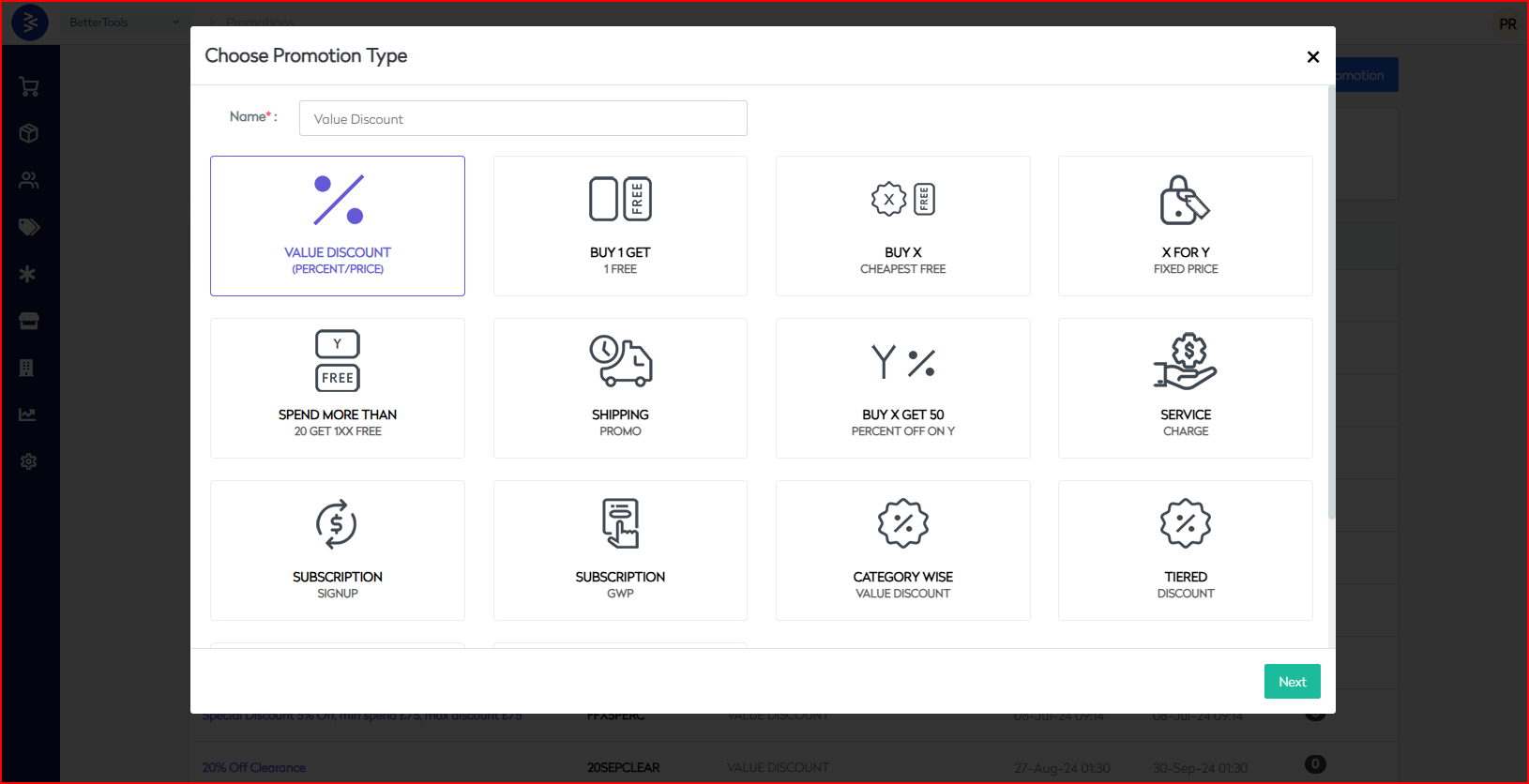
| Value Discount (Percent/Price) | Simple promotion offering % or fixed value $$ discount |
| Buy 1 Get 1 Free | BOGOF promotion |
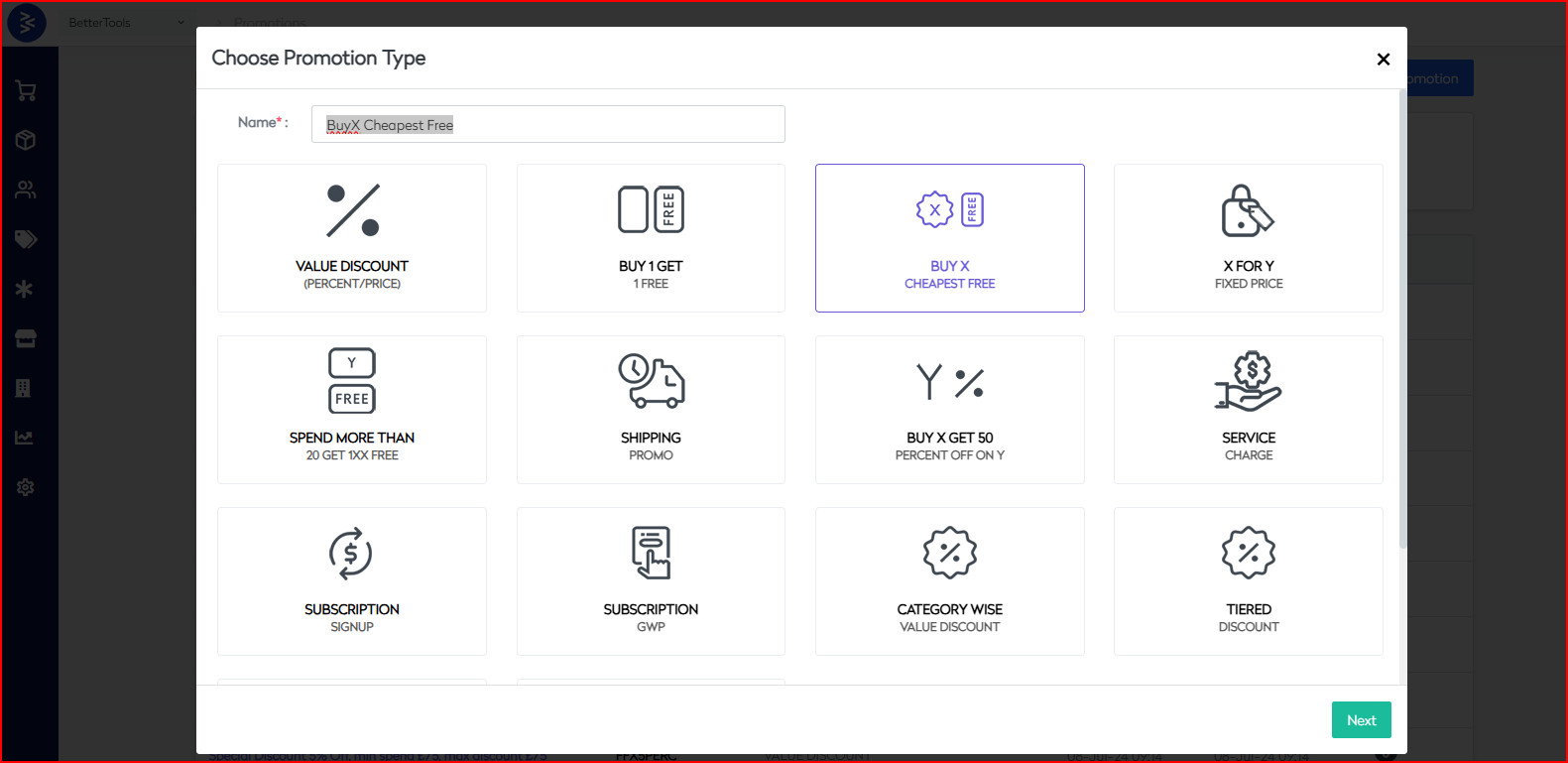
| Buy X Cheapest Free | Buy X number of items and get the cheapest one free |
| Buy X Get 50 Percent on Y | Buy X items and get the X percentage of discount on next item |
| X For Y Fixed Price | X items for a fixed price (e.g., 2 for $10) |
| Spend More Than 20 Get 1XX free | Spend threshold to receive a free item |
| Category-Wise Discounts | One promotion with different % or $$ discounts across categories |
| Tiered Discounts | Get 10% off on $100, 20% off on $200, etc. |
| Shipping Promo | Free shipping above a certain cart threshold |
| Service Charge | Reverse promotion to apply a service fee to specific products or orders |
| Subscription Signup | Free signup offers for subscription users |
| Subscription GWP | Free Gift as part of a subscription promotion |
| Adhoc Discount | Voucher based promotion to offer custom discount against each voucher |
| Third Party Promo |
Generating Vouchers for Promotions
The Generate Vouchers functionality in CommerceHub allows you to create unique, non-sequential voucher or promotional codes that can be used across various marketing channels.
These vouchers are linked to a promotion configured in the system and can be tailored for different usage rules based on campaign needs.
Key Capabilities
- Generate unique voucher codes in bulk.
- Use vouchers for online or offline campaigns.
- Align voucher use with specific promotions in the system.
- Support for different usage rules:
- Assigned to a specific customer email
- Usable by any customer
- Single-use or multi-use configurations
Managing Voucher Batches
Once vouchers are generated, they are grouped into batches:
- View all voucher batches, including the total number of vouchers generated.
- Export batches for sharing with marketing partners or for external distribution.
- Click into a batch to view the status of individual vouchers:
- Claimed or unclaimed
- Cancel specific vouchers if necessary
This flexible promotion engine enables business users to run targeted marketing campaigns, boost engagement, and drive sales across multiple customer touchpoints.
Common Terminologies across Promotions Types
The following terms and configuration options are common across all promotion types in CommerceHub and are essential for setting up promotional campaigns.
General Fields
- Display Name: The name of the promotion visible on the website.
- Coupon Code: The unique code users enter to apply the promotion.
- Campaign Code: Internal reference text used for campaign tracking, grouping promotions on the website, or passing data for website consumption.
Application Scope
-
Applied At:
- Order Header: Applies to the entire order (e.g., flat $10 off).
- Order Line: Applies to specific product lines (e.g., BOGOF on a product).
-
Use With Other Code:
- Red: Cannot be combined with any other promotion.
- Amber: Can be combined only with other amber promotions.
- Green: Can be combined with both amber and green promotions.
Promotion Configuration
- Promotion Group: Used for internal reference or to label campaigns, which can also be displayed on the website to highlight specific promotions.
- Example: “NewYear2025” campaign code to track and display New Year promotional offers.
- Promotion Image: Optional image to display on the site.
- Description: Descriptive text displayed on the website.
- Promotion Message: Message shown to users during promotion or can be used for enrichment.
- Promotion Additional Message: Secondary message if needed or can be used for enrichment.
- Additional Info 8, 9, 10: Custom fields used to populate content on the website as needed. -These can be leveraged to display additional promotional details or messaging.
- Date Range:
- From Date: Start date and time for promotion.
- To Date: End date and time for promotion.
Eligibility & Constraints
- Payment Methods: Restrict promotion to specific payment types (e.g., 5% off on prepaid).
- Order Quantity: Min–Max item count in the basket for eligibility.
- Order Amount: Min–Max basket value required.
- Max Discount: Cap on the total discount value (e.g., 10% off up to $100).
- Data Set:
- Included Items: Products eligible for promotion.
- Excluded Items: Products excluded from promotion.
- Active: Toggle to enable or disable the promotion.
- One Time Only: Limit promotion to one-time use per user or order.
- One Time For All: Apply only once per user account.
Product-Level Settings
- Product Price Range: Product value can be set for promotions
- Min Product Price
- Max Product Price
Redemption Controls
- Max No. of Redemptions Allowed: Limit on total redemptions.
- Max Redemption Value Allowed: Cap on the total discount value across all uses.
Taxation
- Is Taxable: Whether tax applies to the discounted amount.
- Price Includes Tax: If enabled the discount amount includes applicable taxes.
Channel & Customer Targeting
- Channels: Define where the promotion is applicable (Web, App, Store).
- Customers:
- Included Customers: List of eligible customers.
- Excluded Customers: List of ineligible customers.
- Customer Groups:
- Included Customer Groups: List of eligible customer groups
- Excluded Customer Groups: List of ineligible customers groups.
Display Logic
- Show for Qualified Products Only: Show the promotion only when the basket meets the criteria.
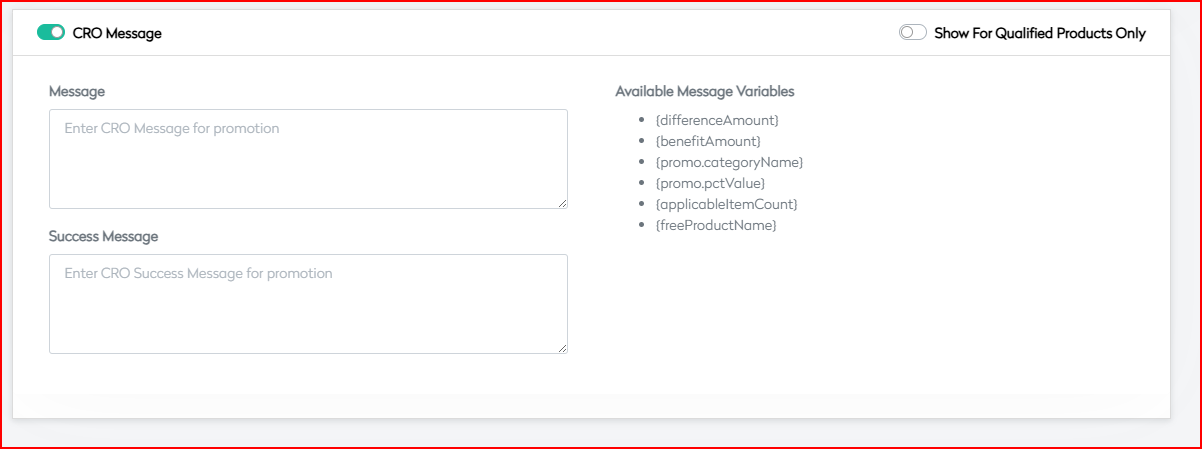
CRO Message
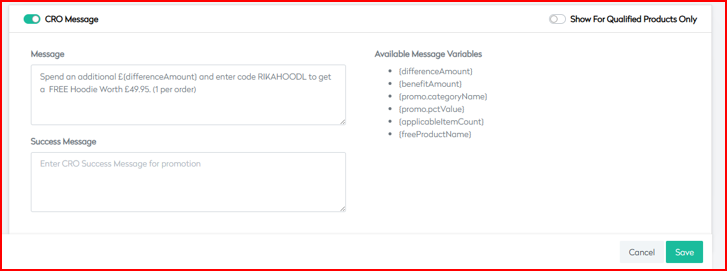
- Message: Message shown when promotion is applicable.
- Success Message: Shown when basket qualifies for the promotion.
Available Variables for Messaging:
{differenceAmount}: Amount remaining for eligibility.{benefitAmount}: Discount amount offered.{promo.categoryName}: Name of the applicable category.{promo.pctValue}: Discount percentage.{applicableItemCount}: Number of eligible items.{freeProductName}: Free product name offered.
Use this terminology as a reference while creating or managing promotions to ensure consistency and accuracy in configuration across the platform.
How to Create a Promotions
Promotions in CommerceHub can be easily created using the built-in promotion module. Business users can choose a promotion type, define discount logic, and apply conditions like product, category, or order value. Once configured, promotions can be activated immediately or scheduled for future campaigns.
Next section of the article covers how to create promotions based on their types:
Value Discount Promotion
The Value Discount promotion enables merchants to configure either percentage-based or fixed value discounts across products or orders. Designed with flexibility and precision targeting, it caters to a wide range of business use cases such as seasonal sales, flash discounts, member promotions, and clearance events.
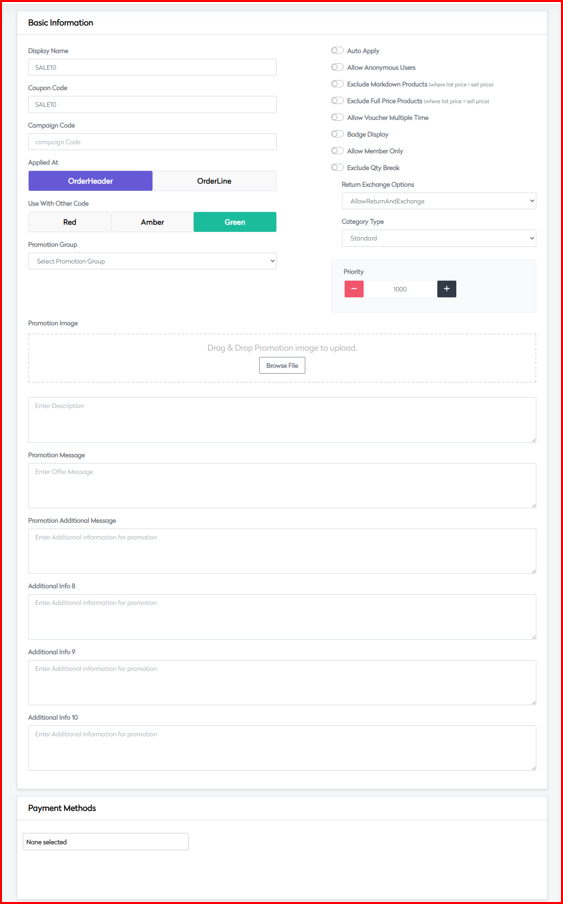
- Basic Information
Fill in the core details that define and govern the promotion.
Core Settings
| Field | Description |
|---|---|
| Display Name | Name shown to customers |
| Coupon Code | Optional unique code for manual redemption |
| Campaign Code | Internal tracking identifier |
| Applied At | OrderHeader (cart-level) or OrderLine (item-level) |
Compatibility Settings
| Setting | Options |
|---|---|
| Use With Other Code | Red (High Restriction), Amber (Medium), Green (Low) |
Promotion Group
Choose the category for promotion grouping:
- Flash
- Clearance
- Offer
Control Flags
| Option | Description |
|---|---|
| Auto Apply | Automatically apply the promotion |
| Allow Anonymous Users | Available for guest checkouts |
| Exclude Markdown Products | Prevent discount on already marked-down items |
| Exclude Full Price Products | Prevent discount on non-discounted items |
| Allow Voucher Multiple Time | Redeem the same code multiple times |
| Badge Display | Display badge on eligible items |
| Allow Member Only | Restrict promotion to logged-in users |
| Exclude Qty Break | Exclude items using quantity break pricing |
Additional Controls
| Field | Description |
|---|---|
| Voucher Validity Days | Duration for voucher usage |
| Return Exchange Options | None, AllowReturn, AllowExchange, AllowBoth |
| Category Type | None, Standard, Membership, Referral |
| Priority Setting | Numerical value for application priority |
Media and Messaging
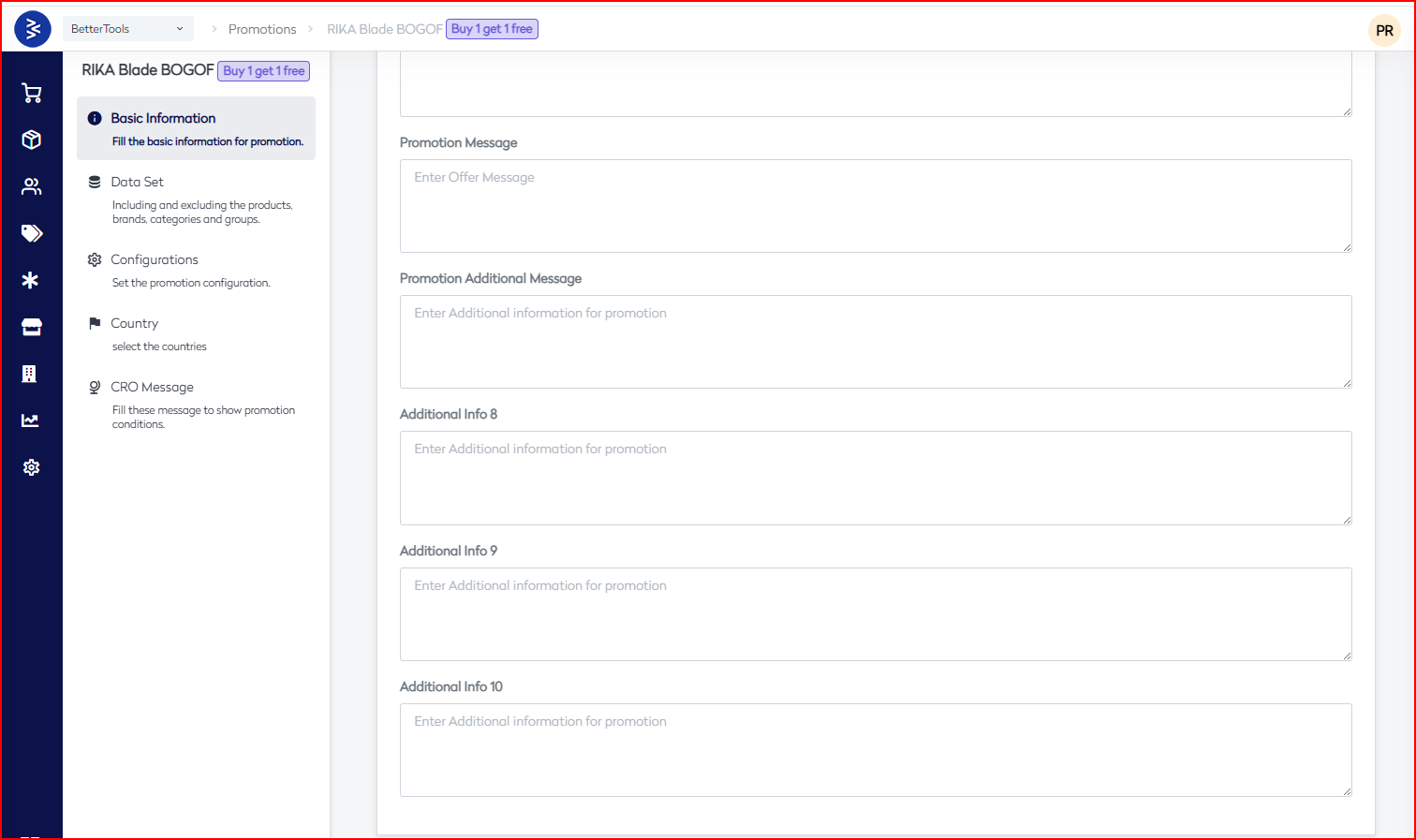
- Promotion Image Upload
- Promotion Message (primary)
- Additional Messages: Info 8, Info 9, Info 10
Payment Method Integration
Supported platforms:
- All active payments methods/ PSP
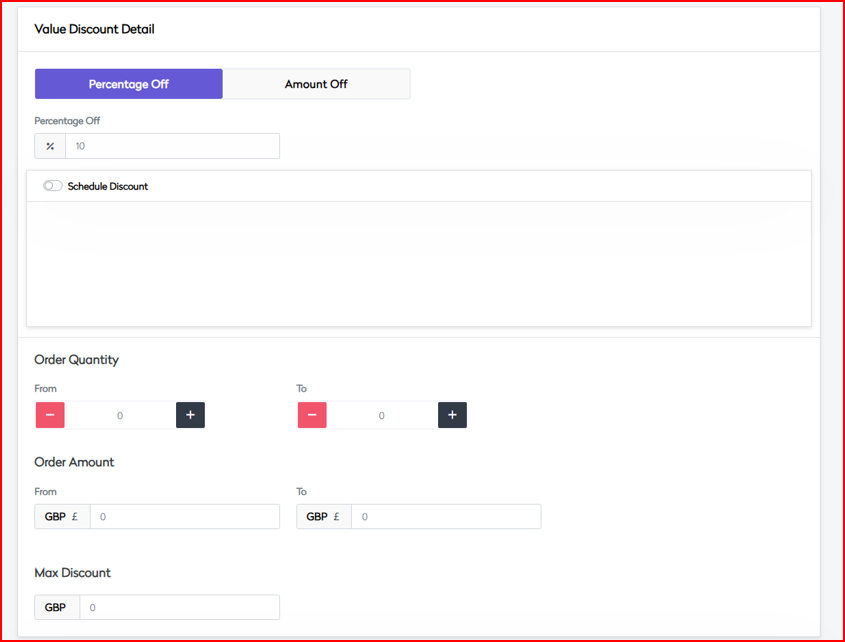
- Discount Detail Configure the core discount rules and control parameters.
Discount Type
| Option | Description |
|---|---|
| Percentage Off | Discount by % of order or product value |
| Amount Off | Fixed amount discount (INR) |
Scheduling
| Field | Description |
|---|---|
| From/To Dates | Duration of the promotion |
| Schedule Discount | Enable scheduling logic |
Order Parameters
| Field | Description |
|---|---|
| Quantity Threshold | Minimum and maximum item count for eligibility |
| Order Amount Range | Range for total cart value (INR) |
Discount Controls
| Field | Description |
|---|---|
| Max Discount Amount | Upper cap on applied discount (INR) |
| Notes | Internal notes or description |
| New Promotion Name | Alternate/alias name |
| Status Tracking | Manage promotion lifecycle status |
| Search Feed Generation | Enable for search optimization |
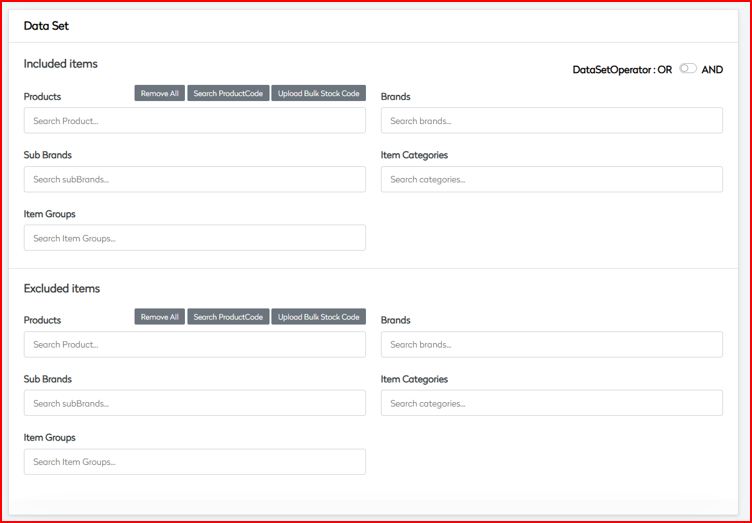
- Data Set Define the target segments for applying or excluding discounts.
Inclusion Rules
| Category | Description |
|---|---|
| Logical Operator | AND / OR |
| Products | Select SKUs or bulk upload supported |
| Brands | Target by brand |
| Sub Brands | Segment under brand |
| Item Categories | Apply to product categories |
| Item Groups | Target predefined product groups |
Exclusion Rules
Use same categories as above to exclude specific products or segments.
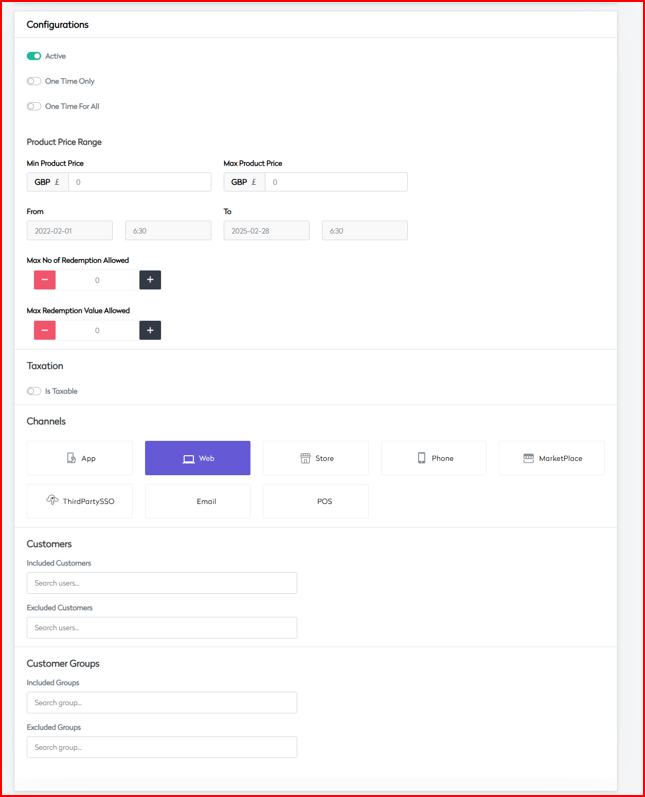
- Configurations Control where, when, and how the promotion is used.
Activation Controls
| Field | Description |
|---|---|
| Active Status | Toggle promotion live status |
| One Time Only | Restrict to one-time use per user |
| One Time For All | Apply once platform-wide |
Price Range Parameters
| Field | Description |
|---|---|
| Min Product Price | Minimum price per item (INR) |
| Max Product Price | Maximum price (INR) |
Time Settings
- From/To date range for campaign period
Redemption Limits
| Field | Description |
|---|---|
| Max No. of Redemptions | Total allowed redemption count |
| Max Redemption Value | Total discount value allowed (INR) |
Tax Configuration
| Field | Description |
|---|---|
| Is Taxable | Toggle tax applicability |
| Price Includes Tax | Set if tax is included in product price |
Channel Availability Enable or disable the promotion across:
- App
- Web
- Store
- Phone
- MarketPlace
- ThirdPartySSO
- POS
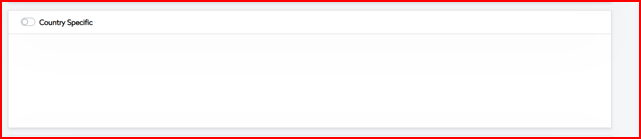
- Country Configure location-specific behavior.
Geographic Targeting
| Setting | Description |
|---|---|
| Country Specific | Enable location-based targeting |
| Multi-country Support | Select multiple regions |
Localization
- Support for locale-specific content (e.g.,
en-GB,fr-FR,de-DE)
- CRO Message Configure promotional communication displayed on product pages or during checkout.
| Setting | Description |
|---|---|
| Failure Message | Displayed when promotion isn't applicable |
| Promotional Content | Highlight key offer details |
| Show For Qualified Products | Display messages only for eligible items |
| Localization Support | Enable language-specific content customization |
 |
Buy 1 Get 1 Free Promotion
This promotion is ideal for driving higher order volumes, increasing AOV, engaging customer segments, and supporting short-term or ongoing marketing objectives with measurable results.
The Buy 1 Get 1 Free promotion allows you to configure flexible rules and conditions to offer an additional item for free when a specific product is purchased. This documentation outlines the configuration options organized into five key segments.
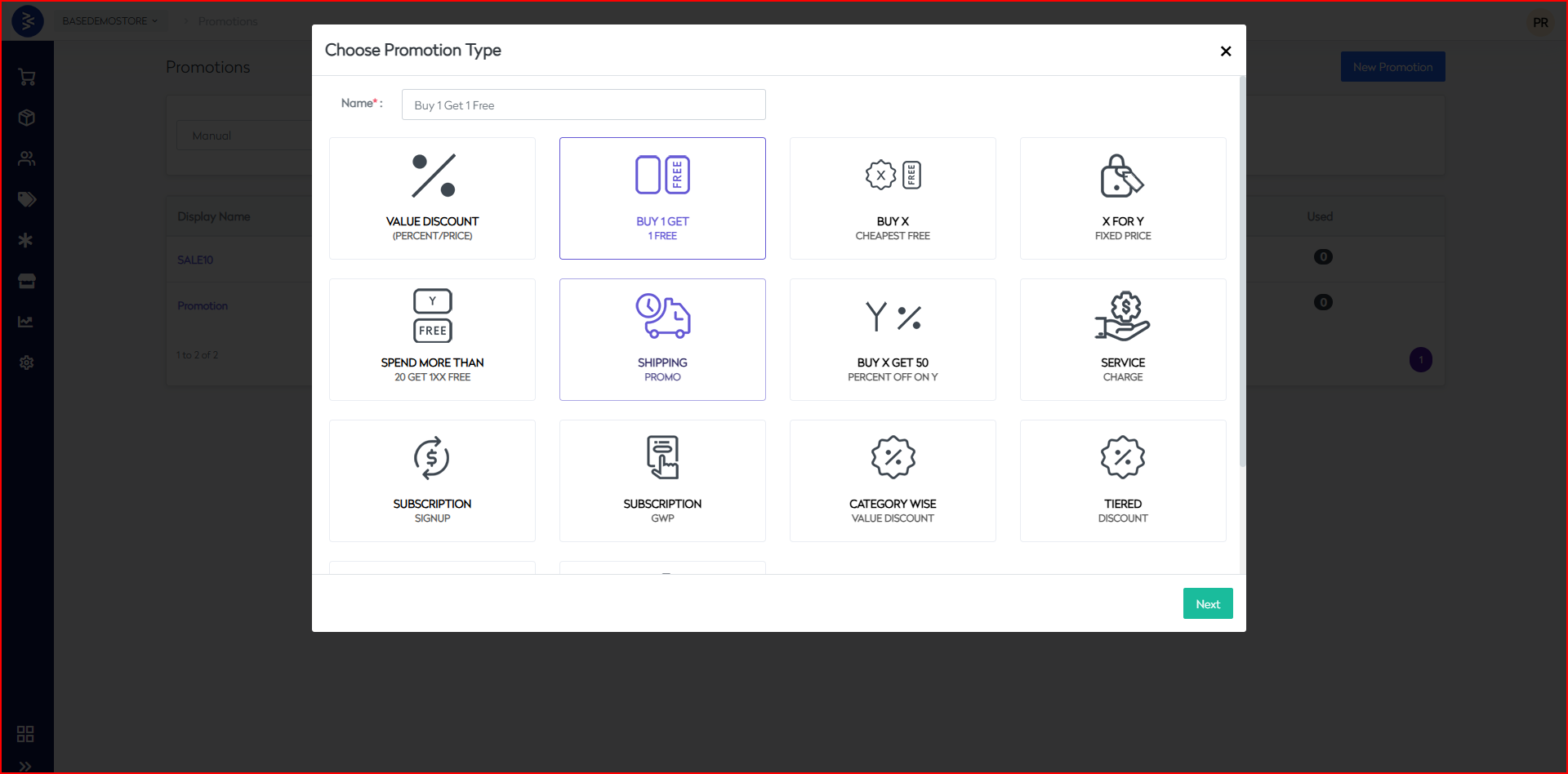
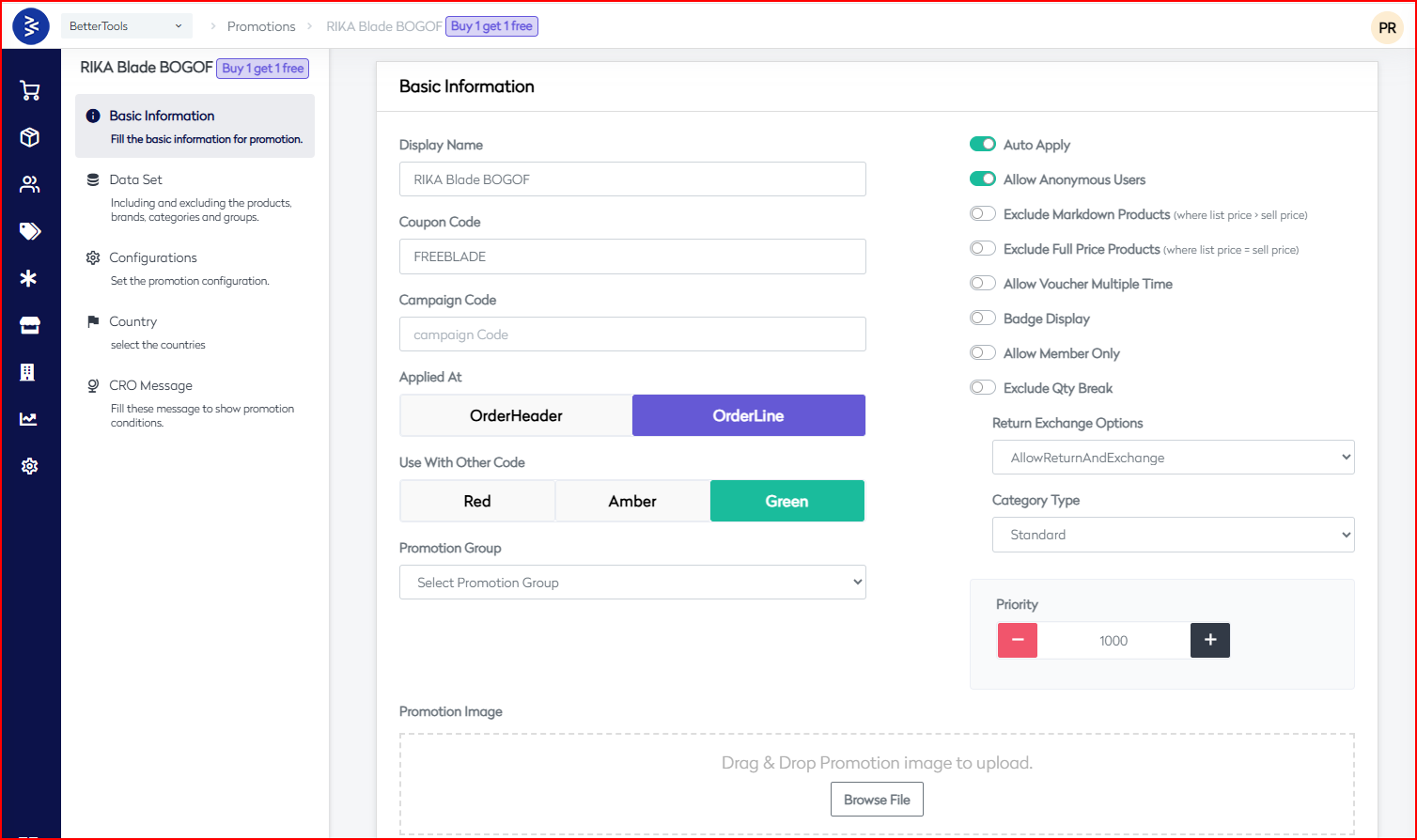
- Basic Information Fill the essential details to define the promotion.
Core Settings
| Field | Description |
|---|---|
| Display Name | Name shown to customers |
| Coupon Code | Unique redemption code for customers |
| Campaign Code | Internal tracking identifier |
| Applied At | OrderHeader or OrderLine level application |
Usage Controls
| Field | Description |
|---|---|
| Use With Other Code | Controlled via Traffic Light System: |
| - Red: Strict restrictions | |
| - Amber: Moderate restrictions | |
| - Green: Flexible combinations |
Promotion Settings
| Setting | Description |
|---|---|
| Promotion Group | Select from Flash / Clearance / Offer |
| Auto Apply | Apply promotion automatically |
| Allow Anonymous Users | Enable for guest checkout users |
| Exclude Markdown Products | Prevent usage on discounted items |
| Exclude Full Price Products | Exclude full-priced items |
| Allow Multiple Usage | Allow repeated use of voucher |
| Voucher Validity Days | Set duration in days for voucher validity |
| Badge Display | Show badge on eligible products |
| Allow Member Only | Restrict to logged-in or member users |
| Exclude Qty Break | Ignore quantity break pricing logic |
Additional Configuration
| Field | Options |
|---|---|
| Return/Exchange | None, Allow Return, Allow Exchange, Both |
| Category Type | Standard, Membership, Referral |
| Priority | Numerical priority (higher value = higher precedence) |
| Promotion Image Upload | Upload promotional banner |
| Messages | Primary, Additional, and up to 10 Info Fields |
Payment Methods Configure restrictions by payment method if required.
- Data Set
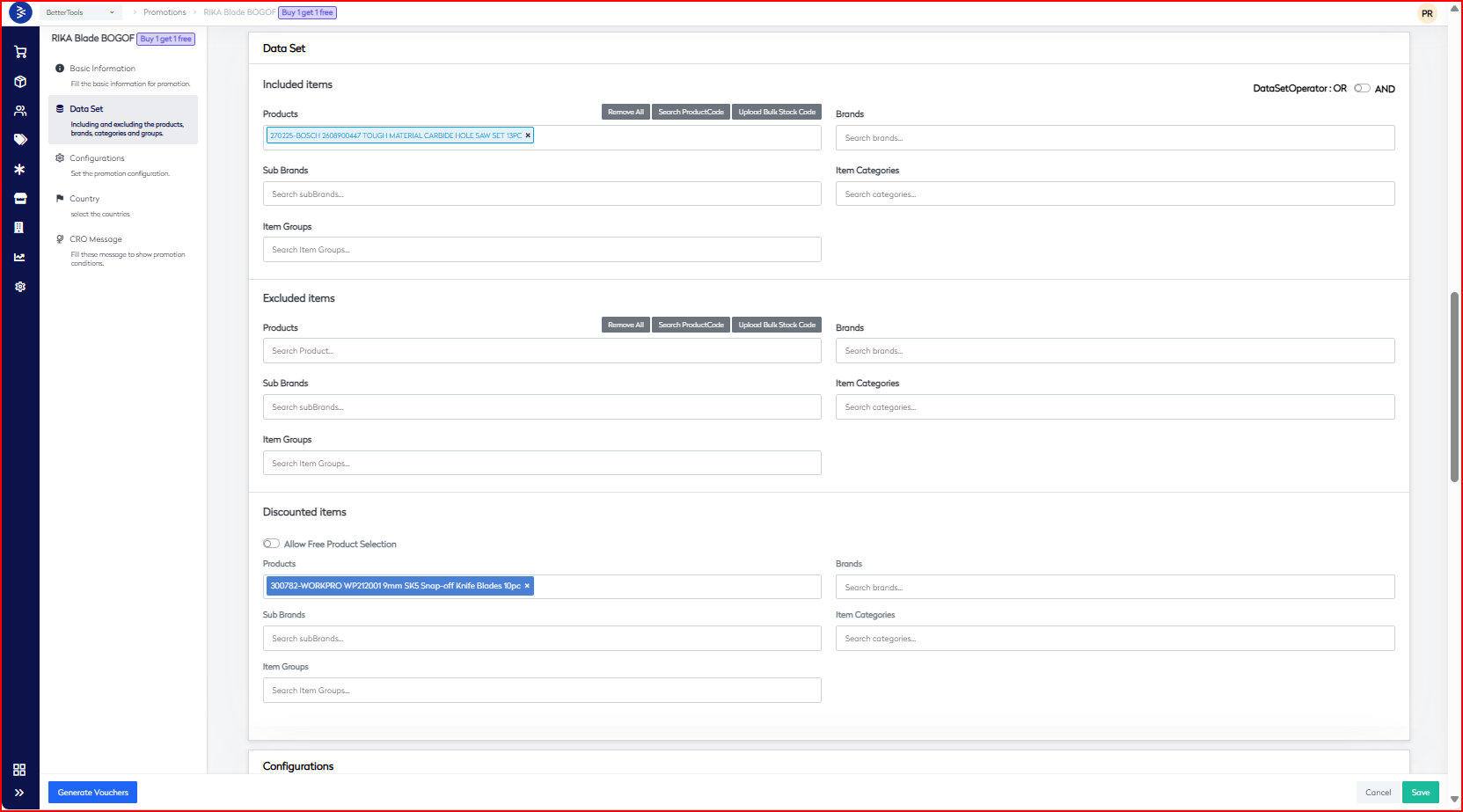
Define inclusion and exclusion rules for products, brands, and categories.
Included Items
| Field | Options / Description |
|---|---|
| DataSet Operator | Logical operator: AND / OR |
| Categories | Products (Bulk SKU upload), Brands, Sub-Brands, Item Categories, Item Groups |
Excluded Items Same fields as above, applied for exclusion logic.
Discounted Items
| Field | Description |
|---|---|
| Free Product Toggle | Enable selection of free item |
| Eligible Categories | Define categories for B1G1 eligibility: Products, Brands, Sub-Brands, Item Categories, Item Groups |
- Configurations
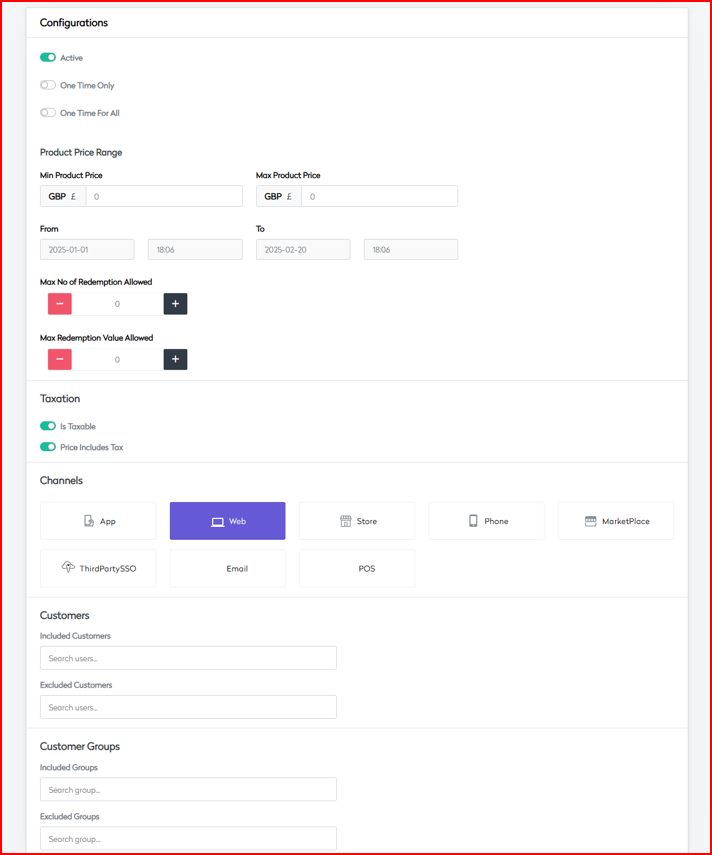
Fine-tune how and where the promotion should be applied.
Status Settings
| Field | Options |
|---|---|
| Active Status | Enable or disable the promotion |
| Usage Restriction | One Time Only / One Time for All |
Price Controls
| Field | Description |
|---|---|
| Min Product Price | Minimum price of items (GBP) |
| Max Product Price | Maximum price (GBP) |
| Max Redemption Count | Total allowed redemptions |
| Max Redemption Value | Total value threshold for redemptions |
Tax Settings
| Field | Description |
|---|---|
| Is Taxable | Enable if the promotion is taxable |
| Price Includes Tax | Specify if price includes tax |
Channel Availability Define where this promotion is active:
- App
- Web
- Store
- Phone
- MarketPlace
- ThirdPartySSO
- POS
Customer Management
| Category | Fields |
|---|---|
| Included Customers | Specific customer inclusion list |
| Excluded Customers | Specific exclusion list |
| Customer Groups | Included Groups, Excluded Groups |
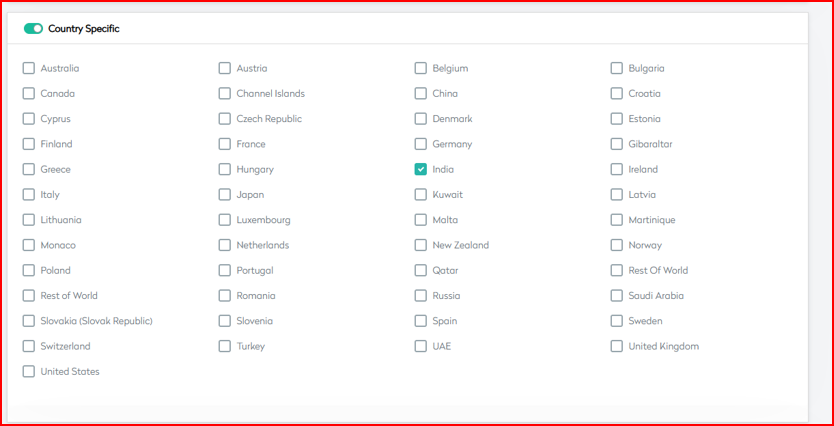
- Country Configure country-specific settings and content.
Geographic Settings
| Field | Description |
|---|---|
| Country Specific | Toggle for enabling country restrictions |
| Country List | Select applicable countries |
| Localization Support | Define languages (e.g., en-GB) |
| Country-specific Fields | Names, Failure Messages, Custom Content |
- CRO Message Define communication and display rules for CRO-related messaging.
Message Configuration
| Field | Description |
|---|---|
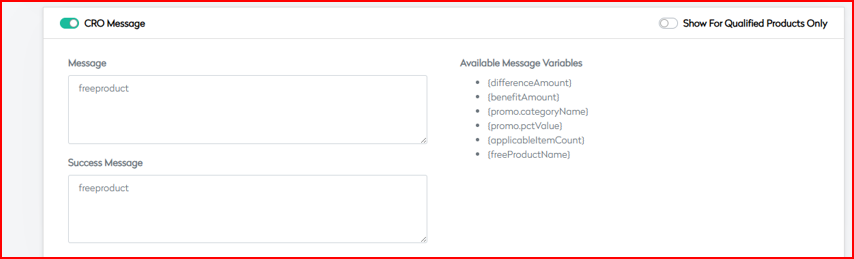
| CRO Message Toggle | Enable message display |
| Show For Qualified Products | Show only if product qualifies |
| Components | Name, Failure Message, Content |
Display Rules
| Rule Category | Options |
|---|---|
| Visibility Conditions | Display only under certain logic |
| Targeting Options | Based on customer, device, etc. |
This structured documentation enables smooth configuration and management of Buy 1 Get 1 Free promotions across all supported platforms and channels.
Buy X Cheapest Free Promotion
The Buy X, Cheapest Free promotion enables merchants to offer discounts where the customer gets the lowest-priced item free after purchasing a specified number of items. This feature is ideal for increasing order value, driving volume sales, and moving selective inventory.
- Basic Information Fill in the core configuration details for the promotion.
General Settings
| Field | Description |
|---|---|
| Display Name | Name displayed to customers |
| Coupon Code | Optional unique redemption code |
| Campaign Code | Internal tracking identifier |
| Applied At | OrderHeader (cart level) or OrderLine (product level) |
Compatibility Controls
| Setting | Options |
|---|---|
| Use With Other Code | Traffic Light System: - Red: Strict - Amber: Moderate - Green: Flexible |
Key Settings
| Option | Description |
|---|---|
| Auto Apply | Apply automatically without coupon |
| Allow Anonymous Users | Allow guest users to use promotion |
| Exclude Markdown Products | Exclude already discounted items |
| Exclude Full Price Products | Exclude full-priced items |
| Allow Voucher Multiple Time | Allow repeated redemption |
| Badge Display | Show badge on product |
| Allow Member Only | Restrict to registered users |
| Exclude Qty Break | Disable application on quantity break pricing |
Additional Controls
| Field | Description |
|---|---|
| Return/Exchange | None, Allow Return, Allow Exchange, Both |
| Category Type | Standard, Membership, Referral |
| Priority | Numeric value for precedence |
| Promotion Image Upload | Upload visual banner |
| Custom Messages | Primary, Additional, Info fields |
| Payment Restrictions | Limit promotion to specific payment methods |
 |
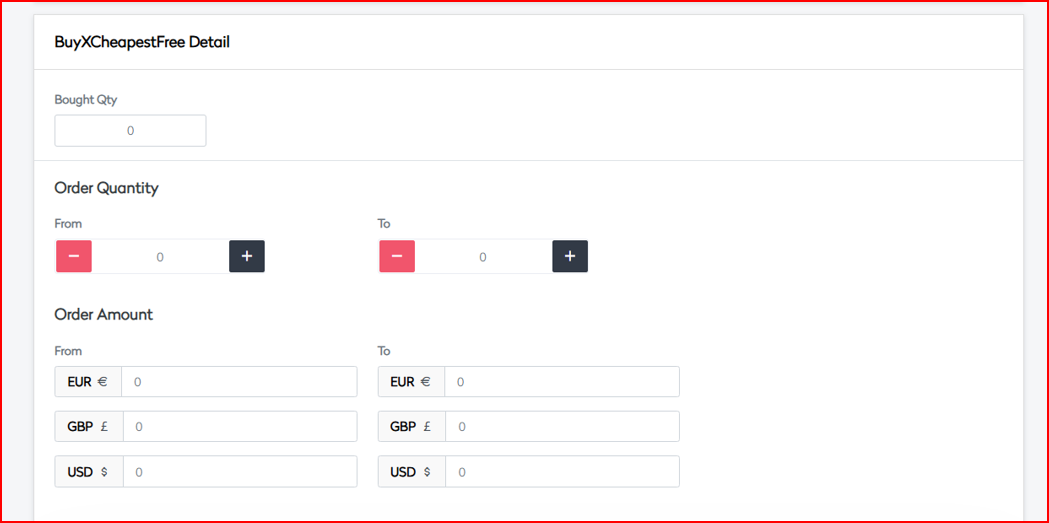
- Discount Detail
Configure discount rules and thresholds.
| Field | Description |
|---|---|
| Bought Quantity | Minimum number of items required to activate |
| Quantity Range | Min and Max quantity thresholds |
| Order Amount Range | Minimum and maximum order value thresholds |
| Multi-Currency Support | Support for GBP / USD / EUR |
- Data Set Define inclusion and exclusion rules for applicable items.
Inclusion Rules
| Category | Description |
|---|---|
| Logical Operator | Apply AND / OR rules |
| Products | Specify SKUs directly or via bulk upload |
| Brands | Include specific brands |
| Sub Brands | Include brand subsets |
| Item Categories | Target product categories |
| Item Groups | Group-based inclusion |
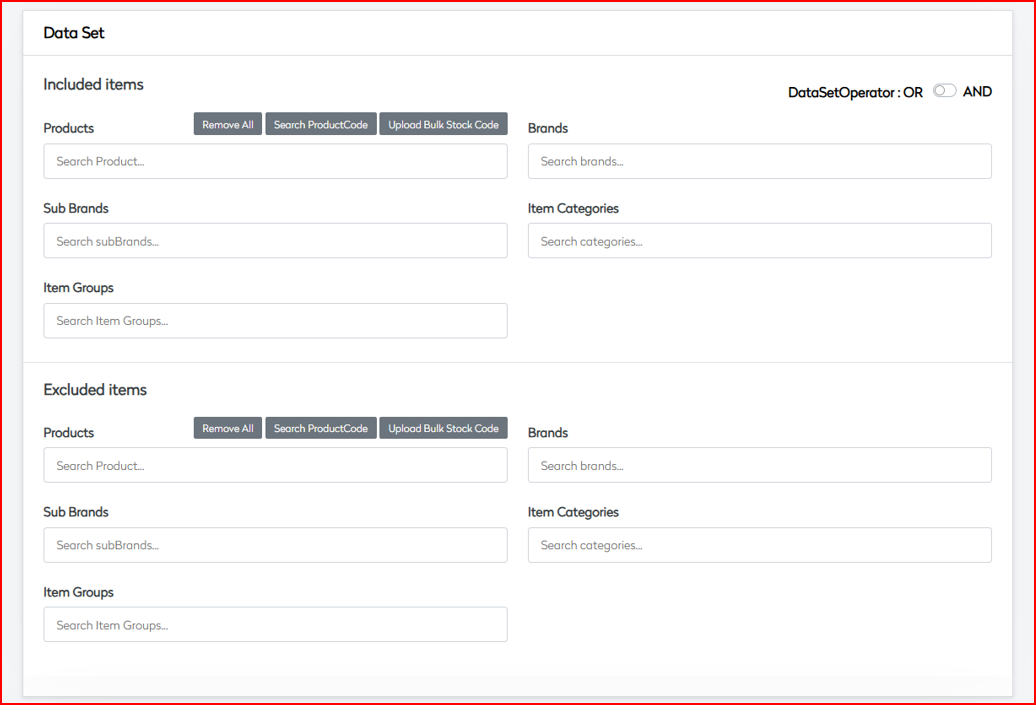
Exclusion Rules Use the same categories to restrict specific products or segments.
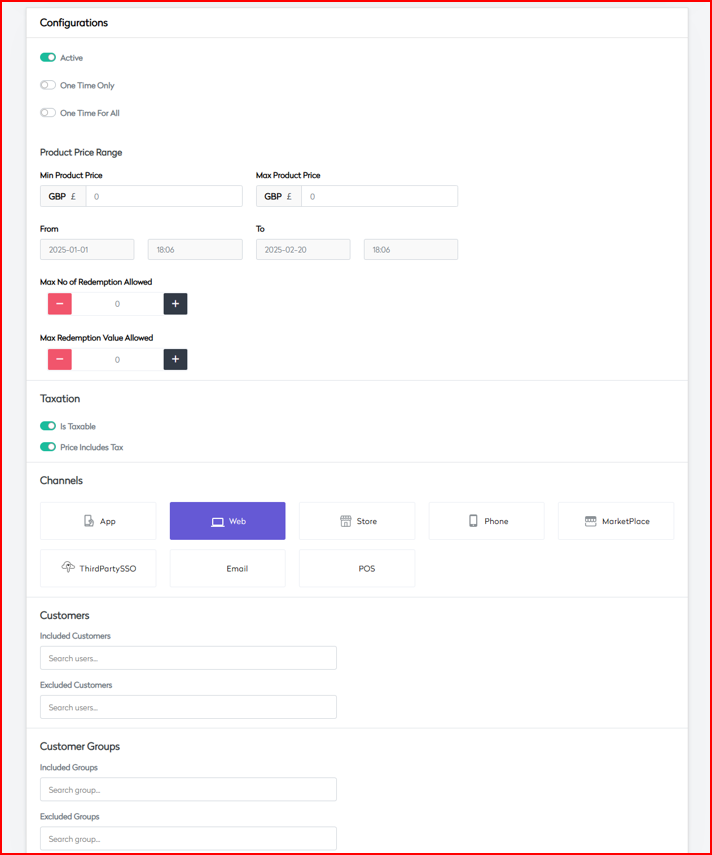
- Configurations Set promotion-level controls and availability.
Activation
| Field | Description |
|---|---|
| Active Status | Enable or disable the promotion |
| Usage Limitations | One Time Only / One Time For All |
Price Control & Limits
| Field | Description |
|---|---|
| Min Product Price | Minimum value of eligible products |
| Max Product Price | Maximum value |
| Max Redemption Count | Limit on total redemptions |
| Max Redemption Value | Limit on total promotional value |
Tax Settings
| Setting | Description |
|---|---|
| Is Taxable | Enable if subject to tax |
| Price Includes Tax | Whether displayed prices include tax |
Channel Availability Enable promotion across supported platforms:
- App
- Web
- Store
- Phone
- MarketPlace
- ThirdPartySSO
- POS
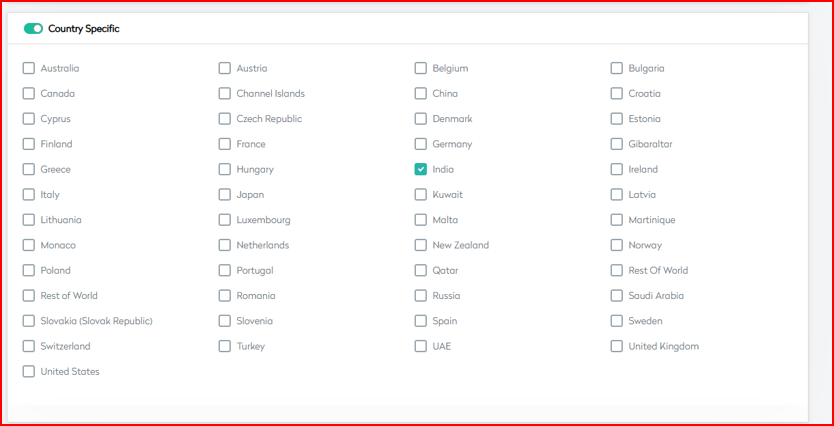
- Country Target the promotion geographically and with localization support.
| Field | Description |
|---|---|
| Country-Specific Toggle | Enable targeting by country |
| Country Selection | Select from supported countries |
| Localization | Support for en-GB, fr-FR, de-DE etc. |
| Country Content | Names, failure messages, localized text |
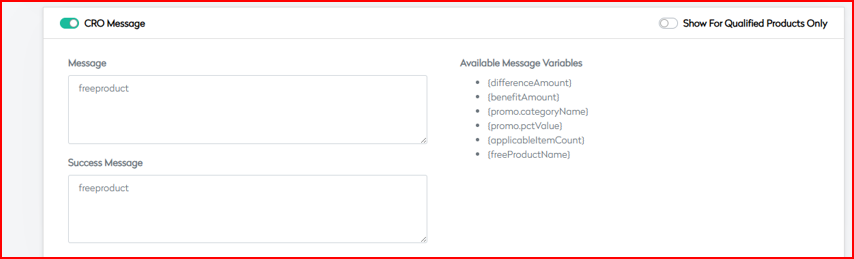
- CRO Message Manage how the promotion is communicated to users.
Message Configuration
| Field | Description |
|---|---|
| CRO Message Toggle | Enable promotional messaging |
| Show For Qualified Only | Limit to qualified products |
| Message Components | Name, Failure Message, Promotional Content |
| Language-specific Support | Customize messages per locale |
 |
This structured documentation ensures that Buy X, Cheapest Free promotions are configured consistently, scale effectively, and deliver the intended business value with minimal operational overhead.
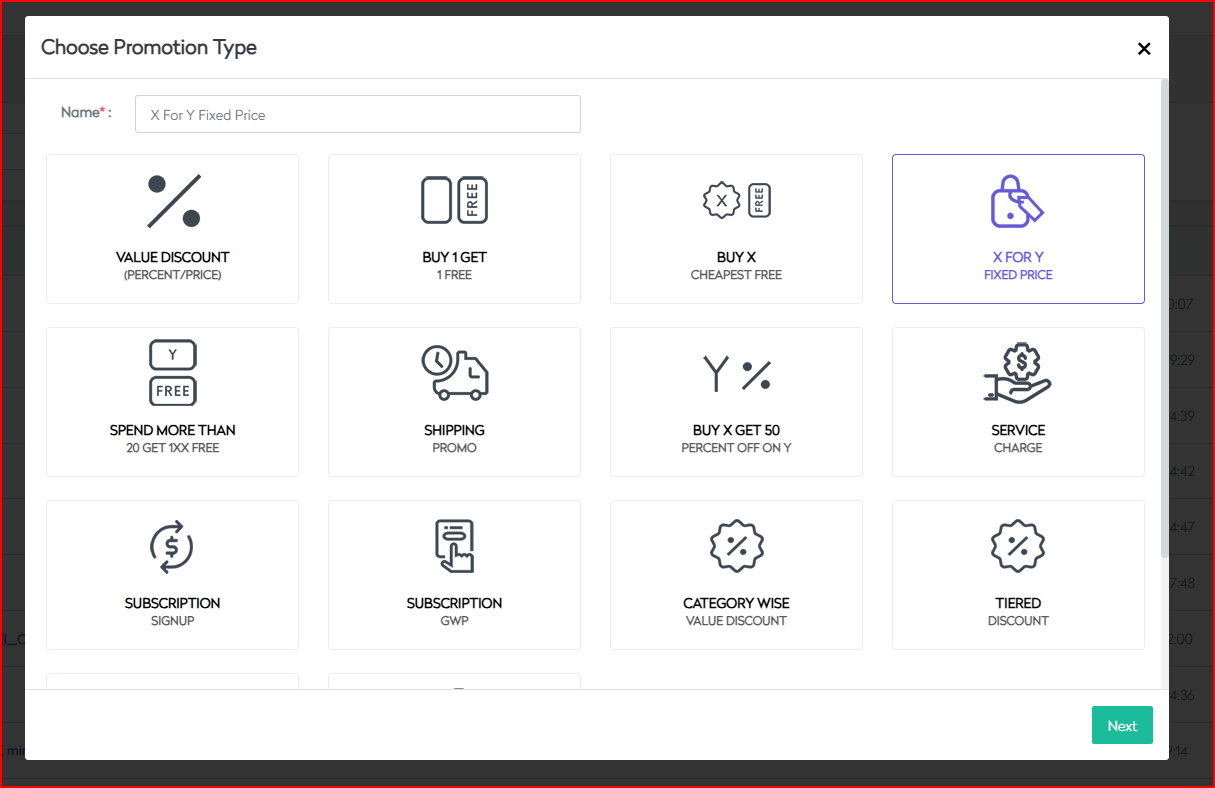
X For Y Fixed Price Promotion
The X For Y Fixed Price promotion enables merchants to offer customers a specific quantity (X) of eligible items for a fixed price (Y), regardless of their original prices. This strategy is ideal for bundling, inventory clearance, and creating attractive volume offers.
- Basic Information
Fill in the core details that define and govern the promotion.
Core Settings
| Field | Description |
|---|---|
| Display Name | Name shown to customers |
| Coupon Code | Optional unique code for manual redemption |
| Campaign Code | Internal tracking identifier |
| Applied At | OrderHeader (cart-level) or OrderLine (item-level) |
Compatibility Settings
| Setting | Options |
|---|---|
| Use With Other Code | Red (High Restriction), Amber (Medium), Green (Low) |
Control Flags
| Option | Description |
|---|---|
| Auto Apply | Automatically apply the promotion |
| Allow Anonymous Users | Available for guest checkouts |
| Exclude Markdown Products | Prevent discount on already marked-down items |
| Exclude Full Price Products | Prevent discount on non-discounted items |
| Allow Voucher Multiple Time | Redeem the same code multiple times |
| Badge Display | Display badge on eligible items |
| Allow Member Only | Restrict promotion to logged-in users |
| Exclude Qty Break | Exclude items using quantity break pricing |
Additional Controls
| Field | Description |
|---|---|
| Return Exchange Options | None, AllowReturn, AllowExchange, AllowBoth |
| Category Type | None, Standard, Membership, Referral |
| Priority Setting | Numerical value for application priority |
| Promotion Image | Upload media for campaign display |
| Custom Messages | Primary and auxiliary promotional content |
 |
- Fixed Price Detail Configure the X-for-Y rules for bundle pricing.
Bundle Configuration
| Field | Description |
|---|---|
| Required Quantity | Quantity of items (X) required for bundle |
| Fixed Price Amount | Fixed price amount (Y) |
| Currency Selection | Select applicable currency (e.g. INR/USD) |
Quantity Parameters
| Field | Description |
|---|---|
| Minimum Purchase Quantity | Lower limit for eligible bundle |
| Maximum Purchase Quantity | Upper limit for bundle application |
Price Controls
| Field | Description |
|---|---|
| Minimum Order Amount | Minimum order value for eligibility |
| Maximum Order Amount | Upper cap for qualifying orders |
| Multi-currency Support | Support for EUR, GBP, USD |
Discount Calculation
| Field | Description |
|---|---|
| Fixed Price Distribution | Allocation logic among eligible items |
| Tax Calculation Method | Inclusive or exclusive of tax |
| Rounding Rules | Specify rounding behavior for split pricing |
 |
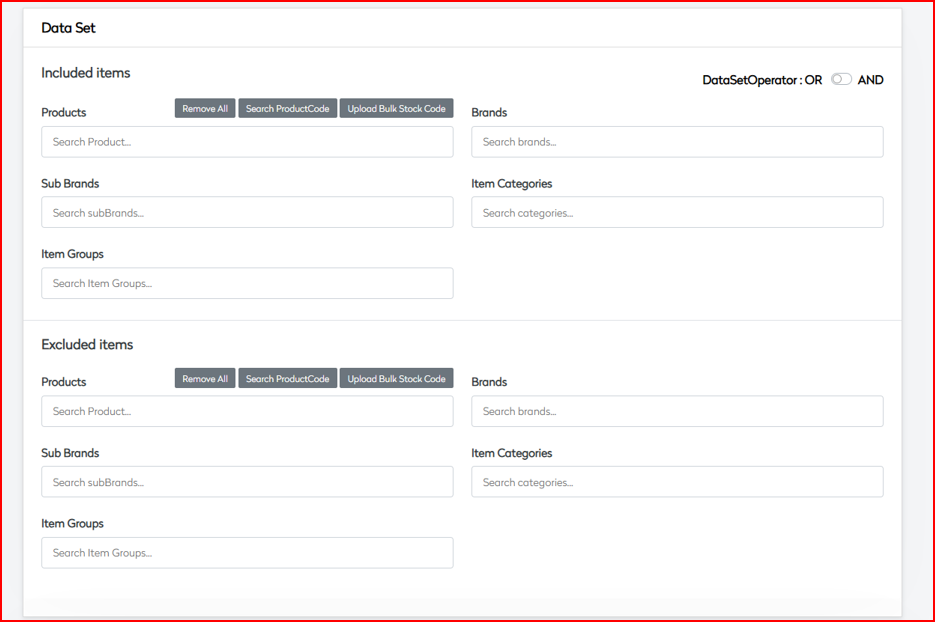
- Data Set Define the eligible product sets for inclusion or exclusion.
Inclusion Rules
| Category | Description |
|---|---|
| Logical Operator | AND / OR |
| Products | Select SKUs or bulk upload supported |
| Brands | Target by brand |
| Sub Brands | Segment under brand |
| Item Categories | Apply to product categories |
| Item Groups | Target predefined product groups |
Exclusion Rules Use the same structure as inclusion to exclude specific products or segments. Supports complex combinations and override logic.
Data Set Operators
- Combine multiple inclusion/exclusion sets using
AND/OR - Handle multi-dimensional segmentation via rule nesting
- Configurations Control redemption logic and platform-specific behavior.
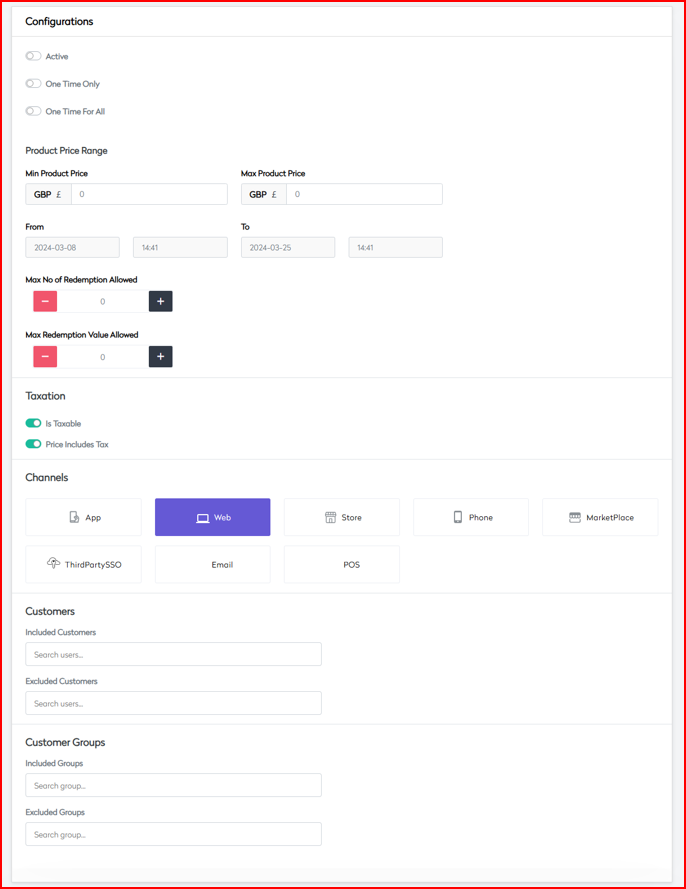
Activation Controls
| Field | Description |
|---|---|
| Active Status | Toggle promotion live status |
| One Time Only | Restrict to one-time use per user |
| One Time For All | Apply once platform-wide |
Price Range Parameters
| Field | Description |
|---|---|
| Min Product Price | Minimum price per item (INR) |
| Max Product Price | Maximum price (INR) |
Redemption Limits
| Field | Description |
|---|---|
| Max No. of Redemptions | Total allowed redemption count |
| Max Redemption Value | Total discount value allowed (INR) |
Channel Availability Enable or disable the promotion across:
- App
- Web
- Store
- Phone
- Marketplace
- ThirdPartySSO
- POS
- Country Configure country-specific rules and localization.
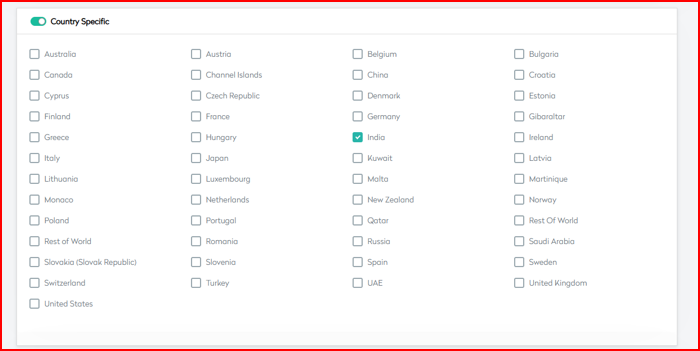
Geographic Targeting
| Setting | Description |
|---|---|
| Country Specific | Enable location-based targeting |
| Region Specifics | Define behavior for states/provinces |
Localization
- Language support for messages and UI (
en-GB,fr-FR, etc.) - Currency formatting and price display
- Local tax and rounding behavior
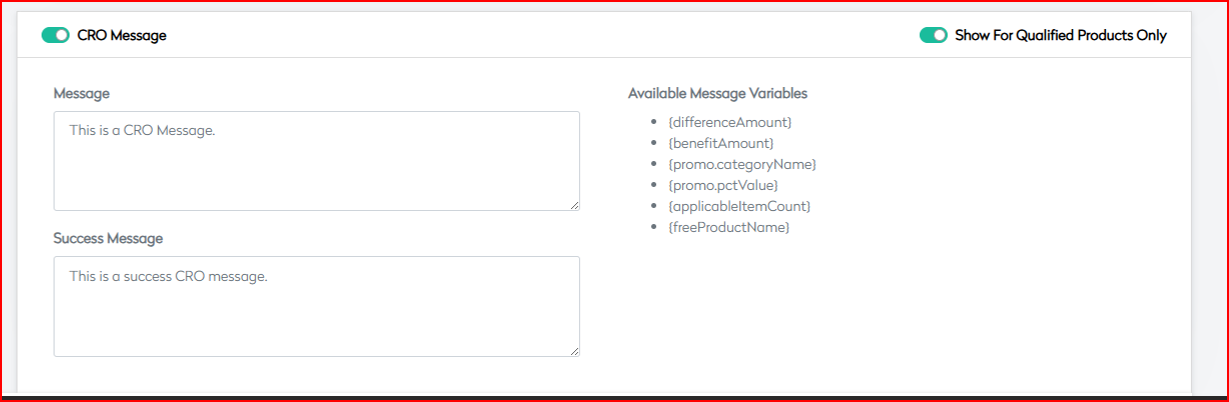
- CRO Message Configure communication to enhance promotion clarity.
Marketing Messages
| Message Type | Description |
|---|---|
| Success Messages | Confirmation of eligible promotion use |
| Failure Messages | Displayed when criteria not met |
| Qualification Messages | Shown to suggest how to qualify |
Display Rules
| Rule | Description |
|---|---|
| Show For Qualified Products | Display messages only for eligible items |
| Message Placement | Product page, cart, or checkout |
| Dynamic Content | Enable contextual messaging |
 |
Spend More & Get Free Promotion
The "Spend More Than X Get Y Free" promotion incentivizes higher order value by offering customers free products when their purchase exceeds a defined threshold. For example, spending more than £20 qualifies a customer for a free item.
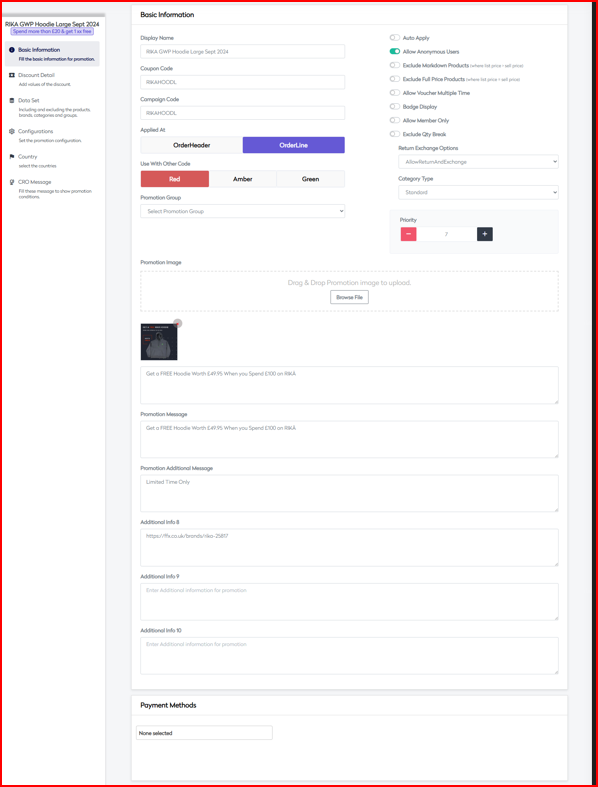
- Basic Information
Set up the foundational information for the promotion.

Core Settings
| Field | Description |
|---|---|
| Display Name | Customer-facing name (e.g., "Spend more than £20 & get 1xx free") |
| Coupon Code | Optional manual redemption code |
| Campaign Code | Internal tracking identifier |
| Applied At | OrderHeader (cart-level) or OrderLine (item-level) |
Promotion Controls
| Option | Description |
|---|---|
| Auto Apply | Automatically apply the promotion |
| Allow Anonymous Users | Available for guest users |
| Exclude Markdown Products | Skip already discounted products |
| Exclude Full Price Products | Skip full-price products |
| Allow Multiple Redemptions | Allow repeated use of promo |
| Badge Display Options | Visual badges for qualifying items |
| Member-Only Restrictions | Restrict to registered customers only |
| Quantity Break Exclusions | Exclude quantity break-priced items |
Business Rules
| Field | Options |
|---|---|
| Return/Exchange Options | None, AllowReturn, AllowExchange, AllowBoth |
| Category Type | Standard, Membership, Referral |
| Priority Setting | Numerical value between 1–100 |
Visual Elements
- Promotion Image Upload
- Badge Configuration
- Display Messages
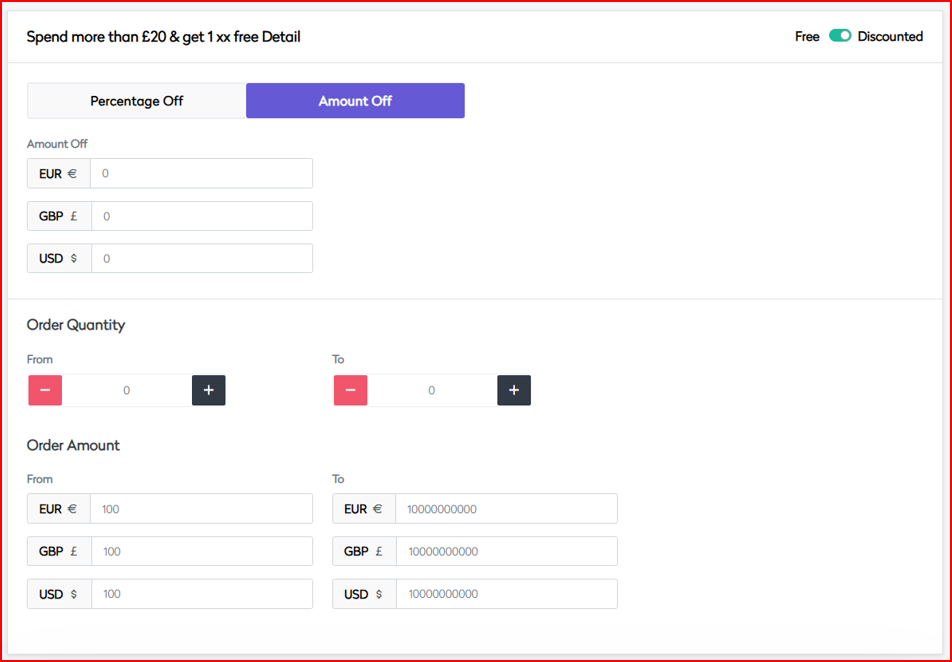
- Spend & Get Detail Define spend threshold and reward logic.
Spending Threshold
| Field | Description |
|---|---|
| Minimum Spend | E.g., £20 |
| Currency Support | GBP, EUR, USD |
Reward Configuration
| Field | Description |
|---|---|
| Free Item Selection | Define reward products |
| Quantity Limits | Maximum free item count per redemption |
| Value Restrictions | Limit free item value |
Order Parameters
| Field | Description |
|---|---|
| Quantity Range | From/To quantity eligibility |
| Amount Range | From/To spend eligibility |
| Multi-buy Rules | Rules for applying multiple times if allowed |
Calculation Rules
| Field | Description |
|---|---|
| Pre/Post-tax Application | Whether spend calculation includes tax |
| Shipping Cost Inclusion | Include shipping in spend calculation |
| Discount Distribution | Logic for allocating value |
 |
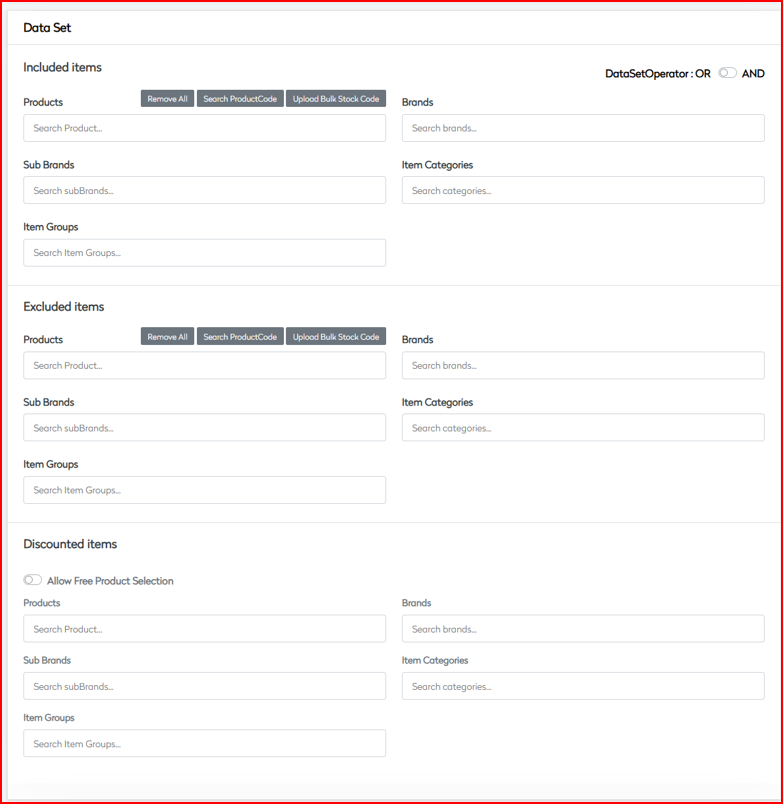
- Data Set Define inclusion and exclusion for qualified products and free items.
Qualifying Products
| Category | Description |
|---|---|
| Product Selection | Select SKUs or bulk upload supported |
| Brands | Brand-level inclusion |
| Sub Brands | Sub-brand logic |
| Categories | Category mapping |
| Item Groups | Grouped product sets |
Free Item Pool
| Field | Description |
|---|---|
| Eligible Products | Define reward items |
| Value Restrictions | Cap value of free products |
| Stock Management | Inventory availability check |
Exclusion Rules
| Category | Description |
|---|---|
| Product Exclusions | Exclude specific SKUs |
| Brand Restrictions | Exclude brands |
| Category Limitations | Block certain categories |
Data Set Operations
- Use
AND/ORlogic to combine conditions - Handle complex rule-building and exceptions
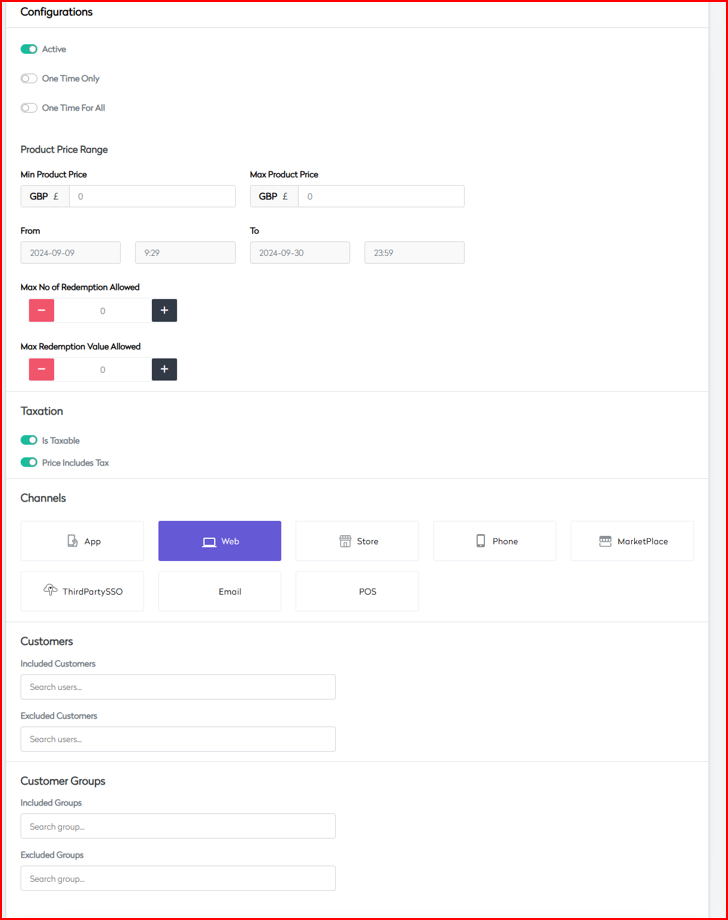
- Configurations Control promotion behavior across scenarios and platforms.
Activation Settings
| Field | Description |
|---|---|
| Start/End Dates | Campaign validity period |
| Active Status | Enable/disable the promotion |
| One-Time Usage | Restrict per-user redemption |
| Redemption Limits | Global cap on redemptions |
Price Controls
| Field | Description |
|---|---|
| Min Product Price | Minimum eligible product price (INR/£) |
| Max Product Price | Maximum price of qualifying items |
| Free Item Value Caps | Cap value of free items |
Channel Management Enable or disable promotion per platform:
- App
- Web
- Store
- Phone
- Marketplace
- Third-party SSO
- POS
Customer Targeting
| Segment | Description |
|---|---|
| Included Customer Groups | Whitelist by group |
| Excluded Customer Groups | Blacklist by group |
| Member Tiers | Apply to specific membership levels |
| New vs Existing Customers | Target by customer lifecycle stage |
 |
- Country Enable location-aware logic for the promotion.
Geographic Rules
| Field | Description |
|---|---|
| Country-Specific Activation | Enable by country |
| Regional Variations | Vary logic by state/region |
| Market-Specific Pricing | Localized price logic |
Localization
- Language customization (e.g.,
en-GB,fr-FR) - Currency display rules
- Compliance with local regulations
Shipping Rules
| Setting | Description |
|---|---|
| Eligible Countries | Countries where promo applies |
| Shipping Method Restrictions | Limit promo to specific shipping types |
| Delivery Options | Control delivery methods allowed |
 |
- CRO Message Configure promotional messaging logic.
Customer Communication
| Message Type | Description |
|---|---|
| Qualification Messages | Encourage spend-up |
| Progress Updates | Show cart progress toward threshold |
| Success Notifications | Confirm eligibility |
| Failure Alerts | Indicate unmet criteria |
Display Rules
| Rule | Description |
|---|---|
| Message Placement | Where messages appear (cart/product/checkout) |
| Timing | When to show messaging |
| Dynamic Content | Enable contextual messages |
| A/B Testing | Support variant testing for effectiveness |
 |
This promotion is highly effective for increasing basket size, introducing new products, managing inventory, and improving loyalty and conversion rates across different customer segments.
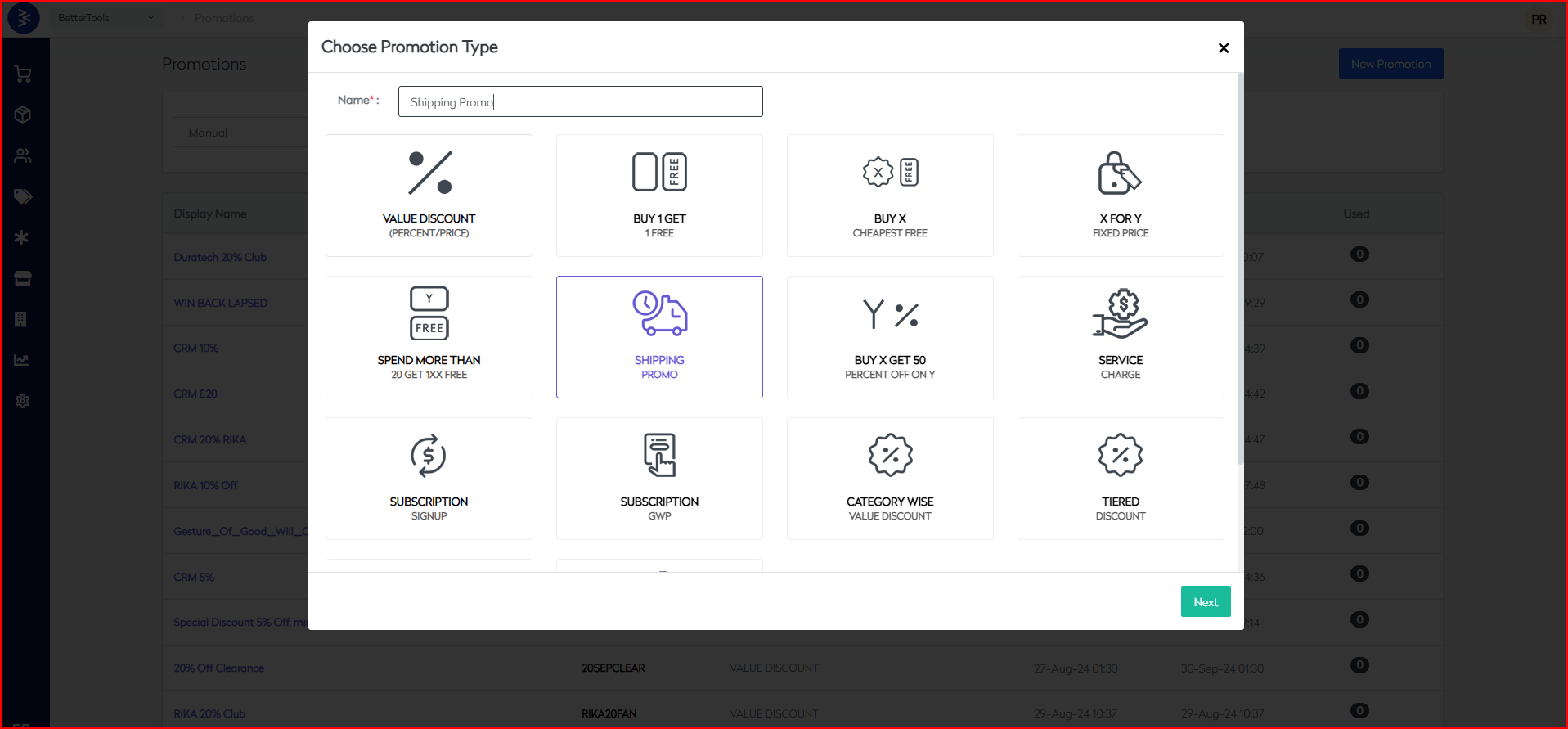
Shipping Promotion
The Shipping Promotion is a specialized promotional type that provides customers with free or discounted shipping based on defined order criteria. It is designed to drive conversions, reduce cart abandonment, and enhance customer satisfaction through optimized delivery incentives.
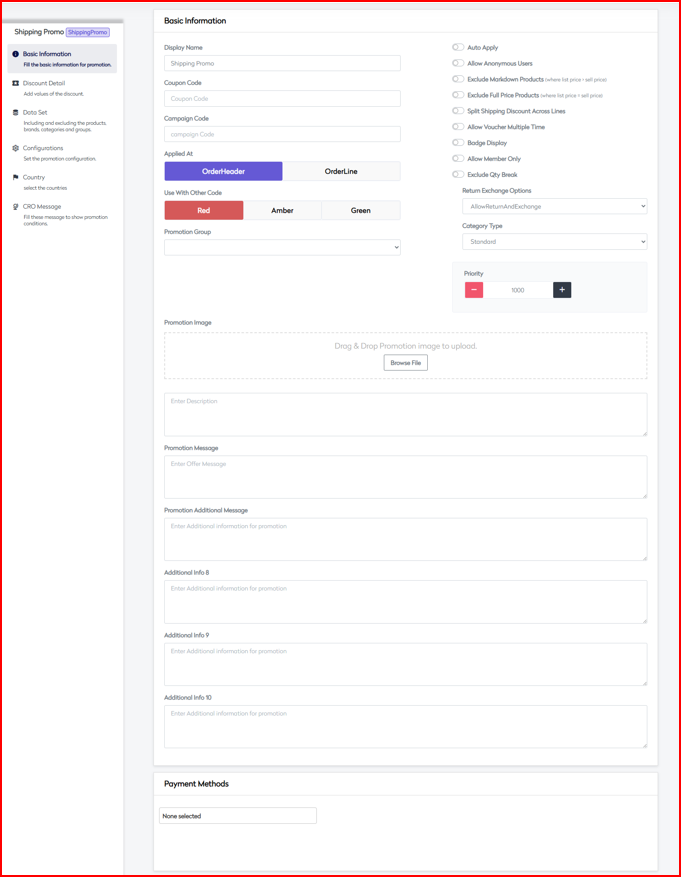
- Basic Information
Define the essential configuration of the shipping promotion.
Core Settings
| Field | Description |
|---|---|
| Display Name | Customer-facing promotion name |
| Coupon Code | Optional code for manual redemption |
| Campaign Code | Internal tracking identifier |
| Applied At | OrderHeader (cart-level) or OrderLine (item-level) |
Promotion Group Options
- Flash
- Clearance
- Offer
Control Flags
| Option | Description |
|---|---|
| Auto Apply | Automatically apply the promotion |
| Allow Anonymous Users | Available to guest users |
| Exclude Markdown Products | Exclude already discounted products |
| Exclude Full Price Products | Exclude full-price items |
| Split Shipping Discount | Split shipping discount across order lines |
| Allow Voucher Multiple Time | Allow code usage more than once |
| Badge Display | Display badge on qualifying items |
| Allow Member Only | Restrict to registered customers |
| Exclude Qty Break | Exclude from quantity-break pricing |
Additional Controls
| Field | Description |
|---|---|
| Voucher Validity Days | Duration in days for voucher applicability |
| Return Exchange | None, AllowReturn, AllowExchange, AllowBoth |
| Category Type | Standard, Membership, Referral |
| Priority Setting | Numeric priority (lower = higher precedence) |
Payment Method Integration
Supported platforms:
- COD
- PayPal
- Klarna
- Checkout ApplePay
- Clearpay
- Stripe
- Checkout
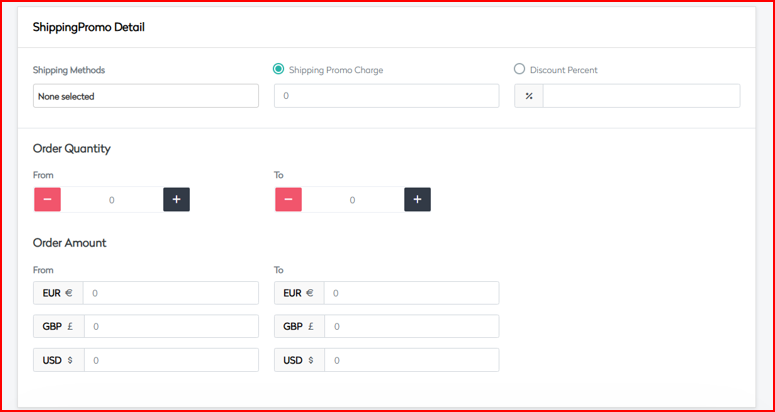
- Shipping Promo Detail
Set rules and discounts related to shipping methods.
Shipping Methods
| Method | Cost |
|---|---|
| Next Day Delivery | £6.99 |
| Click and Collect | £0.00 |
| Standard Shipping | £9.99 |
| Standard 2–4 Days Delivery | £0.00 |
| Price on Request | £0.00 |
Discount Configuration
| Field | Description |
|---|---|
| Shipping Promo Charge | Charge applicable after discount |
| Discount Percent | Discount percentage on shipping |
Order Parameters
| Field | Description |
|---|---|
| Quantity Range | Minimum and maximum quantity limits |
| Order Amount Range | Min/Max cart value for eligibility |
| Currency Support | GBP, EUR, USD |
 |
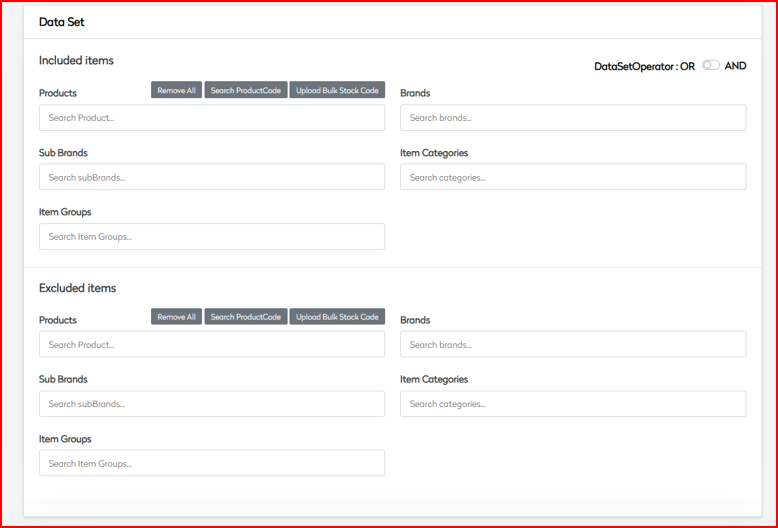
- Data Set
Define target or exclusion groups for the promotion.
Inclusion Rules
| Segment | Description |
|---|---|
| Products | Select or bulk upload eligible SKUs |
| Brands | Target specific brands |
| Sub Brands | Sub-division of brands |
| Categories | Product category-based targeting |
| Item Groups | Predefined product sets |
Exclusion Rules
- Same fields as inclusion (Products, Brands, Categories, etc.)
- Use for exceptions or exclusions
Data Set Operators
- Combine conditions using
AND/OR - Support complex logical rules and exception handling
- Configurations
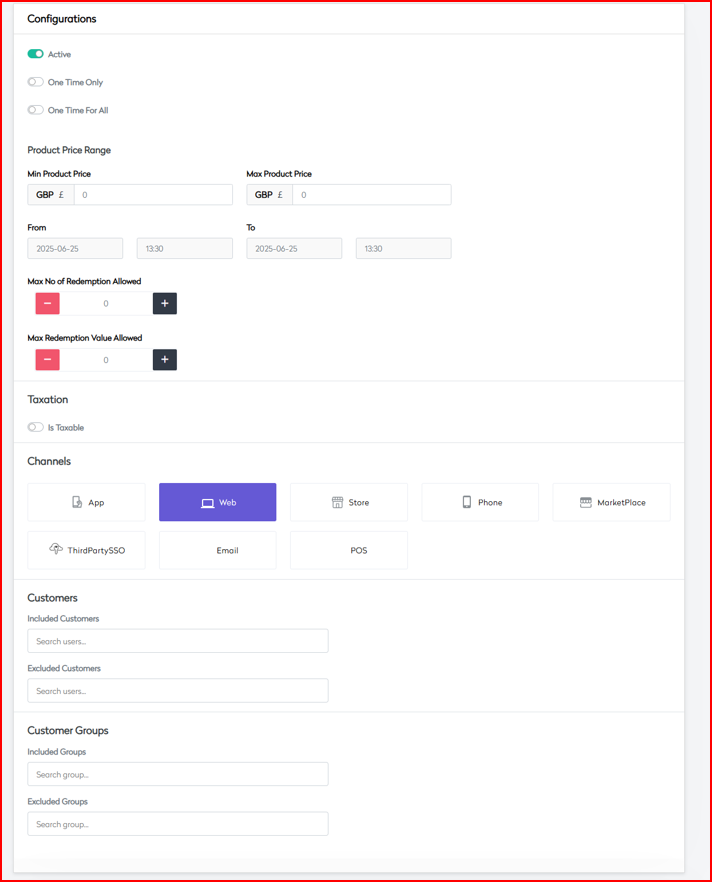
Control where and how the promotion is activated and applied.
Activation Controls
| Field | Description |
|---|---|
| Active Status | Enable/disable the promotion |
| One Time Only | Restrict to single-use per customer |
| One Time For All | Apply once globally per promotion |
Price Range Parameters
| Field | Description |
|---|---|
| Min Product Price | Minimum eligible item price |
| Max Product Price | Maximum price for eligible items |
Redemption Limits
| Field | Description |
|---|---|
| Max No of Redemptions | Global redemption cap |
| Max Redemption Value | Cap on total value given via promo |
Tax Settings
| Field | Description |
|---|---|
| Is Taxable | Whether promotion is subject to tax |
| Price Includes Tax | Whether prices shown are tax-inclusive |
Channel Availability
Enable or disable across sales channels:
- App
- Web
- Store
- Phone
- MarketPlace
- ThirdPartySSO
- POS
Customer Management
| Field | Description |
|---|---|
| Included Customers | Whitelist specific customer IDs |
| Excluded Customers | Blacklist specific customer IDs |
| Included Groups | Eligible customer groups |
| Excluded Groups | Excluded customer groups |
 |
- Country
Configure geography-specific behavior.
Geographic Coverage
Promotion availability across:
- United Kingdom
- United States
- EU countries
- Australia
- Canada
- Others
Localization Support
en-GBfr-FRde-DE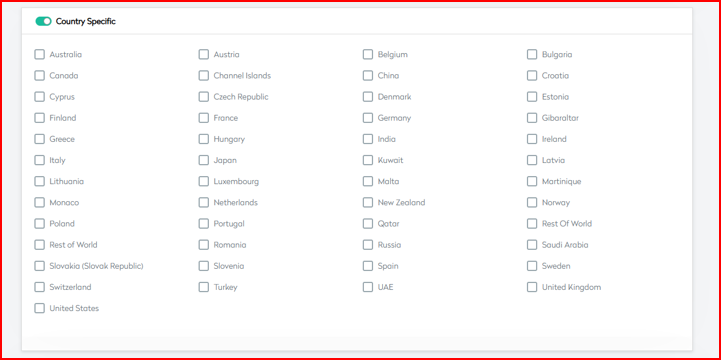
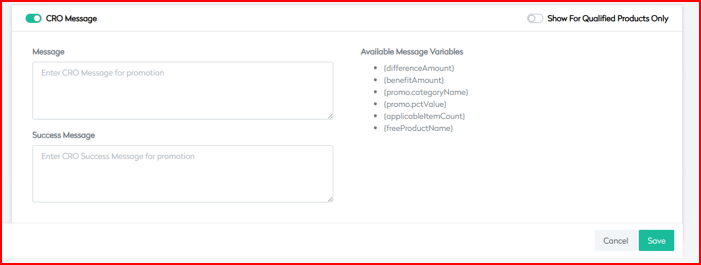
- CRO Message
Configure promotional messaging for customers.
Marketing Messages
| Type | Description |
|---|---|
| Message Content | General promotional copy |
| Success Message | Confirmation on meeting criteria |
| Failure Message | Shown when criteria not met |
Display Options
| Option | Description |
|---|---|
| Show For Qualified Only | Only display to eligible customers |
| Available Variables | {differenceAmount}, {benefitAmount}, {promo.categoryName}, {promo.pctValue}, {applicableItemCount}, {freeProductName} |
 |
| Variable | Description |
|---|---|
{differenceAmount} | The remaining amount the customer needs to spend to qualify for the promotion (e.g., "Spend £5 more to get free shipping"). |
{benefitAmount} | The monetary value of the benefit the customer will receive (e.g., "You save £6.99 on shipping"). |
{promo.categoryName} | The name of the promotional category or group (e.g., "Free Shipping", "Holiday Express"). |
{promo.pctValue} | The percentage value of the discount applied in the promotion (e.g., "Get 100% off on delivery"). |
{applicableItemCount} | Number of items in the cart that qualify for the promotion. Helps display quantity-based messaging. |
{freeProductName} | The name of the free product or reward item associated with the promotion (if any). |
Buy X Get 50% Off on Y Promotion
The Buy X Get 50% Off on Y promotion enables merchants to offer a 50% discount on specific products (Y) when a qualifying quantity of other products (X) is purchased. It helps drive cross-category sales, move inventory strategically, and boost average order value.
- Basic Information
Define essential configuration and rules for the promotion.
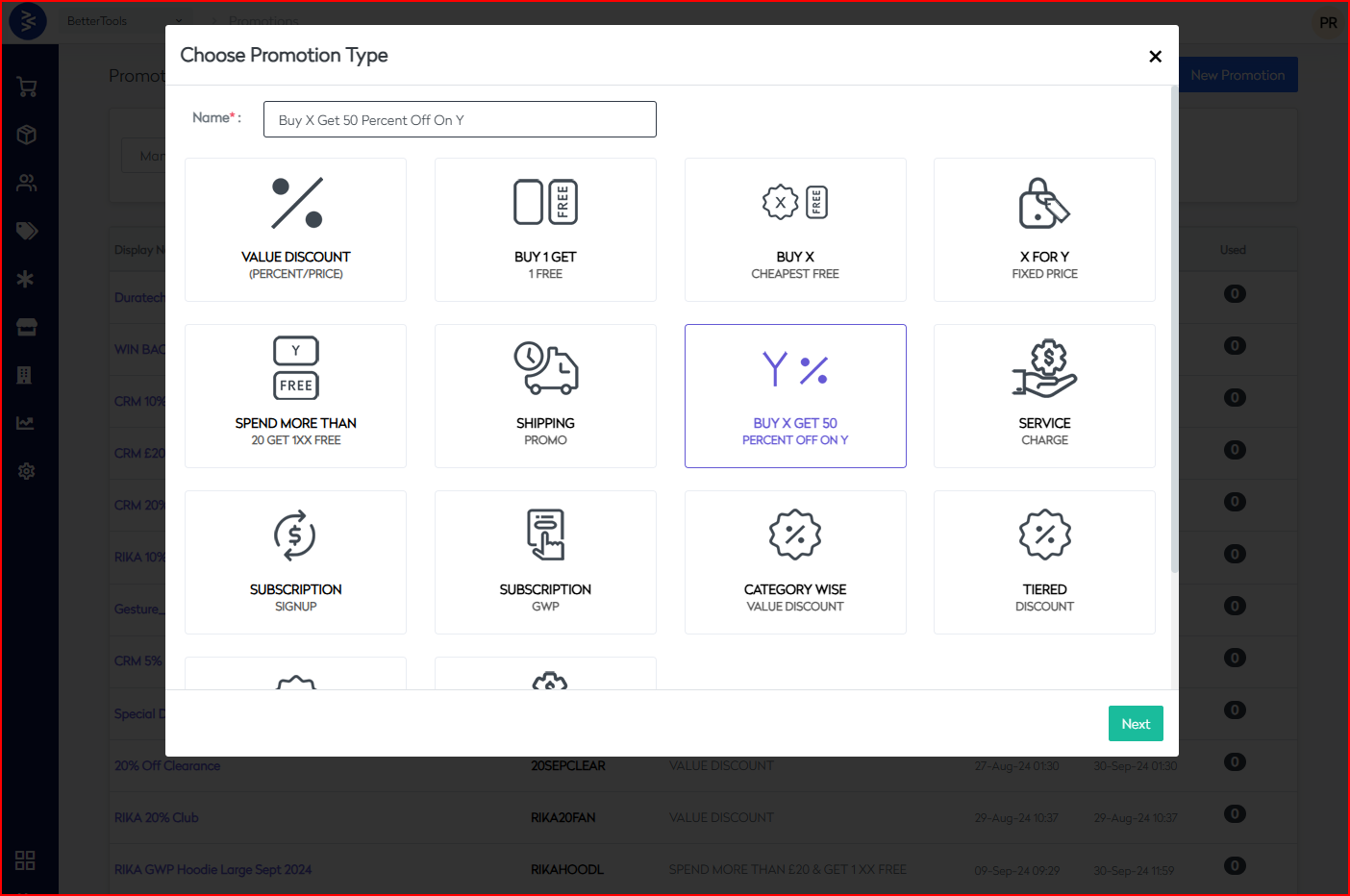
Core Settings
| Field | Description |
|---|---|
| Display Name | Customer-facing promotion name |
| Coupon Code | Optional redemption code |
| Campaign Code | Internal tracking identifier |
| Applied At | OrderHeader (cart-level) or OrderLine (item-level) |
Promotion Group
- Flash
- Clearance
- Offer
Control Flags
| Option | Description |
|---|---|
| Auto Apply | Automatically applies the promotion |
| Allow Anonymous Users | Available for guest users |
| Exclude Markdown Products | Exclude discounted/marked-down items |
| Exclude Full Price Products | Exclude full-price items |
| Allow Voucher Multiple Time | Allows multiple uses of the code |
| Badge Display | Badge display on eligible products |
| Allow Member Only | Restricts promotion to registered users only |
| Exclude Qty Break | Excludes items under quantity break pricing |
Additional Controls
| Field | Description |
|---|---|
| Voucher Validity Days | Duration for voucher usability |
| Return Exchange | None, AllowReturn, AllowExchange, AllowBoth |
| Category Type | Standard, Membership, Referral |
| Priority Setting | Application order priority (lower value = higher) |
Payment Method Integration
Supported platforms:
- COD
- PayPal
- Klarna
- Checkout ApplePay
- Clearpay
- Stripe
- Checkout
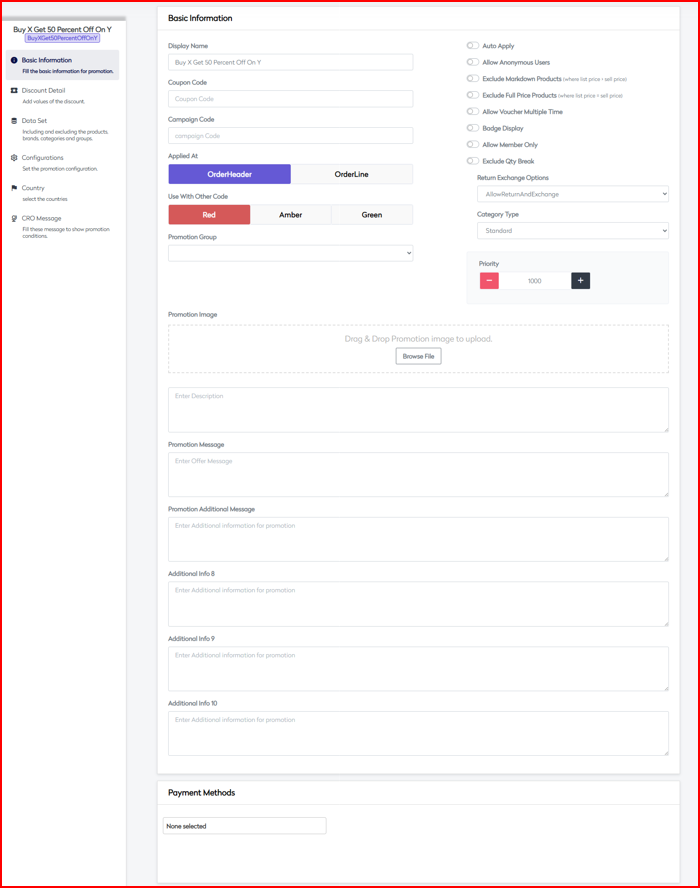
- Discount Detail
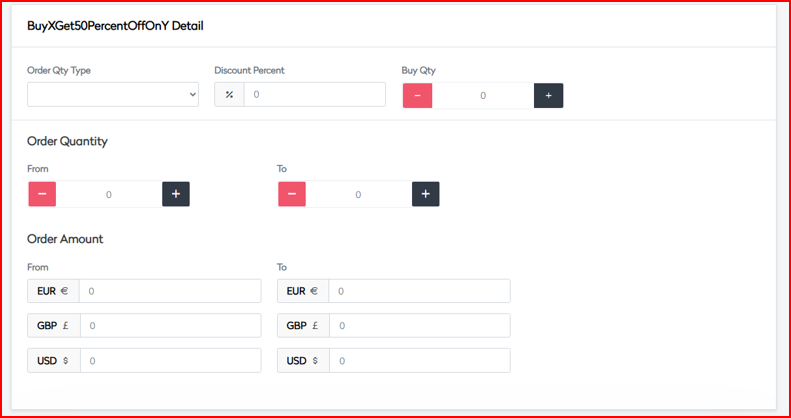
Configure the core rules behind the Buy X, Get Y discount.
Purchase Requirements
| Field | Description |
|---|---|
| Buy Quantity (X) | Quantity required to qualify for the discount |
| Discount Percentage | Fixed discount set to 50% on product Y |
| Order Qty Type | Both, Even, Odd – determines qualification logic |
Order Parameters
| Field | Description |
|---|---|
| Quantity Range | Minimum and maximum eligible quantities |
| Order Amount Range | Cart value threshold to trigger promotion |
| Currency Support | Multi-currency enabled (EUR / GBP / USD) |
 |
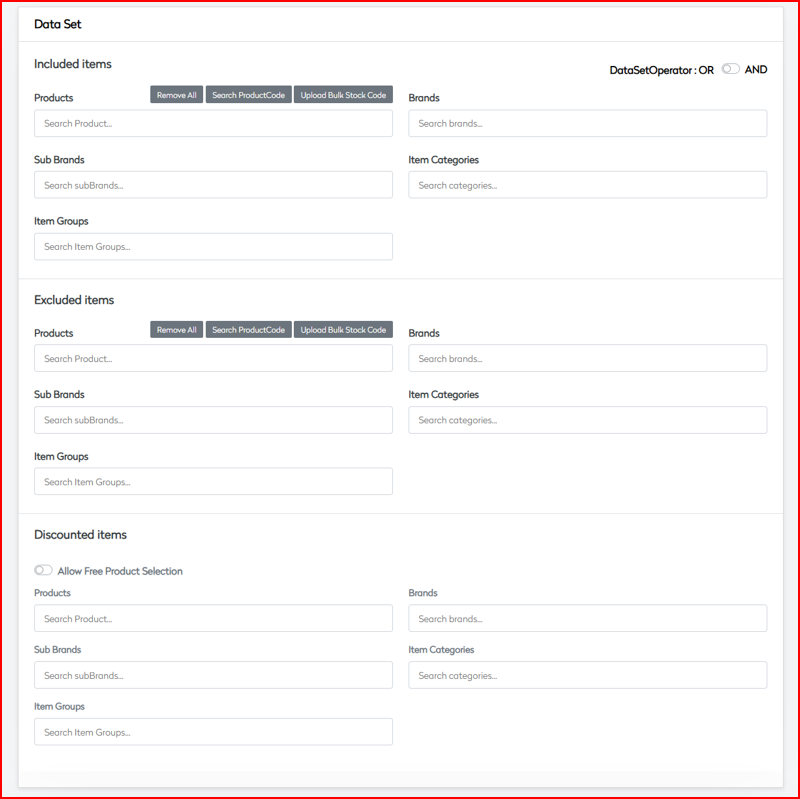
- Data Set
Define the products involved in the promotion.
Inclusion Rules
Qualifying Products (X)
| Segment | Description |
|---|---|
| Products | Select SKUs or bulk upload |
| Brands | Target by brand |
| Sub Brands | Segment under brand |
| Item Categories | Category-based targeting |
| Item Groups | Predefined product groups |
Discounted Products (Y)
| Segment | Description |
|---|---|
| Products | Eligible discounted products |
| Brands | Brands eligible for 50% discount |
| Categories | Product category mapping |
| Groups | Group-based targeting |
Exclusion Rules
Same fields as inclusion, used to restrict products or segments.
Data Set Operators
- Logical
AND/ORbetween rule sets - Support complex targeting logic
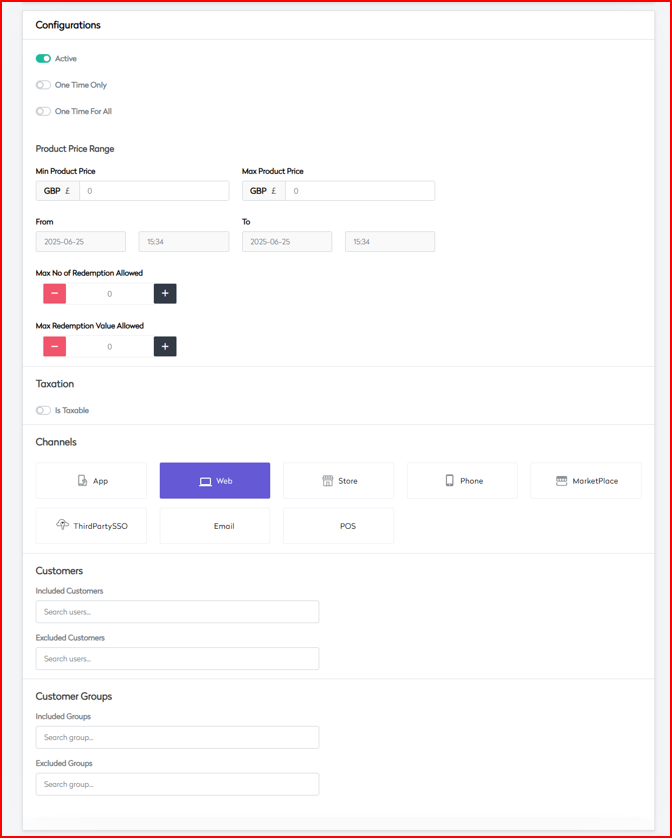
- Configurations
Control the scope and conditions of the promotion.
Activation Controls
| Field | Description |
|---|---|
| Active Status | Enable or disable the promotion |
| One Time Only | Single-use per customer |
| One Time For All | Single-use globally per promo |
Price Range Parameters
| Field | Description |
|---|---|
| Min Product Price | Minimum product value (per item) |
| Max Product Price | Maximum item value |
| Currency Support | Support for GBP, USD, EUR |
Redemption Limits
| Field | Description |
|---|---|
| Max No. of Redemptions | Limit on total redemptions |
| Max Redemption Value | Cap on total discount value (across all users) |
Tax Settings
| Field | Description |
|---|---|
| Is Taxable | Toggle to apply tax |
| Price Includes Tax | Toggle if product price includes tax |
Channel Availability
Enable/disable per platform:
- App
- Web
- Store
- Phone
- MarketPlace
- ThirdPartySSO
- POS
Customer Management
| Segment | Description |
|---|---|
| Included Customers | Customer ID allowlist |
| Excluded Customers | Customer ID denylist |
| Included Groups | Customer group allowlist |
| Excluded Groups | Customer group denylist |
 |
- Country
Geographic Targeting
| Setting | Description |
|---|---|
| Country Specific | Toggle to restrict promotion by location |
| Multi-country Support | Include EU, North America, APAC, Middle East |
Localization Support
en-GBfr-FRde-DE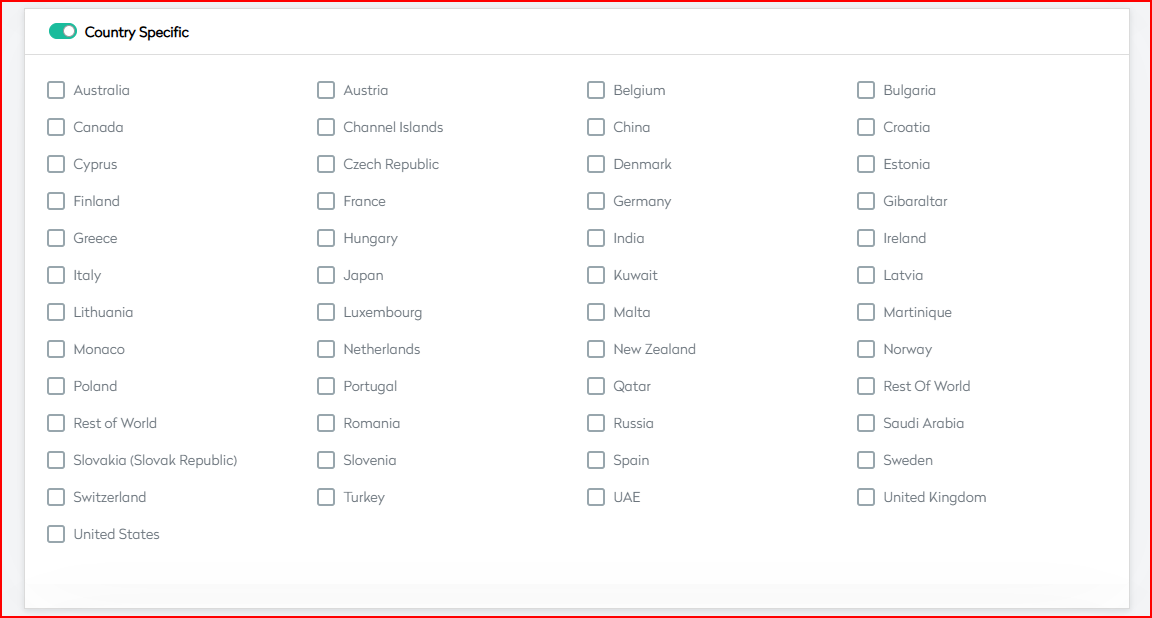
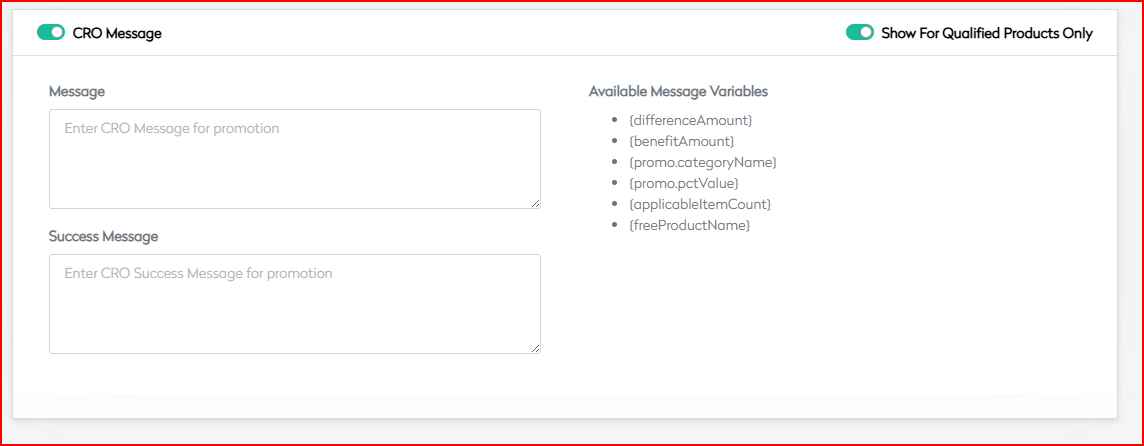
- CRO Message
Control what messages are shown to customers.
Marketing Messages
| Message Type | Purpose |
|---|---|
| Message Content | General description shown on eligible products |
| Success Message | Confirmation when user qualifies |
| Failure Message | Alert when criteria not met |
Display Options
| Field | Description |
|---|---|
| Show For Qualified Products | Show message only if item is eligible |
| Available Variables | {differenceAmount}, {benefitAmount}, {promo.categoryName}, {promo.pctValue}, {applicableItemCount}, {freeProductName} |
| Variable | Description |
|---|---|
{differenceAmount} | The remaining amount the customer needs to spend to qualify for the promotion (e.g., "Spend £5 more to get free shipping"). |
{benefitAmount} | The monetary value of the benefit the customer will receive (e.g., "You save £6.99 on shipping"). |
{promo.categoryName} | The name of the promotional category or group (e.g., "Free Shipping", "Holiday Express"). |
{promo.pctValue} | The percentage value of the discount applied in the promotion (e.g., "Get 100% off on delivery"). |
{applicableItemCount} | Number of items in the cart that qualify for the promotion. Helps display quantity-based messaging. |
{freeProductName} | The name of the free product or reward item associated with the promotion (if any). |
 |
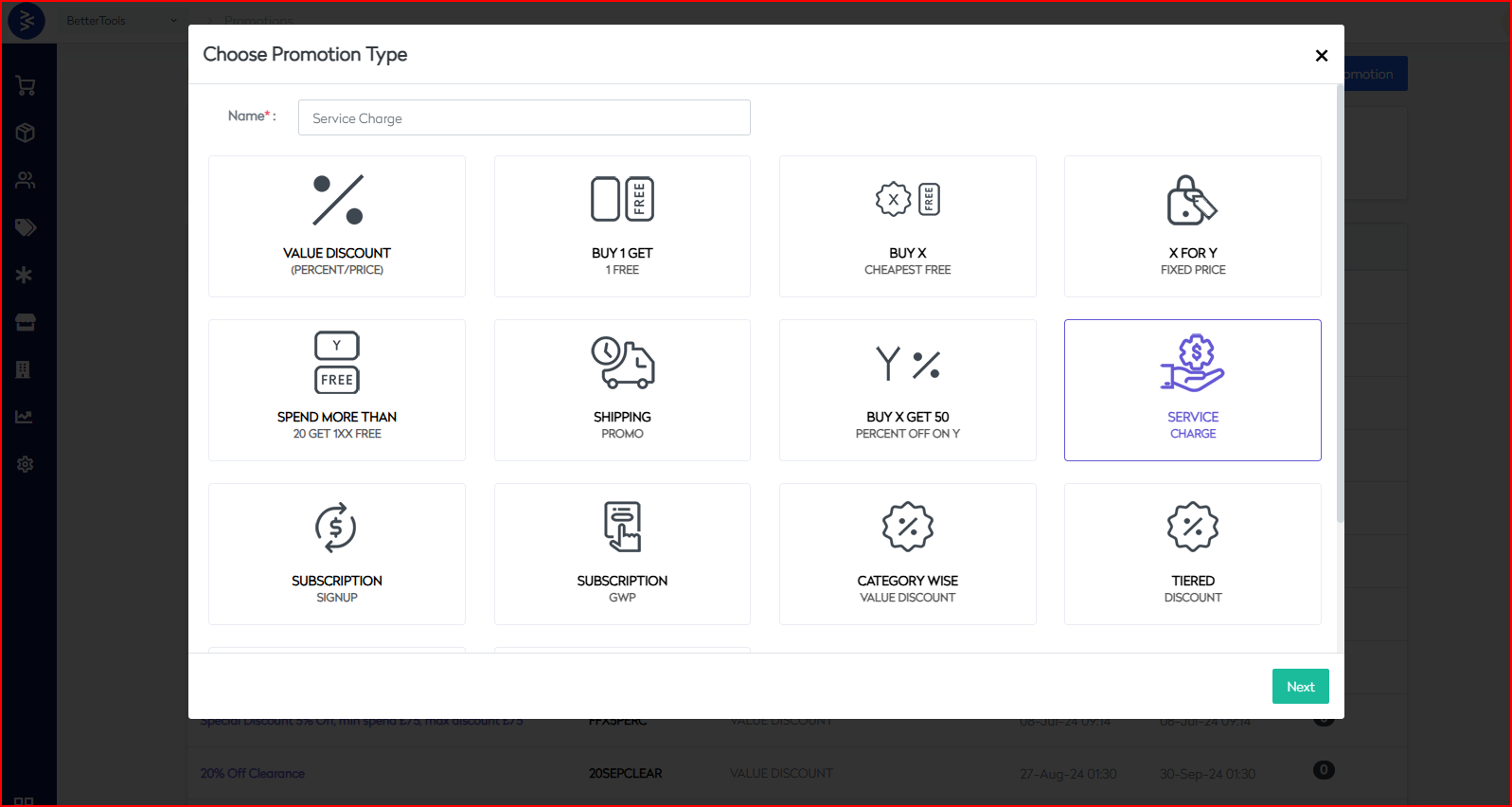
Service Charge Promotion
The Service Charge Promotion allows merchants to apply fixed or variable service charges to orders. It supports flexible application based on order amount, quantity, product groupings, and customer segments. This is ideal for premium handling, packaging, regional services, or tiered service fees.
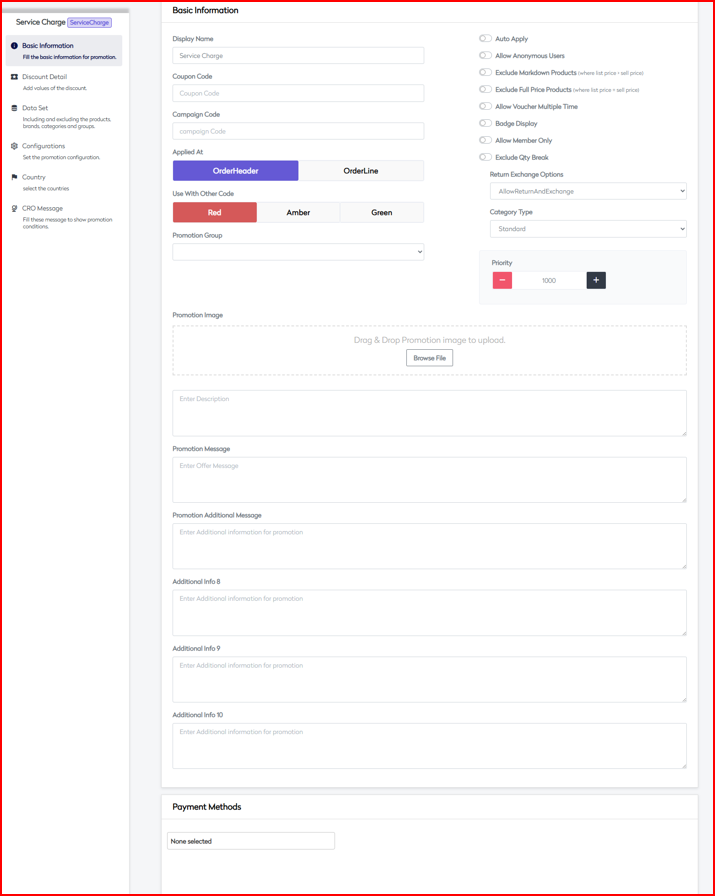
- Basic Information
Define the essential configuration and rules for service charge setup.
Core Settings
| Field | Description |
|---|---|
| Display Name | Name of the service charge promotion |
| Coupon Code | Optional code to activate the service charge |
| Campaign Code | Internal identifier for tracking |
| Applied At | OrderHeader (cart-level) or OrderLine (item-level) |
Compatibility Settings
| Level | Description |
|---|---|
| Red | High restriction |
| Amber | Medium restriction |
| Green | Low restriction |
Control Flags
| Option | Description |
|---|---|
| Auto Apply | Automatically applies the service charge |
| Allow Anonymous Users | Available to guest users |
| Exclude Markdown Products | Skip discounted/marked-down items |
| Exclude Full Price Products | Skip full-priced items |
| Allow Voucher Multiple Time | Allows multiple uses |
| Badge Display | Visual badge for applicable service |
| Allow Member Only | Restricts to registered users |
| Exclude Qty Break | Ignores qty break pricing |
Additional Controls
| Field | Description |
|---|---|
| Voucher Validity Days | Days until voucher expires |
| Return Exchange | None, AllowReturn, AllowExchange, AllowBoth |
| Category Type | Standard, Membership, Referral |
| Priority Setting | Controls priority relative to other promotions |
Payment Method Integration
Supported platforms:
- COD
- PayPal
- Klarna
- Checkout ApplePay
- Clearpay
- Stripe
- Checkout
- Service Charge Detail
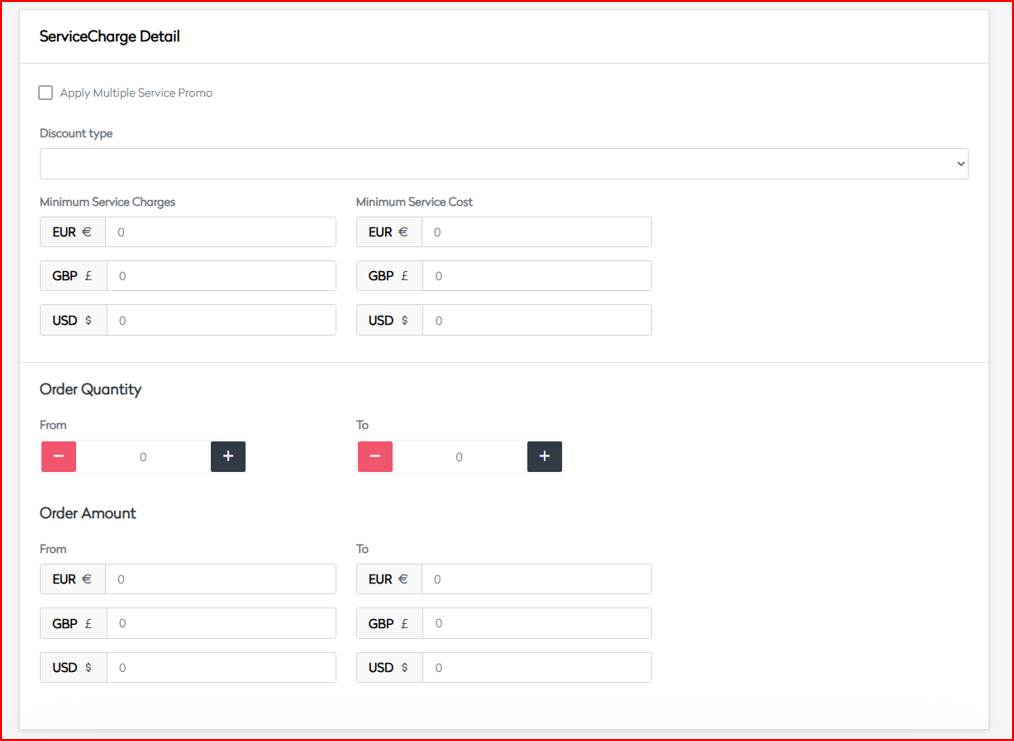
Configure service charge value, calculation type, and threshold conditions.
Charge Configuration
| Field | Description |
|---|---|
| Apply Multiple Service Promo | Toggle to allow stacking charges |
| Discount Type | Fixed or Variable |
Variable Options
- ValuePerUnit
- ValuePerLine
- ValuePerOrder
Fixed Options
| Currency | Amount |
|---|---|
| GBP | e.g. £2.99 |
| EUR | e.g. €3.50 |
| USD | e.g. $3.99 |
Service Charge Controls
| Field | Description |
|---|---|
| Minimum Service Charges | Minimum service fee to apply |
| Minimum Service Cost | Cost floor for service charges |
| Percentage Off Options | Apply as % based on subtotal |
Order Parameters
| Field | Description |
|---|---|
| Quantity Range | Minimum and maximum quantity range |
| Order Amount Range | Order subtotal thresholds (supports multi-currency) |
 |
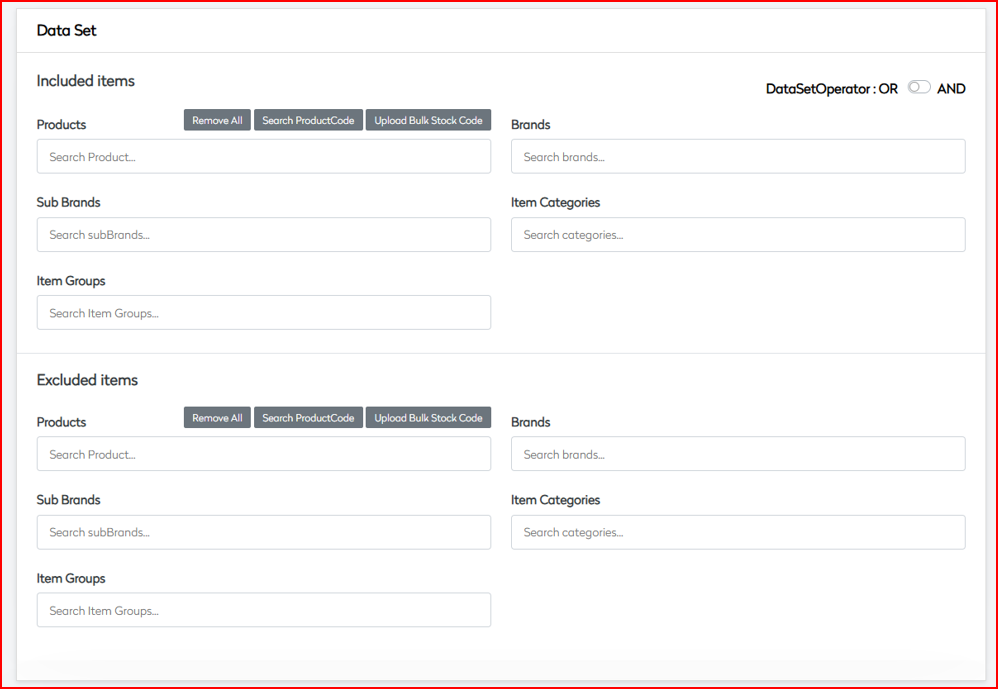
- Data Set
Determine product or category scope for service charges.
Inclusion Rules
| Segment | Description |
|---|---|
| Products | Specific SKUs / bulk upload |
| Brands | Brand-specific application |
| Sub Brands | Narrow brand segments |
| Item Categories | Product categories |
| Item Groups | Predefined product groups |
Exclusion Rules
Same options as inclusion, used to exclude segments.
Data Set Operators
- Logical
AND/ORsupport - Complex combinations and multi-condition handling
- Configurations
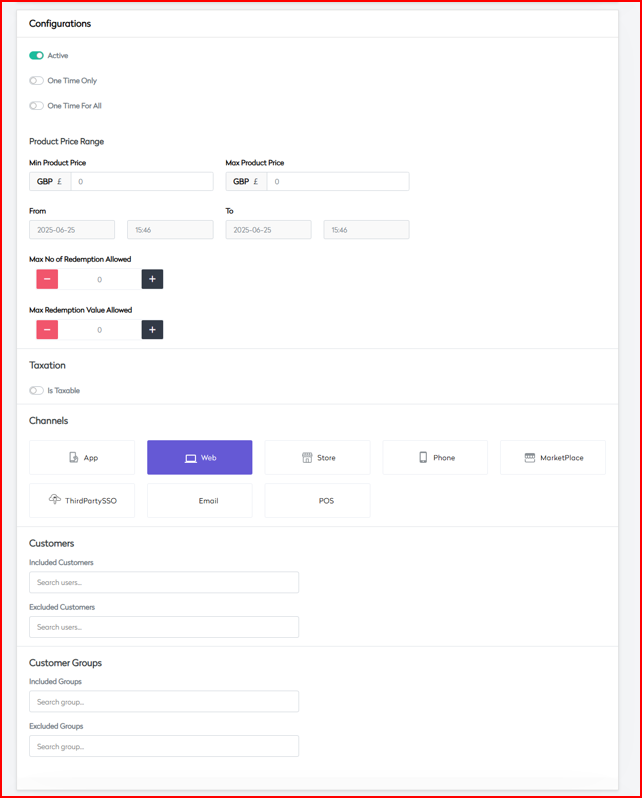
Manage promotion visibility, price rules, and targeting.
Activation Controls
| Field | Description |
|---|---|
| Active Status | Enable/disable the service charge |
| One Time Only | Limit once per customer |
| One Time For All | Limit globally for promotion |
Price Range Parameters
| Field | Description |
|---|---|
| Min Product Price | Product price threshold |
| Max Product Price | Maximum item value |
| Currency Support | EUR / GBP / USD supported |
Time Settings
| Field | Description |
|---|---|
| Valid From | Start date |
| Valid To | End date |
Channel Availability
Enable/disable per platform:
- App
- Web
- Store
- Phone
- MarketPlace
- ThirdPartySSO
- POS
Customer Targeting
| Segment | Description |
|---|---|
| Included Customers | Apply to selected customer list |
| Excluded Customers | Skip for selected customer list |
| Included Groups | Eligible customer groups |
| Excluded Groups | Group-level restrictions |
 |
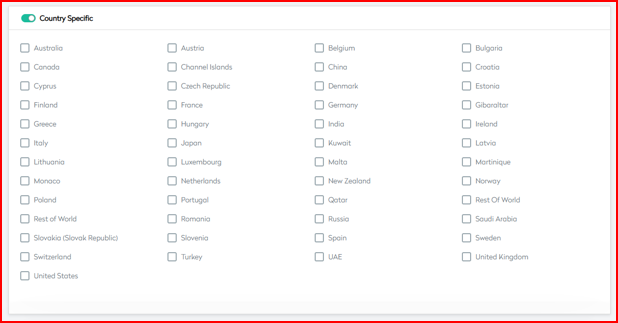
- Country
Geographic Targeting
| Setting | Description |
|---|---|
| Country Specific | Restrict by country |
| Multi-country Support | EU, North America, APAC, etc. |
Localization Support
en-GBfr-FRde-DE- Currency and regional formatting enabled
- CRO Message
Manage promotional messaging for customer awareness and conversion optimization.
Marketing Messages
| Message Type | Purpose |
|---|---|
| Message Content | Description of the applied service charge |
| Success Message | Confirmation when criteria are met |
| Failure Message | Notification when criteria are not satisfied |
Display Options
| Field | Description |
|---|---|
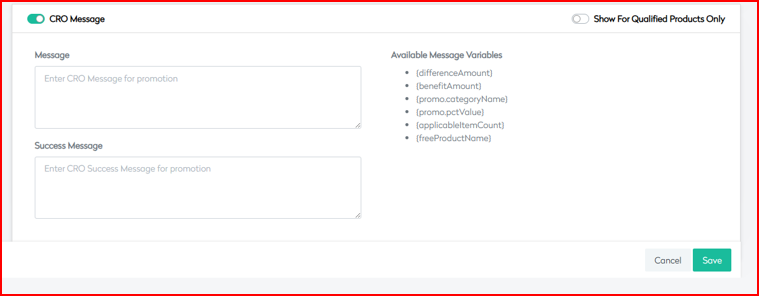
| Show For Qualified Products | Display only when applicable |
| Available Variables | {differenceAmount}, {benefitAmount}, {promo.categoryName}, {promo.pctValue}, {applicableItemCount}, {freeProductName} |
| Variable | Description |
|---|---|
{differenceAmount} | The remaining amount the customer needs to spend to qualify for the promotion (e.g., "Spend £5 more to get free shipping"). |
{benefitAmount} | The monetary value of the benefit the customer will receive (e.g., "You save £6.99 on shipping"). |
{promo.categoryName} | The name of the promotional category or group (e.g., "Free Shipping", "Holiday Express"). |
{promo.pctValue} | The percentage value of the discount applied in the promotion (e.g., "Get 100% off on delivery"). |
{applicableItemCount} | Number of items in the cart that qualify for the promotion. Helps display quantity-based messaging. |
{freeProductName} | The name of the free product or reward item associated with the promotion (if any). |
 |
This promotion is ideal for recovering costs on premium services, managing delivery overheads, and introducing flexible fee structures across order channels and customer types.
Subscription Signup Promotion
The Subscription Signup Promotion is designed to encourage customers to enroll in subscription plans by offering targeted incentives and flexible configuration. It supports recurring payment models, trial periods, and multi-tier plans tailored to various markets.
- Basic Information

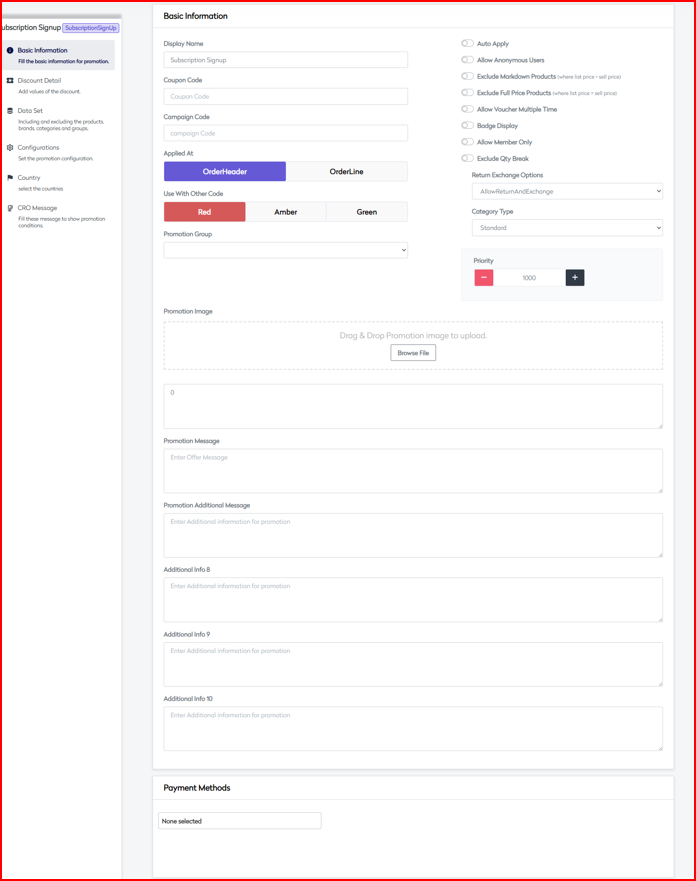
Core Settings
| Field | Description |
|---|---|
| Display Name | Customer-facing promotion name for subscription |
| Coupon Code | Optional code required to trigger the promotion |
| Campaign Code | Internal reference to track the promotion |
| Applied At | OrderHeader (cart-level) or OrderLine (item-level) |
Promotion Controls
| Option | Description |
|---|---|
| Auto Apply | Auto-apply subscription offer to eligible users |
| Allow Anonymous Users | Allow guests to use the promotion |
| Exclude Markdown Products | Avoid applying on marked-down items |
| Exclude Full Price Products | Avoid applying on full-price products |
| Allow Multiple Subscriptions | Enable multi-subscription enrollment |
| Badge Display | Show subscription badge on eligible items |
| Allow Member Only | Restrict to logged-in users |
| Exclude Qty Break | Avoid usage when quantity-based pricing applies |
Business Rules
| Field | Description |
|---|---|
| Subscription Validity | Duration the subscription remains active |
| Return/Exchange Options | None, AllowReturn, AllowExchange, AllowReturnAndExchange |
| Category Type | Standard, Membership, Referral |
| Priority Setting | Determines execution priority of the rule |
Payment Integration
| Supported Payment Methods |
|---|
| Credit Card |
| Direct Debit |
| PayPal |
| Stripe |
| Digital Wallets |
| Other Gateways |
 |
- Subscription Detail
Plan Configuration
| Field | Description |
|---|---|
| Subscription Types | Monthly, Quarterly, Annual |
| Pricing Tiers | Basic, Premium, Enterprise |
| Billing Frequency | Defines how often customer is billed |
| Trial Period Options | Offer free/discounted trials for onboarding |
Billing Parameters
| Field | Description |
|---|---|
| Initial Payment Amount | Amount collected at time of signup |
| Recurring Amount | Payment due on each billing cycle |
Order Parameters
| Field | Description |
|---|---|
| Minimum Commitment | Minimum duration before cancellation |
| Max Subscription Period | Subscription expiration time |
| Auto-renewal | Enable auto-renewal toggle |
| Cancellation Terms | Define cancellation window and refund policy |
 |
- Data Set
Eligible Products/Services
| Segment | Description |
|---|---|
| Products | Select individual SKUs or bulk upload |
| Brands | Brand-level eligibility |
| Sub Brands | Nested segments under brand |
| Item Categories | Category-based inclusion |
| Item Groups | Defined groups such as bundles or kits |
Exclusion Rules
| Segment | Description |
|---|---|
| Non-subscribable | Items that cannot be subscribed to |
| Restricted Categories | Items based on restriction logic |
| Geographic | Limited by country/region |
Data Set Operators
- Combine rules using
AND/OR - Complex nested rule support
- Custom exceptions allowed

- Configurations
Activation Settings
| Field | Description |
|---|---|
| Active Status | Enable or disable promotion |
| Subscription Start/End | Campaign timeline |
| Trial Configuration | Days/periods for trial plan setup |
| Renewal Rules | Controls for auto-renewal and changes |
Price Controls
| Field | Description |
|---|---|
| Base Price | Original price before discount/promo |
| Promotional Price | Offered price during promotion |
| Volume Discounts | Tiered pricing based on quantity/group |
| Currency Support | Supports GBP, EUR, USD, etc. |
Channel Availability
- App
- Web
- Store
- Phone
- MarketPlace
- ThirdPartySSO
- POS
Customer Management
| Segment | Description |
|---|---|
| New vs Existing Users | Target onboarding or retention use cases |
| Loyalty Program Users | Integration with point/membership schemes |
| Account Requirements | Sign-up/login criteria |
| Usage Restrictions | Per-user or per-plan limits |
 |
- Country
Geographic Rules
| Field | Description |
|---|---|
| Country Targeting | Enable/disable by region |
| Regional Variants | Country-specific plans and configurations |
| Market-based Pricing | Adjust pricing and plans per market |
Localization
en-GBfr-FRde-DE- Multi-language and regional compliance
Compliance Settings
| Regulation | Purpose |
|---|---|
| GDPR/CCPA | Privacy and opt-in validation |
| Tax Rules | Compliance with jurisdictional tax rates |
| Payment Compliance | Meets local gateway and legal standards |
 |
- CRO Message
Subscription Communications
| Message Type | Description |
|---|---|
| Welcome Message | Sent upon successful signup |
| Trial Notification | Reminder about upcoming plan conversion |
| Renewal Reminder | Alert user before next billing cycle |
| Cancellation Notice | Confirmation of termination |
| Variable | Description |
|---|---|
{differenceAmount} | The remaining amount the customer needs to spend to qualify for the promotion (e.g., "Spend £5 more to get free shipping"). |
{benefitAmount} | The monetary value of the benefit the customer will receive (e.g., "You save £6.99 on shipping"). |
{promo.categoryName} | The name of the promotional category or group (e.g., "Free Shipping", "Holiday Express"). |
{promo.pctValue} | The percentage value of the discount applied in the promotion (e.g., "Get 100% off on delivery"). |
{applicableItemCount} | Number of items in the cart that qualify for the promotion. Helps display quantity-based messaging. |
{freeProductName} | The name of the free product or reward item associated with the promotion (if any). |

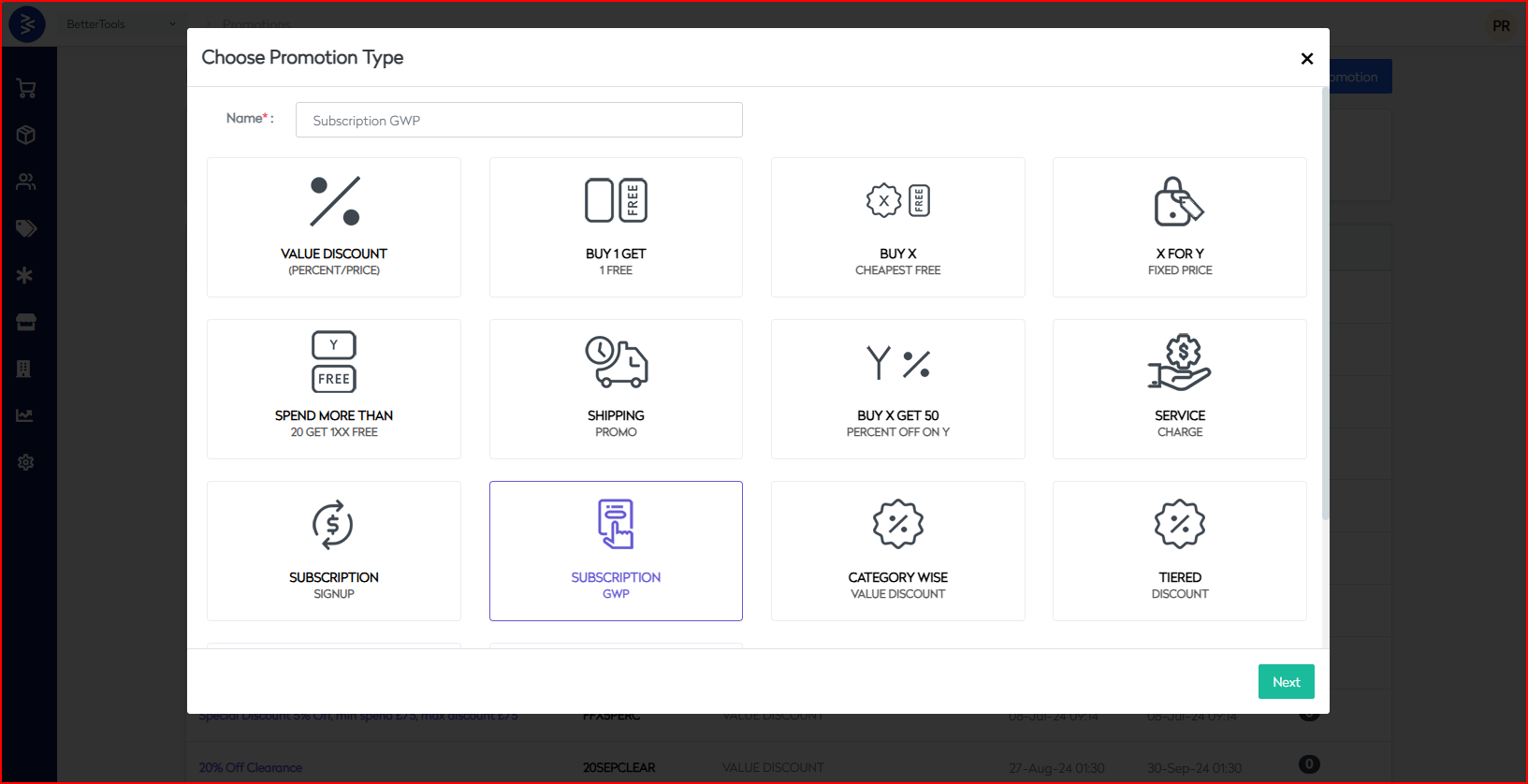
Subscription GWP Promotion
The Subscription GWP Promotion is designed to reward users with gifts upon purchasing a qualifying subscription. This drives subscription conversions, strengthens loyalty, and enhances the value perception of your offerings.
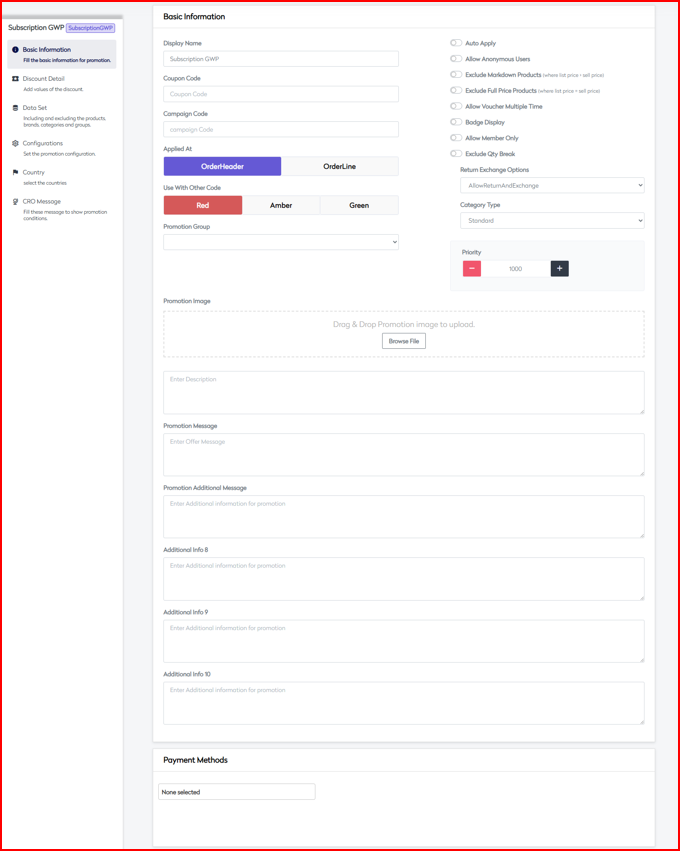
- Basic Information
Define the core settings and fundamental controls for your subscription GWP promotion.
Core Settings
| Field | Description |
|---|---|
| Display Name | Name visible to customers |
| Coupon Code | Optional promotion code for eligibility |
| Campaign Code | Internal reference for tracking and analytics |
| Applied At | OrderHeader (cart-level) or OrderLine (item-level) |
Control Flags
| Option | Description |
|---|---|
| Auto Apply | Automatically applies the promotion |
| Allow Anonymous Users | Guest users eligible |
| Exclude Markdown Products | Exclude discounted items |
| Exclude Full Price Products | Exclude non-discounted products |
| Allow Multiple Redemptions | Allow repeated gift redemptions |
| Badge Display | Show visual badge on qualifying subscriptions |
| Allow Member Only | Restrict to logged-in users |
| Exclude Qty Break | Ignore quantity-based pricing breaks |
Additional Controls
| Field | Description |
|---|---|
| Return Exchange | AllowReturn, AllowExchange, AllowBoth, or None |
| Category Type | Standard, Membership, Referral |
| Priority Setting | Determines promo execution order |
Payment Method Integration
Supported payment platforms:
- Credit/Debit Cards
- PayPal
- Digital Wallets
- Direct Debit
- Other Gateways
- Subscription GWP Detail
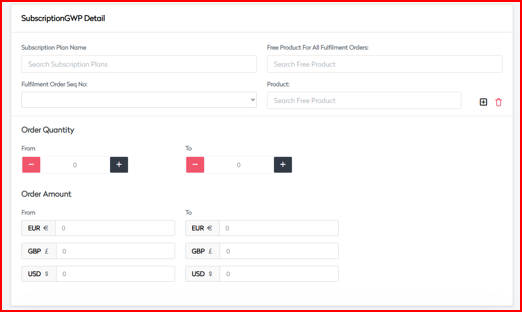
Configure the subscription qualification rules, gift logic, and delivery controls.
Gift Configuration
| Field | Description |
|---|---|
| Gift Selection Rules | Logic for determining eligible gifts |
| Gift Value Parameters | Minimum/maximum value per gift |
| Quantity Limits | Restriction on gift quantities |
| Gift Combinations | Define gift bundles or multiple-gift logic |
Subscription Requirements
| Field | Description |
|---|---|
| Min Subscription Period | Minimum commitment required |
| Subscription Value Threshold | Minimum spend to qualify |
| Subscription Type | Monthly, Annual, Tier-based, etc. |
Order Parameters
| Field | Description |
|---|---|
| Quantity Range | Subscription quantity conditions |
| Order Amount Range | Total order value criteria |
| Currency Support | Supported: EUR, GBP, USD |
Gift Delivery Rules
- Initial Subscription Gift
- Renewal Gifts
- Loyalty Milestone Gifts
- Special Occasion Gifts
- Data Set
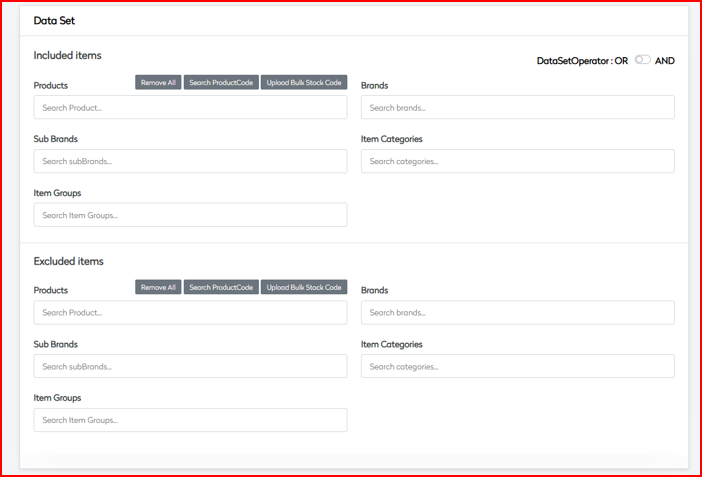
Define product, subscription, and gift eligibility and exclusions.
Inclusion Rules
| Segment | Description |
|---|---|
| Products | Subscribable items |
| Brands | Brand-level eligibility |
| Sub Brands | Refined brand segments |
| Categories | Category-based targeting |
| Groups | Predefined group selections |
Gift Pool
| Segment | Description |
|---|---|
| Gifts | Eligible gifts for selection |
| Gift Categories | Type-based selection logic |
| Value Tiers | Group gifts by monetary value |
Exclusion Rules
| Segment | Description |
|---|---|
| Restricted Items | Items excluded from GWP |
| Categories | Blocklisted product categories |
| Geographic Restrictions | Country-based exclusions |
Data Set Operations
- Logical
AND/ORbetween inclusion/exclusion - Complex rule logic and exception handling
- Configurations
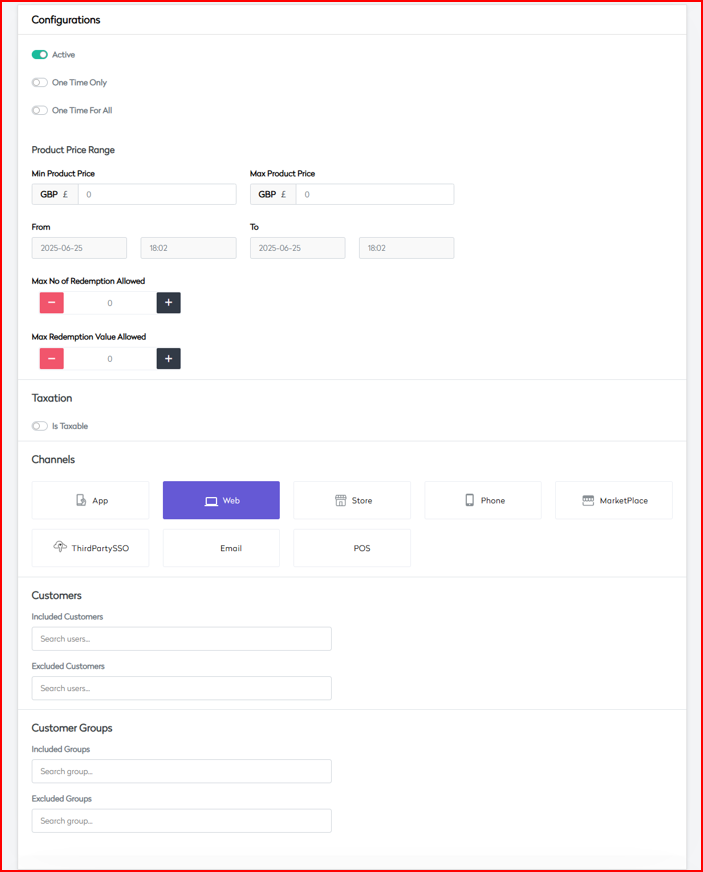
Setup campaign duration, activation logic, redemption controls, and visibility.
Activation Controls
| Field | Description |
|---|---|
| Active Status | Enable or disable the promotion |
| One Time Only | Per-customer single redemption |
| One Time For All | Global single redemption |
Gift Value Parameters
| Field | Description |
|---|---|
| Min Gift Value | Lower bound for gift value |
| Max Gift Value | Upper bound for gift value |
| Calculation Method | Formula or fixed tier |
Channel Availability
Enable or disable per channel:
- App
- Web
- Store
- Phone
- MarketPlace
- ThirdPartySSO
- POS
Customer Management
| Segment | Description |
|---|---|
| Included Customers | Allowlist |
| Excluded Customers | Blocklist |
| Groups | Customer groups and loyalty tiers |
 |
- Country
Configure region-specific rules, localization, and shipping logic.
Geographic Controls
| Field | Description |
|---|---|
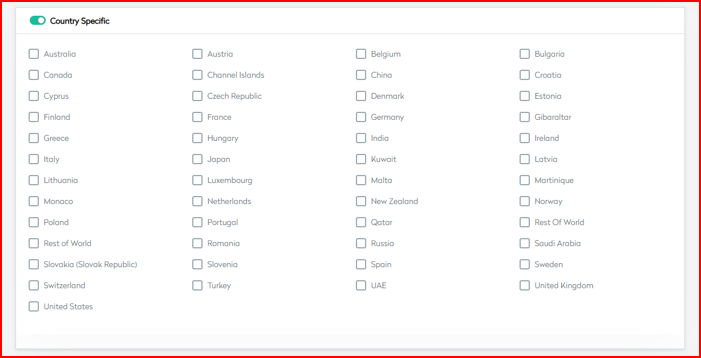
| Country Specific | Restrict promotion to selected countries |
| Multi-country Support | Supports global deployment |
Localization
- Language Support:
en-GB,fr-FR,de-DE, more - Currency Display: EUR / GBP / USD
- Regional Gift Selection
Shipping Rules
- Gift Delivery Options
- Country Restrictions
- Shipping Method Requirements
- CRO Message
Customer-facing communications, notifications, and message logic.
Marketing Messages
| Message Type | Purpose |
|---|---|
| Gift Announcement | Highlight available gifts |
| Success Message | Confirmation upon qualification |
| Failure Message | Message if customer doesn't qualify |
Display Rules
| Field | Description |
|---|---|
| Show For Qualified Products | Limit visibility to eligible items |
| Progress Indicators | Show gift progress status |
| Gift Interface | Allow gift selection or preview |
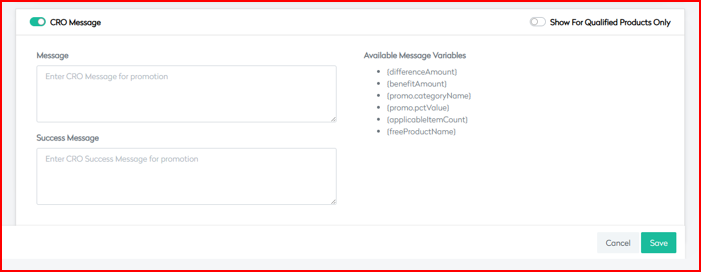
| Variable | Description |
|---|---|
{differenceAmount} | The remaining amount the customer needs to spend to qualify for the promotion (e.g., "Spend £5 more to get free shipping"). |
{benefitAmount} | The monetary value of the benefit the customer will receive (e.g., "You save £6.99 on shipping"). |
{promo.categoryName} | The name of the promotional category or group (e.g., "Free Shipping", "Holiday Express"). |
{promo.pctValue} | The percentage value of the discount applied in the promotion (e.g., "Get 100% off on delivery"). |
{applicableItemCount} | Number of items in the cart that qualify for the promotion. Helps display quantity-based messaging. |
{freeProductName} | The name of the free product or reward item associated with the promotion (if any). |
This promotion type is especially effective for increasing subscription engagement, building loyalty, incentivizing upgrades, and rewarding long-term users.
Category Wise Value Discount Promotion
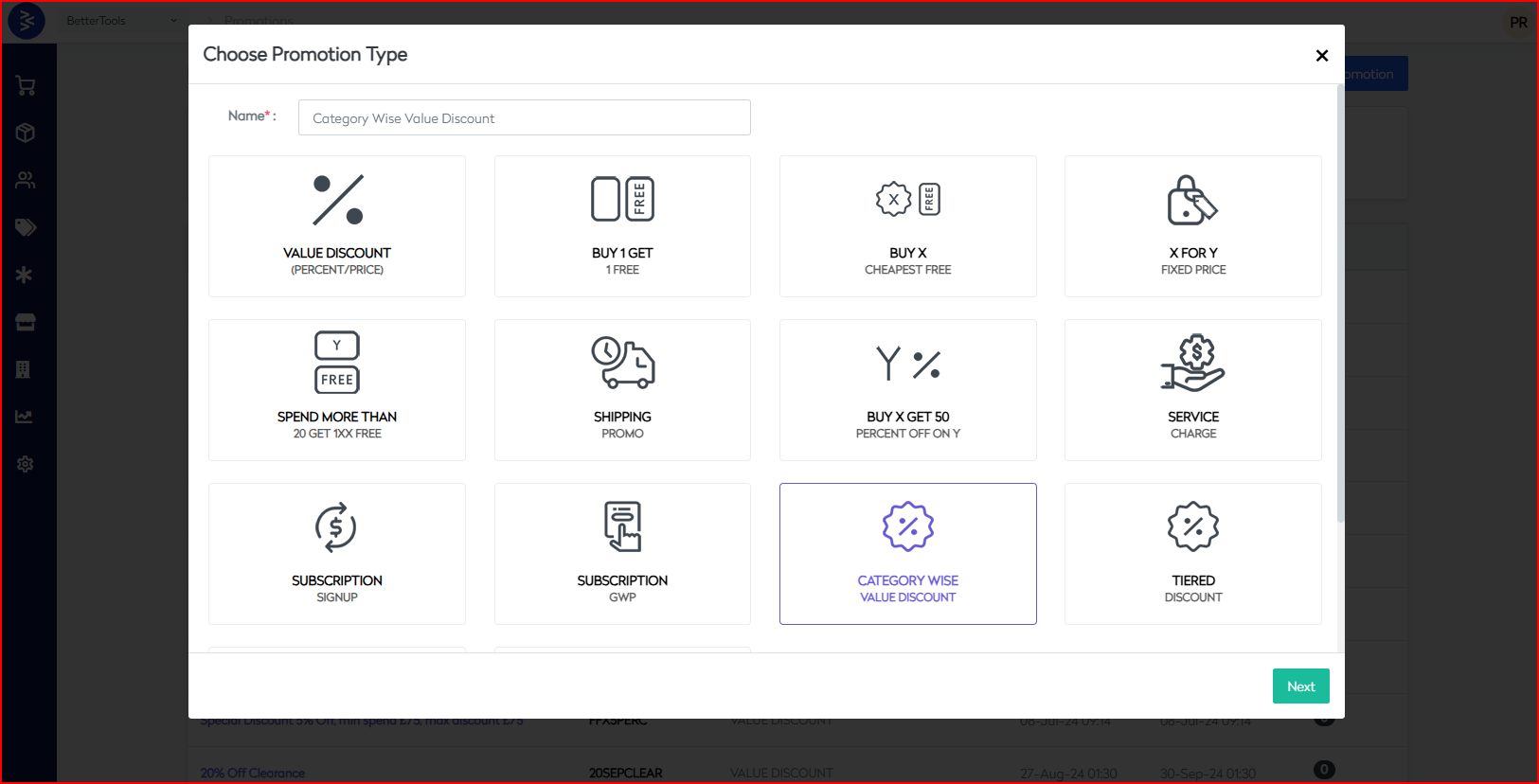
The Category Wise Value Discount promotion enables merchants to apply specific discount strategies based on product categories, providing precise control over pricing and customer incentives across different segments.
1. Basic Information
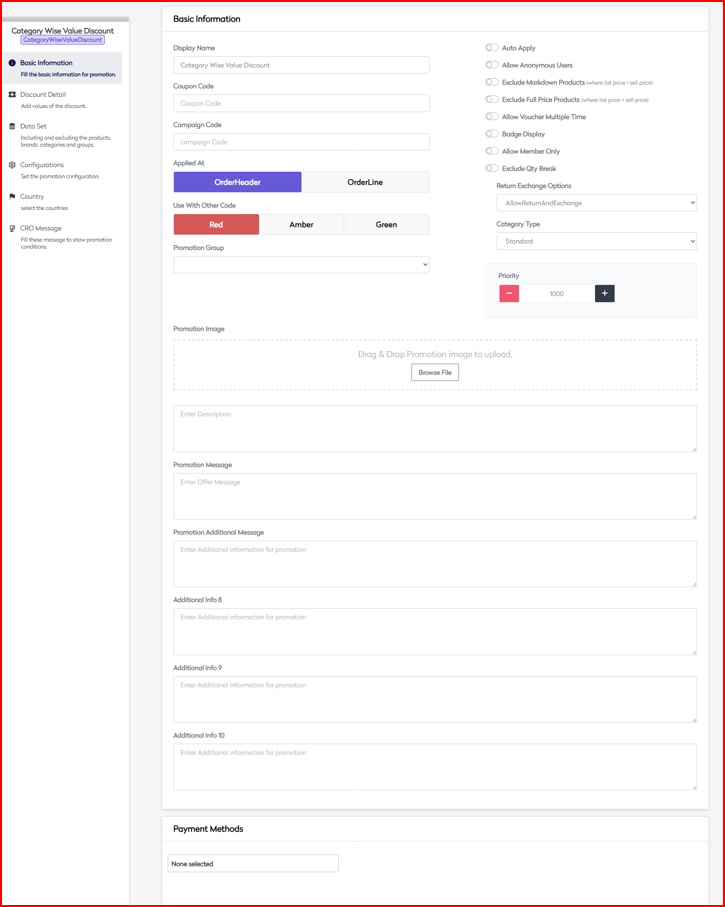
Short: Configure the foundational settings and control flags that govern how the promotion behaves.
Core Settings
| Field | Description |
|---|---|
| Display Name | Internal and customer-facing label |
| Coupon Code | Optional promo code for eligibility |
| Campaign Code | Identifier used for internal tracking |
| Applied At | OrderHeader (cart level) or OrderLine (item/category level) |
Control Flags
| Option | Description |
|---|---|
| Auto Apply | Automatically activates the promotion |
| Allow Anonymous Users | Allows use by guests |
| Exclude Markdown Products | Ignores already-discounted items |
| Exclude Full Price Products | Skips items sold at full price |
| Allow Multiple Redemptions | Enables repeated discount application |
| Badge Display | Shows visual promo badge |
| Allow Member Only | Restricts to logged-in users |
| Exclude Qty Break | Ignores items with quantity-based discounts |
Additional Controls
| Setting | Options |
|---|---|
| Return Exchange | None, AllowReturn, AllowExchange, Both |
| Category Type | Standard, Membership, Referral |
| Priority Setting | Promotion priority during evaluation |
Payment Integration
Supported platforms:
- COD
- PayPal
- Klarna
- Checkout ApplePay
- Clearpay
- Stripe
- Checkout
2. Category Discount Detail
Short: Define how category-based discounts are structured and calculated.
Discount Configuration
| Option | Description |
|---|---|
| Discount Type | Percentage Off, Fixed Amount, Tiered |
| Primary Category | Root category the discount applies to |
| Sub-categories | Narrowed categories |
| Combinations | Cross-category setups |
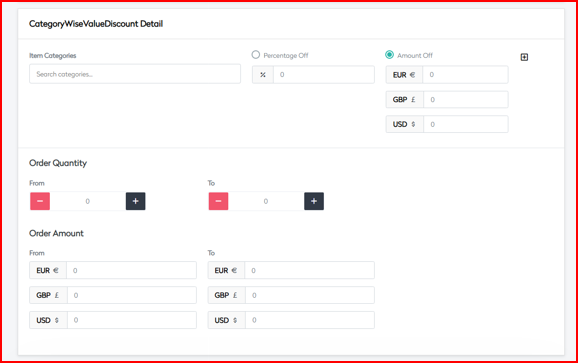
Value Parameters
| Field | Description |
|---|---|
| Min/Max Value | Category spend limits for eligibility |
| Discount Caps | Maximum discount allowed per order |
Multi-currency Support
Supports: EUR, GBP, USD
Order Parameters
| Field | Description |
|---|---|
| Quantity Range | Minimum and maximum items per category |
| Order Amount Range | Total spend threshold |
| Combination Rules | Allow/disallow cross-category use |
 |
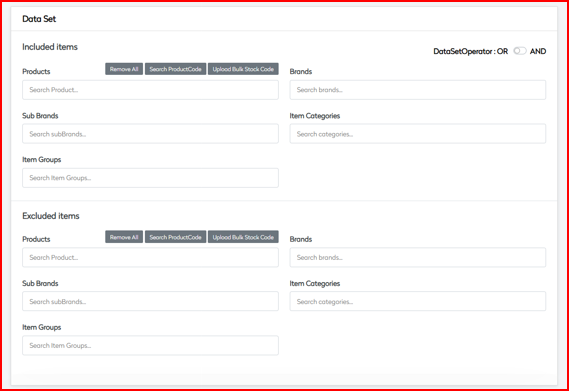
3. Data Set
Short: Specify which categories, brands, and products are eligible or excluded.
Category Inclusion
| Segment | Description |
|---|---|
| Products | Within categories |
| Brands | By brand or sub-brand |
| Categories | Specific or grouped |
| Groups | Predefined collections |
Exclusion Rules
| Segment | Description |
|---|---|
| Categories | Disallowed for this promotion |
| Brands | Excluded brand lists |
| Products | Specific product blocks |
Operations & Hierarchy
- Logical AND/OR between rules
- Parent/Sub-category linkage
- Cross-category handling
- Exception rules
4. Configurations
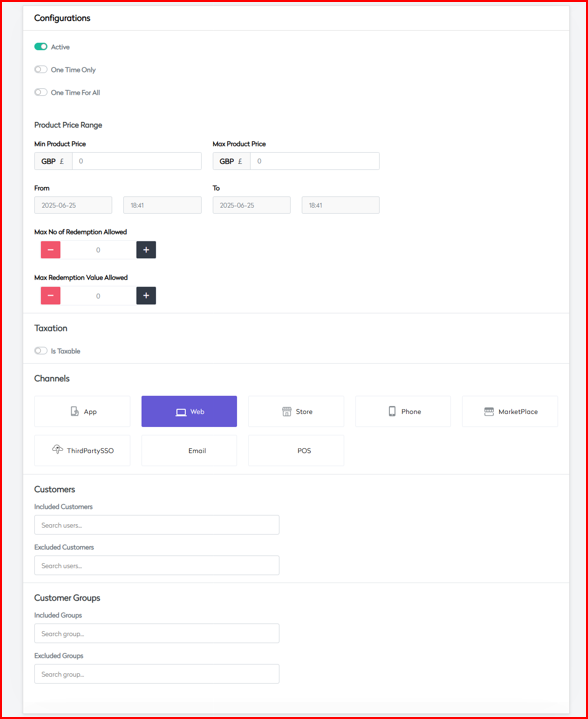
Short: Control activation timing, price limits, channels, and customer eligibility.
Activation Controls
| Field | Description |
|---|---|
| Active Status | Toggle to enable/disable |
| One Time Only | Per-user redemption limit |
| One Time For All | Global limit across users |
Price Range
| Parameter | Description |
|---|---|
| Min Product Price | Lowest priced product to qualify |
| Max Product Price | Maximum item price |
| Value Thresholds | Based on category value |
Channel Availability
Available on:
- App
- Web
- Store
- Phone
- MarketPlace
- ThirdPartySSO
- POS
Customer Management
| Segment | Description |
|---|---|
| Included Customers | Specific user list |
| Excluded Customers | Denied customer access |
| Customer Groups | Eligibility based on group membership |
| Loyalty Tiers | Reward-specific customer segments |
 |
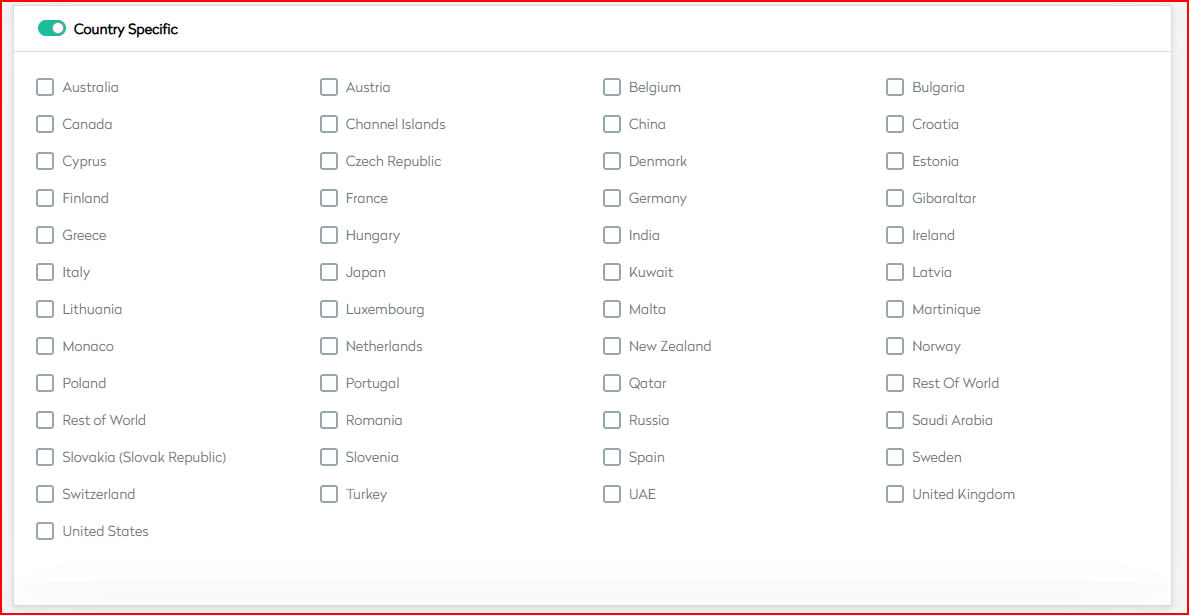
5. Country
Short: Set up region-specific behavior and language/local pricing variations.
Geographic Controls
| Option | Description |
|---|---|
| Country Specific | Enable/disable per country |
| Multi-country Support | Supports deployment in multiple regions |
| Regional Variations | Rules for localized usage |
Localization
- Languages:
en-GB,fr-FR,de-DE, more - Regional category names
- Country-specific pricing
Market-Specific Rules
- Local category hierarchies
- Legal & compliance alignment
- Tax configuration
6. CRO Message
Short: Manage customer-facing communication messages and logic for visibility.
Marketing Messages
| Message Type | Purpose |
|---|---|
| Promo Announcement | Promote category discounts |
| Success Message | Show when user qualifies |
| Failure Message | Show when user doesn’t qualify |
Display Rules
| Setting | Description |
|---|---|
| Qualified Products Only | Show messages on eligible categories only |
| Category-specific Messaging | Personalized per category |
| Progress Indicators | Let users track qualifying progress |
 | |
| Message Variables |
| Variable | Description |
|---|---|
{differenceAmount} | Remaining value needed to qualify |
{benefitAmount} | Discount amount applied |
{categoryName} | Name of the category involved |
{discountValue} | Discount value (fixed or percentage) |
{applicableItemCount} | Number of items qualifying in the category |
Tiered Discount Promotion
The Tiered Discount promotion enables merchants to encourage higher order values through structured, progressive discounts based on predefined thresholds. This strategy motivates customers to increase their basket size by offering incremental incentives.
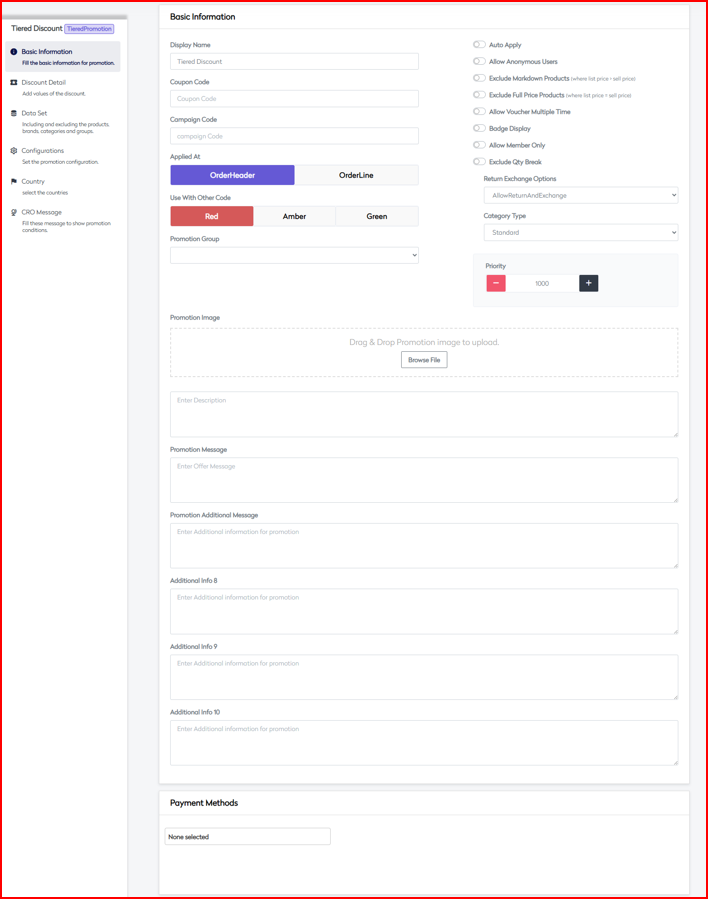
1. Basic Information
Short: Core identifiers, control settings, and application rules for the tiered promotion.

Core Settings
| Field | Description |
|---|---|
| Display Name | Unique name for internal/external reference |
| Coupon Code | Optional promo entry code |
| Campaign Code | Identifier for tracking and analytics |
| Applied At | OrderHeader (cart level) or OrderLine (item level) |
Control Flags
- Auto Apply
- Allow Anonymous Users
- Exclude Markdown Products
- Exclude Full Price Products
- Allow Multiple Redemptions
- Badge Display
- Allow Member Only
- Exclude Qty Break
Additional Controls
| Option | Values |
|---|---|
| Return/Exchange Options | None, AllowReturn, AllowExchange, Both |
| Category Type | Standard, Membership, Referral |
| Priority Setting | Controls promotion execution order |
Payment Integration
Supported methods include:
- Credit/Debit Cards
- PayPal
- Digital Wallets
- Bank Transfers
- Other Payment Gateways
2. Tiered Discount Detail
Short: Define how tiers function, including thresholds, discount values, and conditions.
Tier Configuration
| Attribute | Description |
|---|---|
| Max Tiers | Maximum of 5 tiers supported |
| S.No | Sequential tier indexing |
| Tier Minimum Threshold | Trigger amount/quantity per tier |
| Discount Value | Amount/percent discount per tier |
Threshold Types
- Amount Based (multi-currency supported)
- Quantity Based (units/volume)
Discount Types
- Percentage
- Fixed Amount
Order Parameters
| Parameter | Description |
|---|---|
| Order Quantity | From/To values by unit count |
| Order Amount | Min/Max spend thresholds, currency-specific |
 |
3. Data Set
Short: Specify which products, brands, or categories the tiers apply to or exclude.
Inclusion Rules
- Products (individual or bulk)
- Brands/Sub-brands
- Categories
- Item Groups
Exclusion Rules
- Restricted Products
- Excluded Brands
- Category Restrictions
Data Set Operations
- AND/OR logic
- Complex Rule Combinations
- Exception Handling
Tier Application Rules
- Define which products contribute to tier progress
- Set stackability rules
- Manage progression logic

4. Configurations
Short: Fine-tune behavior based on activation status, price caps, channels, and customer segments.
Activation Controls
| Option | Description |
|---|---|
| Active Status | Toggle promotion on/off |
| One Time Only | Limit redemption per user |
| One Time For All | Global promotion limit |
Price Range Parameters
| Field | Description |
|---|---|
| Min Product Price | Minimum product value |
| Max Product Price | Maximum eligible item price |
| Tier Value Caps | Discount caps at each tier |
Channel Availability
Available through:
- App
- Web
- Store
- Phone
- MarketPlace
- ThirdPartySSO
- POS
Customer Management
| Field | Description |
|---|---|
| Included Users | Targeted customer list |
| Excluded Users | Blacklisted customers |
| Customer Groups | Segment-based eligibility |
| Loyalty Tiers | Tier-based targeting |
 |
5. Country
Short: Enable geography-specific variations and regional logic for tiers and pricing.
Geographic Controls
| Option | Description |
|---|---|
| Country Specific | Enable on a per-country basis |
| Multi-country Support | Enable for several countries |
| Regional Variations | Rule variation by geography |
Localization
- Language Support:
en-GB,fr-FR,de-DE, others - Currency Display and Tier Threshold Localization
Market-Specific Rules
- Local Tax Laws
- Tier Variations
- Pricing Compliance

6. CRO Message
Short: Define how to communicate tier-related messages and savings to users during their shopping journey.
Marketing Messages
| Message Type | Purpose |
|---|---|
| Tier Announcements | Promote discount levels and benefits |
| Progress Updates | Inform customer how far they are from next tier |
| Achievement Notifications | Let users know when they’ve reached a new tier |
| Next Tier Incentives | Encourage spending to unlock higher tiers |
Display Rules
- Show for Qualified Products Only
- Display Tier Progress Indicators
- Show Savings/Benefit Calculations
 Message Variables
| Variable | Description |
|---|---|
{currentTier} | Current tier level achieved by the customer |
{nextTierThreshold} | Value/quantity needed to reach next tier |
{currentDiscount} | Discount amount applied at the current tier |
{potentialSavings} | Estimated discount if next tier is reached |
{remainingAmount} | Value or quantity still needed to reach next tier |
Adhoc Discount ValueDiscount Promotion
The Adhoc Discount ValueDiscount promotion allows merchants to configure flexible discount campaigns quickly for specific customer segments, products, or events. It supports percentage or fixed-amount discounts with granular targeting and scheduling controls.
1. Basic Information
Short: Set foundational promotion metadata, logic level, controls, and compatibility flags.
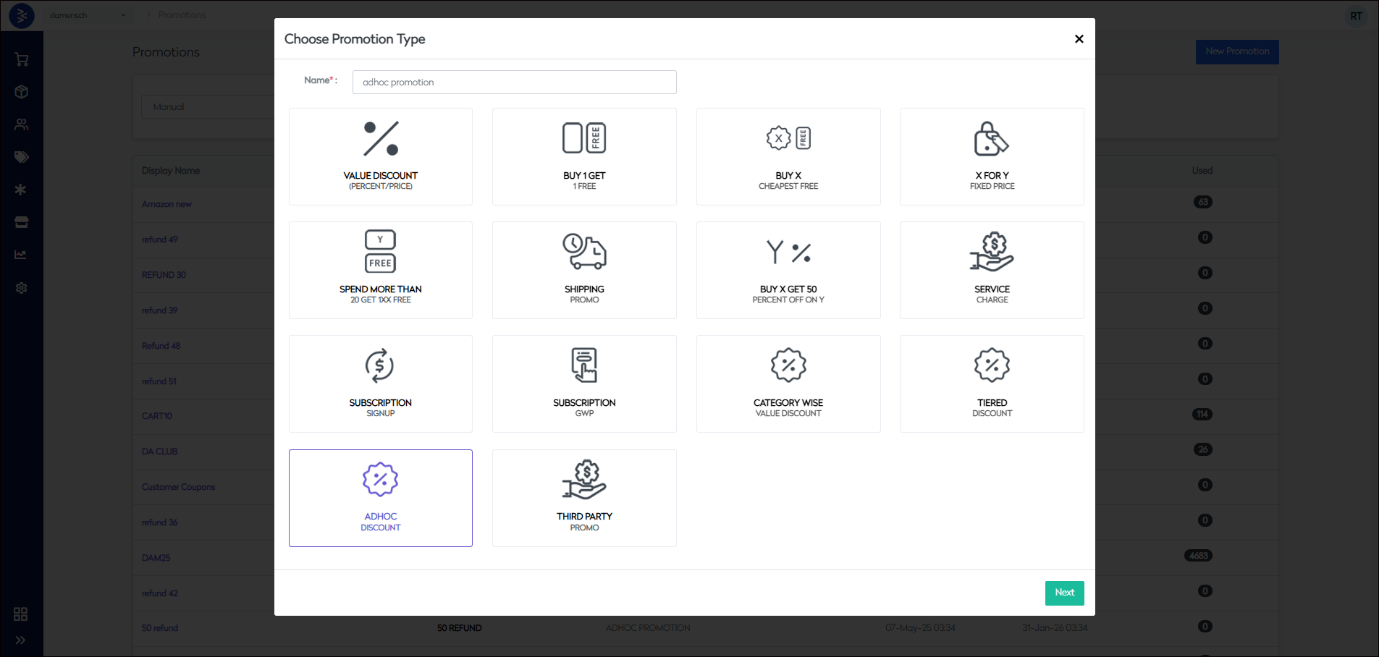
Core Details
| Field | Description |
|---|---|
| Display Name | Promotion label shown to users/admins |
| Coupon Code | Optional code for manual application |
| Campaign Code | Internal tracking identifier |
| Applied At | OrderHeader or OrderLine level logic |
Promotion Settings
| Setting | Description |
|---|---|
| Use With Other Code | Restriction control: Red, Amber, or Green |
| Promotion Group | Assign to Flash, Clearance, or Offer campaigns |
Control Options
- Auto Apply
- Allow Anonymous Users
- Exclude Markdown Products
- Exclude Full Price Products
- Allow Voucher Multiple Time
- Voucher Validity Days
- Badge Display
- Allow Member Only
- Exclude Qty Break
Additional Configuration
| Setting | Description |
|---|---|
| Return/Exchange | None, AllowReturn, AllowExchange, AllowReturnAndExchange |
| Category Type | None, Standard, Membership, Referral |
| Priority Setting | Defines rule stacking priority |
| Promotion Image Upload | Optional image display |
| Promotion Messages | Custom promo label/message |
| Payment Methods | Enable for supported payment types |
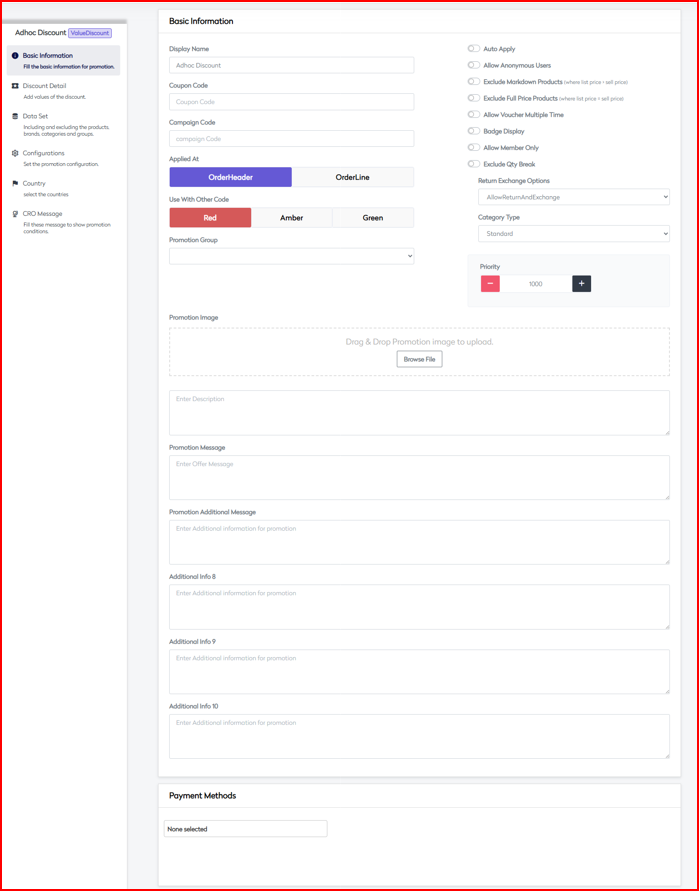 |
2. Discount Detail
Short: Define the actual discount logic, applicable timeframe, order conditions, and caps.
Discount Types
- Percentage Off
- Amount Off (Supports EUR / GBP / USD)
Scheduling
| Field | Description |
|---|---|
| Schedule Discount | Enable scheduling option |
| From/To Dates | Validity duration for discount |
| Notes Field | Optional notes for admin/ops use |
Order Parameters
| Field | Description |
|---|---|
| Order Quantity | Quantity From/To range |
| Order Amount | Value From/To per currency (EUR/GBP/USD) |
| Max Discount | Maximum total discount in GBP |
Status Management
| Field | Description |
|---|---|
| Start Status | Initial state of the promotion |
| End Status | Termination state of the promotion |
| Original Promotion Name | Used for cloning/reference |
| Search Feed Generation | Include in search feed toggle |
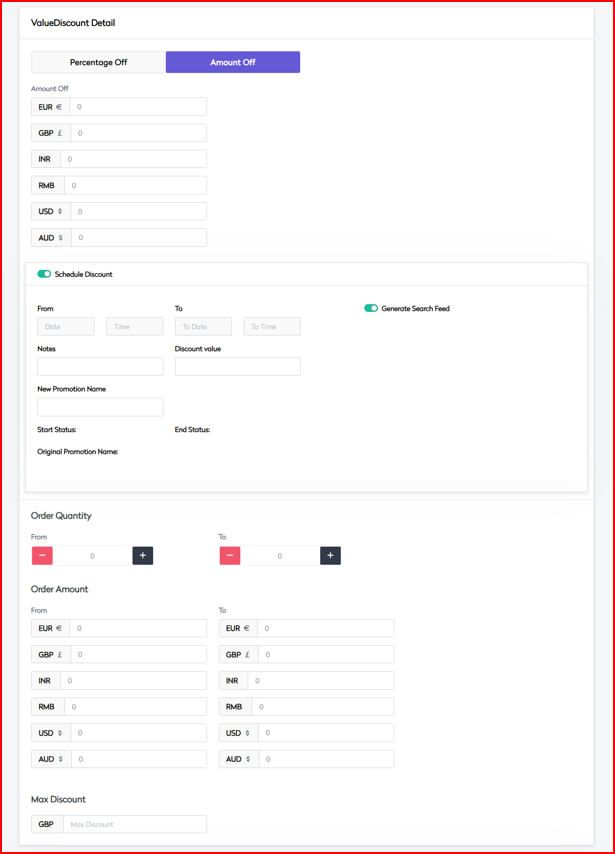 |
3. Data Set
Short: Define included/excluded product segments with logical operations.
Included Items (DataSetOperator: OR/AND)
- Products (via Search or Bulk Upload)
- Brands
- Sub Brands
- Item Categories
- Item Groups
Excluded Items
- Products (via Search or Bulk Upload)
- Brands
- Sub Brands
- Item Categories
- Item Groups
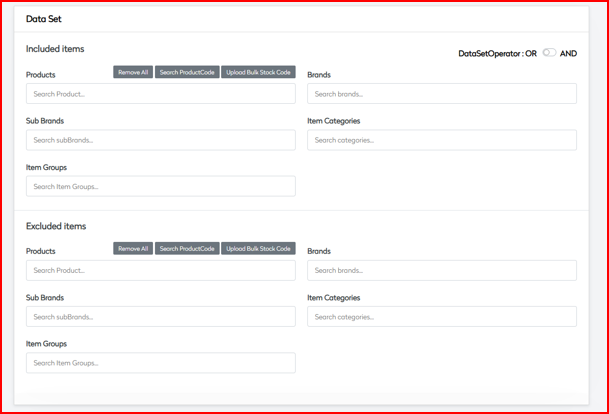
4. Configurations
Short: Fine-tune behavior via status flags, pricing rules, tax settings, and availability controls.
Status Settings
| Setting | Description |
|---|---|
| Active | Promotion enabled or disabled |
| One Time Only | Redeemable once per customer |
| One Time For All | Global single-use promotion |
Price Control
| Field | Description |
|---|---|
| Min Product Price | Minimum item price to be eligible |
| Max Product Price | Maximum item price to be eligible |
| Valid Date Range | From/To range for activation |
Limitations
| Field | Description |
|---|---|
| Max No of Redemptions | Global redemption count limit |
| Max Redemption Value | Maximum total discount value allowed |
Tax Settings
- Is Taxable
- Price Includes Tax
Channel Availability
- App
- Web
- Store
- Phone
- MarketPlace
- ThirdPartySSO
- POS
Customer Management
- Included Customers
- Excluded Customers
- Included Groups
- Excluded Groups
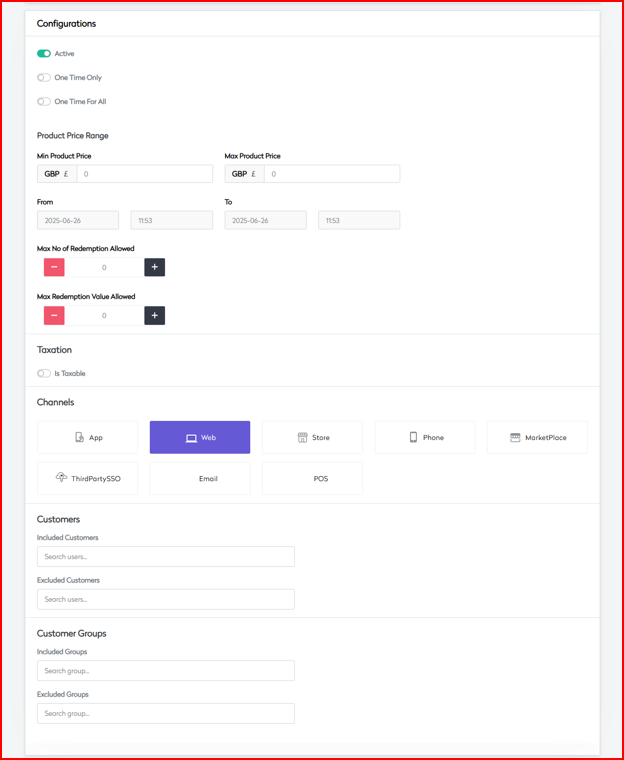
5. Country
Short: Define country-specific controls, localization, and regional policy support.
Country Selection
| Option | Description |
|---|---|
| Country Specific Toggle | Enable region-restricted activation |
| Country List | United Kingdom, United States, Europe, Asia, Middle East, Rest of World |
Regional Settings
- Multi-country selection support
- Country/region-specific business rules
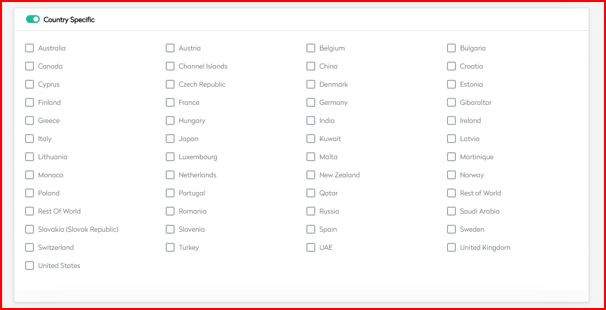
6. CRO Message
Short: Display customer-facing messages to show discount info and progress.
Message Configuration
| Field | Description |
|---|---|
| Show For Qualified Products | Toggle to limit messages to eligible items |
| Message Content | Primary display message |
| Success Message | Confirmation text after applying discount |
| Failure Message | Message shown when not eligible |
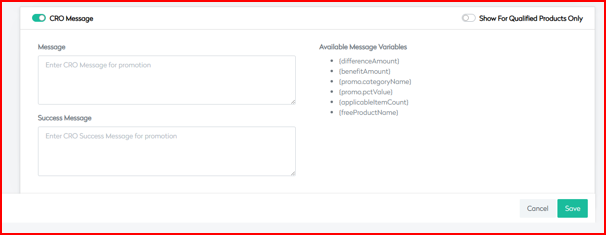 | |
| Message Variables |
| Variable | Description |
|---|---|
{differenceAmount} | Amount remaining to qualify |
{benefitAmount} | Discount or benefit applied |
{promo.categoryName} | Category name where promo is applied |
{promo.pctValue} | Discount percentage applied |
{applicableItemCount} | Number of qualifying items |
{freeProductName} | Free product name (if applicable) |
Localization
Supported languages:
en-GBfr-FRde-DE
Message Components
- Name
- Failure Message
- Content
Third Party Promo
The Third Party Promo promotion allows BetterCommerce clients to configure and execute custom promotional campaigns integrated with external systems. It supports advanced controls, flexible product targeting, and seamless API-based validation to enhance promotional agility and scale.
1. Basic Information
Short: Define foundational settings for a third-party powered promotion.
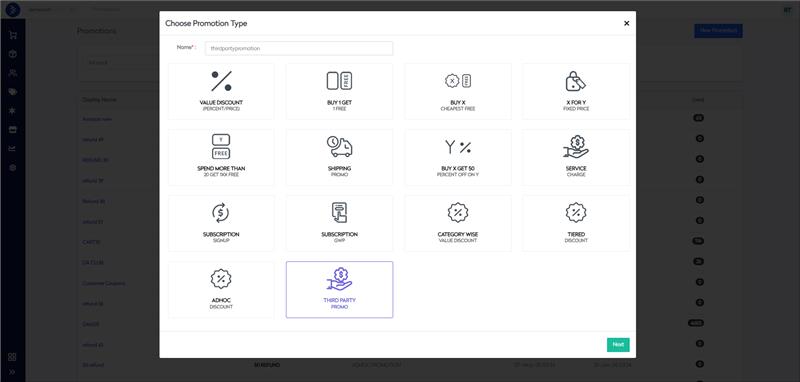
Core Details
| Field | Description |
|---|---|
| Display Name | Custom label to identify the promotion |
| Coupon Code | External or internal voucher code |
| Campaign Code | Internal campaign tracking code |
| Applied At | OrderHeader (cart level) or OrderLine (product level) |
Usage Controls
| Option | Description |
|---|---|
| Use With Other Code | Red: Not combinable Amber: Conditional Green: Freely combinable |
Promotion Settings
- Promotion Group Selection (Flash / Clearance / Offer)
- Auto Apply
- Allow Anonymous Users
- Exclude Markdown Products
- Exclude Full Price Products
- Allow Voucher Multiple Time
- Voucher Validity Days
- Badge Display
- Allow Member Only
- Exclude Qty Break
Additional Configuration
| Setting | Description |
|---|---|
| Return/Exchange | None, AllowReturn, AllowExchange, AllowReturnAndExchange |
| Category Type | None, Standard, Membership, Referral |
| Priority Setting | Execution order priority |
| Promotion Image Upload | Visual identification for display |
| Promotion Message | Summary message for end-user communication |
| Payment Method Support | Integrate with enabled payment gateways |
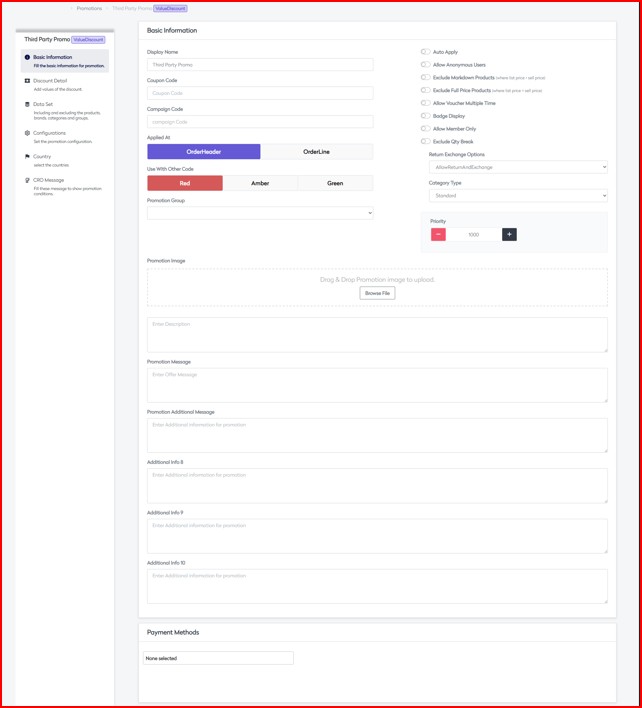 |
2. Discount Detail
Short: Define eligibility criteria, integration rules, and discount validation logic.
Order Parameters
| Field | Description |
|---|---|
| Order Quantity | From / To quantity values |
| Order Amount | From / To cart value (EUR / GBP / USD) |
| Max Discount | Maximum allowed discount (GBP) |
Third Party Integration
| Feature | Description |
|---|---|
| API Configuration | Connect with external promo validation |
| Response Handling | Interpret third-party system feedback |
| Error Management | Gracefully handle failures |
| Transaction Processing | Confirm successful redemption |
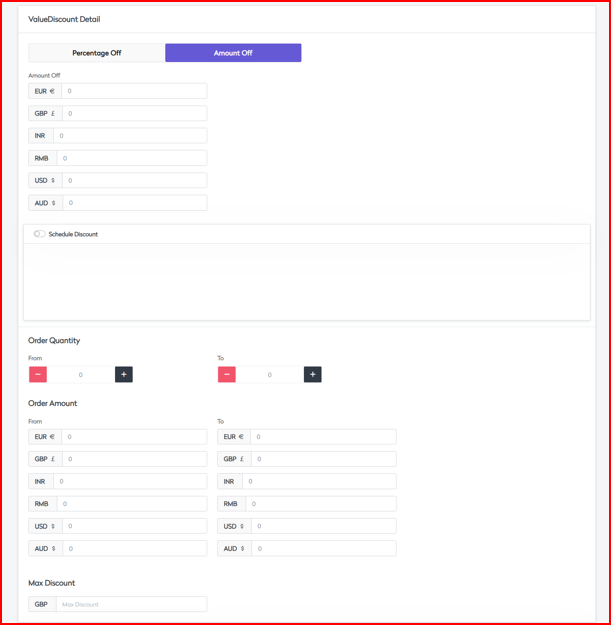 |
3. Data Set
Short: Configure eligible and excluded product datasets, including upload and rule logic.
Included Items (DataSetOperator: OR / AND)
- Products (via Search by ProductCode or Bulk Stock Code Upload)
- Brands
- Sub Brands
- Item Categories
- Item Groups
Excluded Items
- Products
- Brands
- Sub Brands
- Item Categories
- Item Groups
Data Management
| Capability | Description |
|---|---|
| Bulk Upload | Upload product sets |
| Data Validation | Ensure correctness before activation |
| Error Handling | Show errors in upload or setup |
| Update Mechanisms | Sync and refresh dataset |
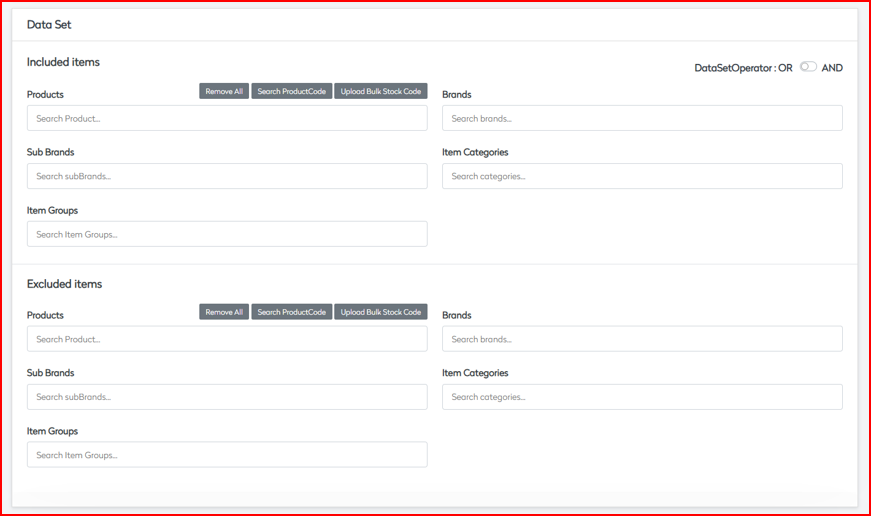 |
4. Configurations
Short: Activate and manage behavior, constraints, price thresholds, and user access.
Status Settings
| Setting | Description |
|---|---|
| Active Status | Enables or disables the promotion |
| One Time Only | Single-use per customer |
| One Time For All | One-time use for all users collectively |
Product Price Range
- Minimum Product Price (GBP)
- Maximum Product Price (GBP)
Validity Settings
| Field | Description |
|---|---|
| From Date | Promotion start |
| To Date | Promotion end |
| Max No of Redemption | Global redemption cap |
| Max Redemption Value | Global discount value cap |
Tax Configuration
- Is Taxable
- Price Includes Tax
Channel Availability
- App
- Web
- Store
- Phone
- MarketPlace
- ThirdPartySSO
- POS
Customer Management
- Included Customers List
- Excluded Customers List
- Included Groups
- Excluded Groups
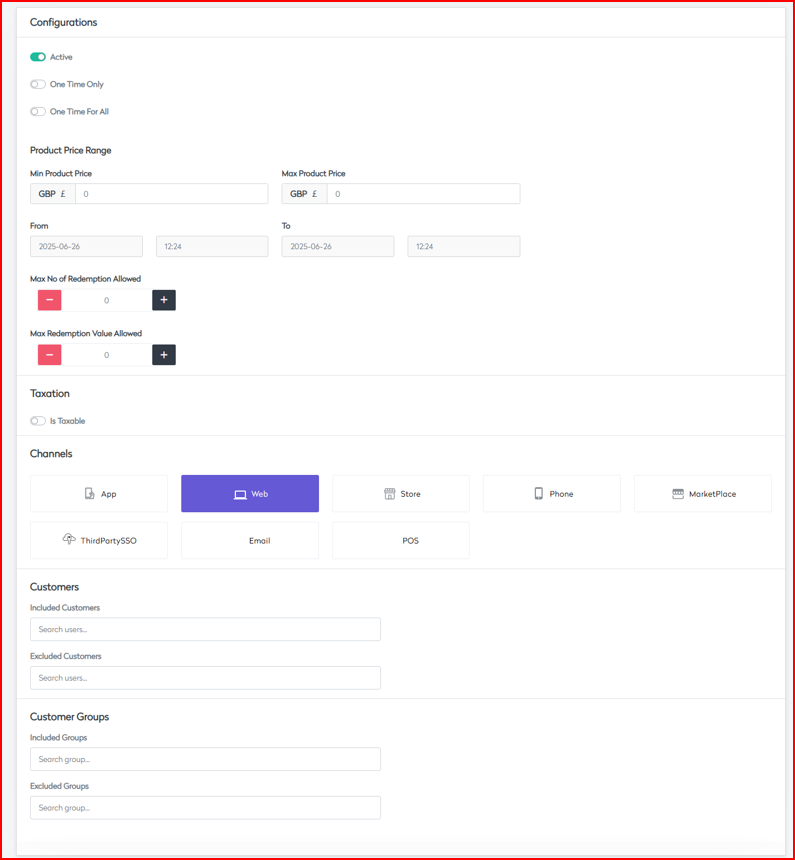
5. Country
Short: Enable country-specific control and regional compliance for international rollouts.
Country Selection
| Field | Description |
|---|---|
| Country Specific | Toggle to restrict by country |
| Available Countries | UK, US, Europe, Asia, Middle East, RoW |
Multi-region Support
- Currency Management
- Regional Pricing
- Local Tax Compliance
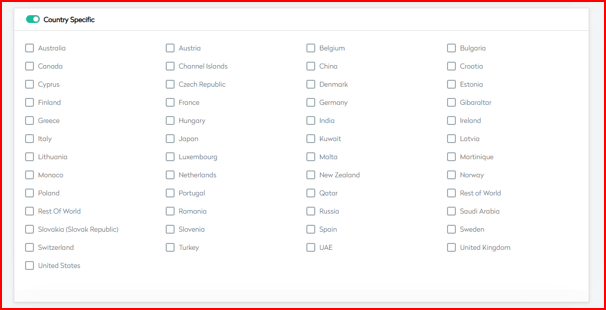
6. CRO Message
Short: Manage what customers see on eligible products, cart, or summary views.
Localization Support
en-GBfr-FRde-DE
Message Components
- Name
- Failure Message
- Content
Display Configuration
- Show For Qualified Products Only
- Message Content
- Success Message
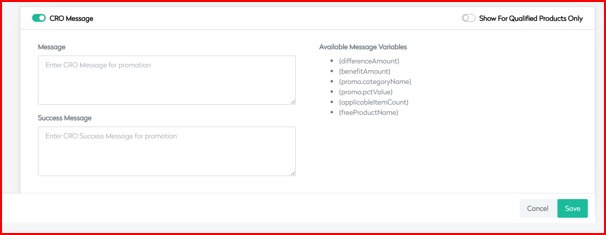 Dynamic Variables
| Variable | Description |
|---|---|
{differenceAmount} | Amount needed to qualify for promo |
{benefitAmount} | Discount value awarded |
{promo.categoryName} | Name of affected product category |
{promo.pctValue} | Percentage discount |
{applicableItemCount} | Number of qualifying products |
{freeProductName} | Name of the associated free product |
Message Management
- Multi-language Support
- Dynamic Content Rendering
- Error Messaging
- Success Notifications